Hit or Miss
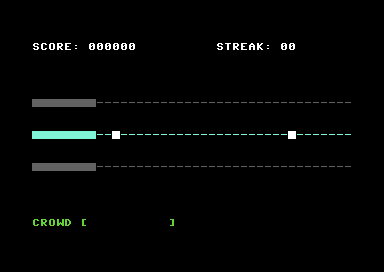
Detect when notes are hit or missed. Add visual feedback. The toy becomes a game.
What You’re Building
Notes scroll. The SID sings. But nothing happens when a note reaches the hit zone. You can’t succeed. You can’t fail. There’s no game yet.
By the end of this unit, you’ll have:
- Hit detection — pressing X while a note is in the hit zone removes it
- Miss detection — notes that scroll past without being hit trigger feedback
- Visual feedback — green flash for hits, red flash for misses
- The SID still plays on every keypress (maintaining the “toy” feel)
It’s a game now. You can win. You can lose. There are stakes.
The Key-Down Problem
In Unit 2, we checked if X was held and played a note. But for hit detection, we need to know when X transitions from not-pressed to pressed — the exact moment of the key-down.
Why? If we check every frame that X is held, a single keypress lasting 10 frames would try to hit 10 notes. We only want one hit per press.
key_was_pressed: !byte $00 ; Was X pressed last frame?Each frame, we compare “is pressed now” with “was pressed last frame”:
            jsr check_x_key         ; A = 1 if pressed now
            ldx key_was_pressed     ; X = was it pressed last frame?
            sta key_was_pressed     ; Update for next frame

            cpx #$00
            bne not_key_down        ; Was already pressed
            cmp #$01
            bne not_key_down        ; Not pressed now either

            ; Key just went down!
            jsr check_hit
            jsr play_note
The transition happens when key_was_pressed is 0 and current state is 1. That’s the moment we check for a hit.
Hit Detection
A “hit” means: X pressed while any note is in the hit zone (columns 0-7).
HIT_ZONE_X  = 8                 ; Columns 0-7 are the hit zone

check_hit:
            ldx #$00
check_hit_loop:
            lda note_x,x
            cmp #NOTE_INACTIVE
            beq check_hit_next      ; Skip inactive slots

            cmp #HIT_ZONE_X         ; Is position < 8?
            bcs check_hit_next      ; No, not in hit zone

            ; Found a note in hit zone - HIT!
            jsr erase_note          ; Remove from screen
            lda #NOTE_INACTIVE
            sta note_x,x            ; Mark as inactive
            lda #FLASH_DURATION
            sta hit_flash           ; Trigger green flash
            rts                     ; Done (first match only)

check_hit_next:
            inx
            cpx #MAX_NOTES
            bne check_hit_loop
            rts                     ; No note in zone
We scan through all note slots. The first active note with position less than HIT_ZONE_X is a hit. We erase it, mark it inactive, trigger a flash, and return.
Why “first match only”? With our spawn rate, there’s rarely more than one note in the zone. If there were two, hitting both with one press would feel wrong. One press, one hit.
Miss Detection
A “miss” happens when a note scrolls off the left edge without being hit. In move_notes, when a note’s position decrements from 0 to $FF (wrapping around), it’s a miss:
move_notes:
            ; ... for each active note ...
            dec note_x,x            ; Move left

            lda note_x,x
            cmp #NOTE_INACTIVE      ; Did it wrap to $FF?
            beq despawn_note        ; Yes - it's a miss

            jsr draw_note           ; No - draw at new position
            jmp move_next

despawn_note:
            lda #FLASH_DURATION
            sta miss_flash          ; Trigger red flash
            jmp move_next
The note was already erased before the move. When it wraps to $FF, that’s our inactive marker — but we also know it means the player missed. We trigger the red flash and move on.
Visual Feedback
Feedback needs to be immediate and clear. We use colour changes on the hit zone:
FLASH_DURATION  = 4             ; Frames (about 80ms at 50fps)
COL_GREEN       = $05           ; Hit feedback
COL_RED         = $02           ; Miss feedback
COL_CYAN        = $03           ; Normal state

hit_flash:      !byte $00       ; Frames remaining
miss_flash:     !byte $00       ; Frames remaining
Each frame, we check if a flash is active and update colours:
update_flash:
            ; Hit flash takes priority
            lda hit_flash
            beq uf_no_hit_flash
            dec hit_flash
            jsr flash_zone_green
            rts

uf_no_hit_flash:
            ; Then miss flash
            lda miss_flash
            beq uf_no_miss_flash
            dec miss_flash
            jsr flash_zone_red
            rts

uf_no_miss_flash:
            ; Restore normal colour
            jsr restore_zone_colour
            rts
The flash routines just loop through the hit zone columns setting colour RAM:
flash_zone_green:
            ldx #$00
fzg_loop:
            lda #COL_GREEN
            sta COLOUR + (ROW_TRACK2 * 40),x
            inx
            cpx #HIT_ZONE_X
            bne fzg_loop
            rts
Four frames at 50fps is about 80 milliseconds — long enough to notice, short enough to feel snappy.
Empty Keypresses
What if you press X when there’s no note in the hit zone?
The SID still plays. check_hit returns without finding anything, but play_note still runs. This maintains the “musical toy” feel from Unit 1 — you can always make noise, even if you’re not scoring.
In a future unit, we might add a penalty for empty presses. For now, they’re harmless.
The Main Loop
Here’s how it all fits together:
main_loop:
            jsr wait_frame

            ; Check for key-down transition
            jsr check_x_key
            ldx key_was_pressed
            sta key_was_pressed
            cpx #$00
            bne ml_not_key_down
            cmp #$01
            bne ml_not_key_down

            ; Key just went down
            jsr check_hit
            jsr play_note
            lda #$01
            sta key_state
            jmp ml_after_input

ml_not_key_down:
            ; Handle key release for SID gate
            cmp #$00
            bne ml_after_input
            lda key_state
            cmp #$01
            bne ml_after_input
            jsr stop_note
            lda #$00
            sta key_state

ml_after_input:
            ; Spawning and movement (same as Unit 2)
            ; ...

            ; Update flash effects
            jsr update_flash

            jmp main_loop
Note that we have two separate state variables:
key_was_pressed— for detecting key-down transitionskey_state— for managing the SID gate (on/off)
They serve different purposes and update at different times.
What You’ve Built
Run it. Watch a note scroll toward the hit zone. Press X at the right moment — the note vanishes, the zone flashes green. Miss one — red flash.
You now have:
- Collision detection — Checking if objects are in the right place
- State transitions — Detecting the moment something changes
- Visual feedback — Immediate response to player actions
- Success and failure — The core of any game
What You’ve Learnt
- Key-down detection — Compare current state with previous frame to find transitions
- Collision zones — Use comparison operators to check if values fall within ranges
- Timer-based effects — Decrement counters each frame for timed events
- Colour RAM manipulation — Change colours without changing characters
- Priority systems — Hit flash overrides miss flash (most recent isn’t always best)
Next Unit
You can hit notes. You can miss them. But nothing’s counting. The score stays at zero. The streak never moves.
In Unit 4, we add scoring. Hits earn points. Consecutive hits build streaks. The numbers on screen start to mean something.