Notes in Motion
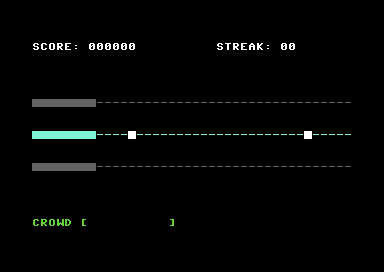
Spawn notes on the right, watch them scroll toward the hit zone. The highway comes alive.
What You’re Building
The stage is set. The SID can sing. But nothing’s moving yet.
By the end of this unit, you’ll have:
- Notes spawning on the right edge of Track 2
- Smooth animation as they scroll toward the hit zone
- Multiple notes on screen at once
- Proper frame timing so it looks the same on every C64
It’s not a game yet — you can’t hit the notes, can’t score points, can’t fail. But it looks like a game. Something is happening. The highway is alive.
The Problem With Speed
Our Unit 1 main loop runs as fast as it can. On a real C64, that’s roughly a million cycles per second. If we moved a note every time through the loop, it would cross the screen in a blur — maybe 50 times per second.
We need to slow down. But not with delay loops (those are unpredictable). We need to sync with something reliable.
The Raster Beam
The C64 draws the screen 50 times per second (PAL) or 60 times (NTSC). An electron beam sweeps across the screen, line by line, painting each frame. The VIC-II chip tracks which line it’s currently drawing in register $D012.
RASTER = $d012 ; Current raster line (0-255)If we wait for the raster to reach line 0, we know a new frame has started. Do our game logic, then wait again. One update per frame. Smooth, consistent, predictable.
; Wait for new frame
wait_not_zero:
            lda RASTER
            beq wait_not_zero   ; If already 0, wait until it's not
wait_zero:
            lda RASTER
            bne wait_zero       ; Wait for line 0
Why wait for “not zero” first? If we’re already on line 0 when we check, we’d immediately continue — and might run multiple updates in the same frame. The two-step wait ensures we catch the transition to line 0.
This is the foundation of all smooth C64 animation. Every game you’ve ever played on this machine does something like this.
Storing Notes
We need to track which notes exist and where they are. The simplest approach: an array of X positions.
MAX_NOTES       = 4             ; Up to 4 notes on screen
NOTE_INACTIVE   = $ff           ; Marker for empty slot

note_x:
            !byte $ff, $ff, $ff, $ff   ; 4 slots, all inactive
A note with X position $FF doesn’t exist. Any other value is its column on screen (0-39).
Why 4 notes? At our spawn rate (one per second) and scroll speed (~1.3 seconds to cross), we’ll typically have 1-2 notes visible. Four gives us headroom without wasting memory.
Spawning Notes
To spawn a note, find an empty slot and set its position to 39 (the right edge):
NOTE_START_X    = 39            ; Spawn at right edge

spawn_note:
            ldx #$00
find_slot:
            lda note_x,x
            cmp #NOTE_INACTIVE
            beq found_slot      ; Found an empty slot
            inx
            cpx #MAX_NOTES
            bne find_slot
            rts                 ; No free slots, skip spawn

found_slot:
            lda #NOTE_START_X
            sta note_x,x
            jsr draw_note       ; Show it on screen
            rts
We search from slot 0. First empty slot wins. If all slots are full, we skip the spawn — the player won’t notice one missing note in a stream.
Moving Notes
Every few frames, shift all active notes one column left:
move_notes:
            ldx #$00
move_loop:
            lda note_x,x
            cmp #NOTE_INACTIVE
            beq move_next       ; Skip inactive notes

            jsr erase_note      ; Remove from old position
            dec note_x,x        ; Move left

            lda note_x,x
            cmp #NOTE_INACTIVE  ; Wrapped to $FF?
            beq move_next       ; Yes - it's now despawned

            jsr draw_note       ; Draw at new position

move_next:
            inx
            cpx #MAX_NOTES
            bne move_loop
            rts
When a note at column 0 decrements, it wraps to $FF — which is our inactive marker. The note despawns automatically. No special case needed.
Drawing and Erasing
Notes need to appear on screen and disappear when they move. We’re drawing on Track 2, which is at row 12.
NOTE_CHAR       = $a0           ; Solid block
NOTE_COLOUR     = $01           ; White
TRACK_CHAR      = $2d           ; Dash (to restore track)
ROW_TRACK2      = 12
Drawing uses indirect addressing — we calculate the screen position and write through a pointer:
screen_ptr  = $fb               ; Zero page pointer

draw_note:
            stx temp_x          ; Save note index

            lda note_x,x        ; Get X position
            cmp #HIT_ZONE_X     ; In hit zone (columns 0-3)?
            bcc draw_note_done  ; Yes - don't overdraw

            clc
            adc #<(SCREEN + ROW_TRACK2 * 40)
            sta screen_ptr
            lda #>(SCREEN + ROW_TRACK2 * 40)
            adc #$00
            sta screen_ptr + 1

            ldy #$00
            lda #NOTE_CHAR
            sta (screen_ptr),y

            ; ... set colour similarly ...

draw_note_done:
            ldx temp_x
            rts
The < and > operators extract the low and high bytes of an address. We add the note’s X position to the base address of row 12, giving us the exact screen location.
Erasing is identical, but writes TRACK_CHAR instead — restoring the dash that was there before.
Timing It All
Two timers control the rhythm:
NOTE_SPEED      = 4             ; Move every 4 frames
SPAWN_INTERVAL  = 90            ; Spawn every 90 frames (~1.5 seconds)

move_timer:     !byte 4
spawn_timer:    !byte 90
Each frame, decrement both. When they hit zero, do the action and reset:
main_loop:
            ; Wait for new frame
            jsr wait_frame

            ; Handle input (same as Unit 1)
            jsr check_x_key
            ; ... key state logic ...

            ; Spawn timer
            dec spawn_timer
            bne no_spawn
            lda #SPAWN_INTERVAL
            sta spawn_timer
            jsr spawn_note
no_spawn:

            ; Move timer
            dec move_timer
            bne no_move
            lda #NOTE_SPEED
            sta move_timer
            jsr move_notes
no_move:

            jmp main_loop
At 50 frames per second:
- Notes move ~12 times per second (every 4 frames)
- Notes spawn every 1.5 seconds (every 90 frames)
- A note takes ~3 seconds to cross the screen (39 columns ÷ 12.5 moves)
Try changing these constants. NOTE_SPEED = 2 makes notes fly. SPAWN_INTERVAL = 45 doubles the note density. This is how you tune game feel.
The Complete Picture
Here’s how it all fits together:
main:
            jsr setup_screen    ; From Unit 1
            jsr init_sid        ; From Unit 1
            jsr init_notes      ; NEW: Clear note array, reset timers
            jmp main_loop

init_notes:
            ldx #MAX_NOTES - 1
init_loop:
            lda #NOTE_INACTIVE
            sta note_x,x
            dex
            bpl init_loop

            lda #NOTE_SPEED
            sta move_timer
            lda #$01            ; Spawn first note quickly
            sta spawn_timer
            rts
The first spawn timer is set to 1 instead of 60 — so a note appears almost immediately. Otherwise you’d wait a full second staring at an empty track.
What You’ve Built
Run it. Watch the notes scroll. Press X — the SID still sings. The two systems coexist: input handling from Unit 1, animation from Unit 2.
You now have:
- Frame-synced animation — Smooth, consistent movement tied to the display
- Object lifecycle — Spawn, update, despawn
- Array-based game objects — Multiple independent entities
- Timer-driven events — Actions that happen on schedule
This is the skeleton of every action game. Enemies spawn, bullets fly, platforms move — they all work like this.
What You’ve Learnt
- Raster synchronisation —
$D012tracks the electron beam; wait for line 0 for frame sync - Object arrays — Store entity state in parallel arrays; use sentinel values for inactive slots
- Timer patterns — Decrement counters each frame; act when zero; reset
- Indirect addressing — Calculate addresses at runtime; access through zero page pointers
- Screen coordinate math — Row × 40 + column = screen offset
Next Unit
Notes scroll past, but nothing happens when they reach the hit zone. You can’t succeed. You can’t fail. There’s no game yet.
In Unit 3, we detect when you press X at the right moment — and when you don’t. Hits and misses. The game gets teeth.