The Crowd
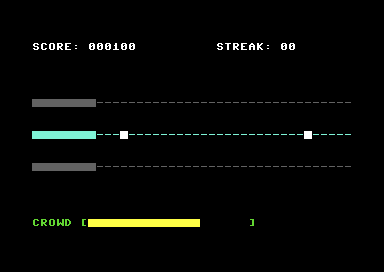
Add stakes with a crowd meter. Hit notes to keep them happy. Miss too many and it's game over.
What You’re Building
Score goes up. Streak goes up and down. But there’s no consequence for missing. You can’t lose. Where’s the tension?
By the end of this unit, you’ll have:
- A crowd meter that rises with hits and falls with misses
- Colour feedback showing your danger level (green/yellow/red)
- Game over when the crowd empties
- Real stakes — every note matters now
The toy becomes a game.
The Crowd Meter
The crowd starts half-interested. Play well and they get excited. Play badly and they leave. When they’re gone, it’s over.
CROWD_MAX       = 20            ; Full crowd
CROWD_START     = 10            ; Start half-full

crowd_meter:    !byte CROWD_START
game_running:   !byte $01       ; 1 = playing, 0 = game over
Why start at 10? It gives you room to grow and room to fail. Starting at max feels wrong — you can only go down. Starting at zero means instant danger. Half-full creates a balanced opening.
Asymmetric Updates
Hits add 1. Misses subtract 2. This asymmetry is intentional:
update_crowd_hit:
            lda crowd_meter
            cmp #CROWD_MAX
            bcs uch_done        ; Already maxed
            inc crowd_meter
uch_done:
            rts

update_crowd_miss:
            lda crowd_meter
            sec
            sbc #$02            ; Subtract 2
            bcs ucm_store       ; No underflow
            lda #$00            ; Floor at 0
ucm_store:
            sta crowd_meter
            bne ucm_done        ; Not zero? Continue
            jsr trigger_game_over
ucm_done:
            rts
Why +1/-2? Several reasons:
- Creates tension — You can’t coast on early success
- Rewards consistency — One lucky hit doesn’t save you from two misses
- Makes recovery feel earned — Climbing back from danger takes effort
- Standard rhythm game design — Guitar Hero, Dance Dance Revolution all do this
Try changing the ratio. +1/-1 is too forgiving. +1/-3 might be brutal. The numbers are easy to tune.
Colour Feedback
The meter changes colour to show danger level:
draw_crowd:
            ; Determine colour
            lda crowd_meter
            cmp #$05            ; Below 5?
            bcc dc_danger
            cmp #$0f            ; Below 15?
            bcc dc_normal
            ; 15+ = happy
            lda #COL_GREEN
            jmp dc_set_colour
dc_normal:
            lda #COL_YELLOW
            jmp dc_set_colour
dc_danger:
            lda #COL_RED
dc_set_colour:
            sta crowd_colour
            ; ... draw meter using this colour
Three zones:
- Green (15-20): Crowd is loving it
- Yellow (5-14): Doing okay, but careful
- Red (0-4): Danger zone — one more miss could end you
The colour tells you your status at a glance. No need to count blocks.
Drawing the Meter
The meter is 20 characters wide. Filled blocks for crowd level, spaces for empty:
CROWD_SCREEN_POS = SCREEN + (ROW_CROWD * 40) + 7  ; After "CROWD ["

draw_crowd:
            ; ... colour selection above ...

            ldx #$00            ; Position counter
            ldy crowd_meter     ; Blocks to draw
dc_loop:
            cpx #CROWD_MAX
            bcs dc_done

            cpy #$00
            beq dc_empty
            lda #$a0            ; Solid block
            dey                 ; One less to draw
            jmp dc_draw
dc_empty:
            lda #$20            ; Space
dc_draw:
            sta CROWD_SCREEN_POS,x
            lda crowd_colour
            sta CROWD_COLOUR_POS,x
            inx
            jmp dc_loop
dc_done:
            rts
We use Y as a countdown. While Y > 0, draw solid blocks and decrement Y. When Y hits 0, draw spaces for the rest. Simple and efficient.
Game Over
When the crowd empties, the game stops:
trigger_game_over:
            lda #$00
            sta game_running

            ; Draw "GAME OVER" text
            ldx #$00
tgo_loop:
            lda gameover_text,x
            beq tgo_done
            sta SCREEN + (GAMEOVER_ROW * 40) + GAMEOVER_COL,x
            lda #COL_RED
            sta COLOUR + (GAMEOVER_ROW * 40) + GAMEOVER_COL,x
            inx
            bne tgo_loop
tgo_done:
            rts

gameover_text:
            !scr "game over"
            !byte 0
The main loop checks game_running before processing input or spawning notes. When it’s zero, everything freezes:
main_loop:
            lda game_running
            beq main_loop_frozen    ; Skip to waiting loop

            ; ... normal game logic ...
            jmp main_loop

main_loop_frozen:
            ; Just sync to raster, don't process anything
wait_frozen:
            lda RASTER
            bne wait_frozen
            jmp main_loop
In Unit 8, we’ll add a proper state machine with restart capability. For now, game over means game over.
Integration
In check_hit, after awarding points:
            jsr add_score
            inc streak
            ; ... best streak check ...

            jsr update_crowd_hit    ; Crowd gets happier

            lda #FLASH_DURATION
            sta hit_flash
In move_notes, when a note despawns:
despawn_note:
            lda #$00
            sta streak              ; Reset streak

            jsr update_crowd_miss   ; Crowd gets unhappier (may end game)

            lda #FLASH_DURATION
            sta miss_flash
            jmp move_next
The update_crowd_miss call might trigger game over, so the main loop checks game_running after movement.
What You’ve Built
Run it. Watch the yellow meter. Hit notes — it grows toward green. Miss one — it drops. Miss a few more — red zone. Miss again — “GAME OVER”.
You now have:
- Fail state — A way to lose
- Tension meter — Visual representation of danger
- Colour feedback — Instant status communication
- Asymmetric mechanics — Misses hurt more than hits help
This is what makes it a game, not a toy.
What You’ve Learnt
- Bounded values — Clamping to min/max ranges
- State flags — Using variables to control program flow
- Colour as information — Visual feedback without text
- Tension design — How asymmetry creates stakes
Next Unit
One track. One key. One voice. But SID Symphony should have three of each — that’s the “symphony” part.
In Unit 6, we activate all three tracks with all three SID voices. Three keys, three lanes, three sounds. The full rhythm game experience.