Three Voices
Expand to all three tracks with all three SID voices. Three keys, three lanes, three sounds.
What You’re Building
One track. One key. One voice. But this is SID Symphony — we need harmony.
By the end of this unit, you’ll have:
- All three tracks active
- Three keys (X, C, V) for the three tracks
- Three SID voices playing a C major chord
- Notes spawning across all tracks in rotation
- Track-specific hit detection and feedback
It’s a real rhythm game now. Your fingers are moving, the SID is singing harmonies.
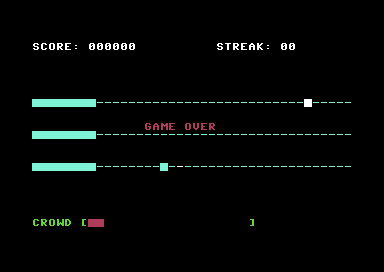
Three Tracks, Three Keys
| Track | Row | Key | SID Voice | Note |
|---|---|---|---|---|
| 1 (top) | 8 | X | Voice 1 | C |
| 2 (middle) | 12 | C | Voice 2 | E |
| 3 (bottom) | 16 | V | Voice 3 | G |
Why X, C, V? They’re adjacent on the bottom row of the keyboard. Three fingers, three keys, natural hand position. It’s the same pattern rhythm games have used for decades.
Reading Three Keys
The C64 keyboard is a matrix. Different keys need different row/column combinations:
check_x_key:
            lda #%11111011      ; Select row 2
            sta CIA1_PRA
            lda CIA1_PRB
            and #%10000000      ; Check column 7
            bne cx_not
            lda #$01
            rts
cx_not:     lda #$00
            rts

check_c_key:
            lda #%11111011      ; Select row 2
            sta CIA1_PRA
            lda CIA1_PRB
            and #%00010000      ; Check column 4
            bne cc_not
            lda #$01
            rts
cc_not:     lda #$00
            rts

check_v_key:
            lda #%11110111      ; Select row 3
            sta CIA1_PRA
            lda CIA1_PRB
            and #%10000000      ; Check column 7
            bne cv_not
            lda #$01
            rts
cv_not:     lda #$00
            rts
Each key check selects a row (by writing to CIA1_PRA) and reads a column (from CIA1_PRB). The keyboard matrix is documented in every C64 reference — look up the row and column for any key.
Tracking Three Key States
Each key needs its own transition detection:
key_x_was:      !byte $00
key_c_was:      !byte $00
key_v_was:      !byte $00

key_x_state:    !byte $00       ; For SID gate
key_c_state:    !byte $00
key_v_state:    !byte $00
The main loop checks all three keys every frame:
            ; Key X (Track 1)
            jsr check_x_key
            ldx key_x_was
            sta key_x_was
            cpx #$00
            bne ml_x_not_down
            cmp #$01
            bne ml_x_not_down
            ; X just pressed - check for hit on track 1
            lda #TRACK_1
            jsr check_hit_on_track
            lda #TRACK_1
            jsr play_voice
            ; ... similar for C and V
Three SID Voices
The SID has three identical voices, each with its own registers:
; Voice 1: $D400-$D406
; Voice 2: $D407-$D40D
; Voice 3: $D40E-$D414

SID_V1_FREQ_LO = $d400
SID_V2_FREQ_LO = $d407
SID_V3_FREQ_LO = $d40e
We configure each voice with a different pitch to form a C major chord:
; C4 (~262 Hz)
PITCH_V1_LO = $17
PITCH_V1_HI = $11

; E4 (~330 Hz)
PITCH_V2_LO = $8f
PITCH_V2_HI = $15

; G4 (~392 Hz)
PITCH_V3_LO = $a1
PITCH_V3_HI = $19
When you hit all three notes together, the chord rings out. That’s the “symphony” moment.
Playing and Stopping Voices
play_voice:
            cmp #TRACK_1
            bne pv_not_1
            lda #$41            ; Pulse wave + gate on
            sta SID_V1_CTRL
            rts
pv_not_1:
            cmp #TRACK_2
            bne pv_not_2
            lda #$41
            sta SID_V2_CTRL
            rts
pv_not_2:
            lda #$41
            sta SID_V3_CTRL
            rts
Each voice is independent. You can play voice 1 while voice 2 sustains while voice 3 is silent. The SID handles mixing automatically.
Note Data with Tracks
Notes now need to know which track they belong to:
MAX_NOTES   = 6             ; More slots for 3 tracks

note_x:
            !byte $ff, $ff, $ff, $ff, $ff, $ff
note_track:
            !byte 0, 0, 0, 0, 0, 0
Why 6 slots? With three tracks spawning notes, we might have 2 per track visible at once. Four slots could overflow; six gives us headroom.
Track-Specific Hit Detection
When X is pressed, only check notes on track 1:
check_hit_on_track:
            sta check_track         ; Store which track to check
            ldx #$00
chot_loop:
            lda note_x,x
            cmp #NOTE_INACTIVE
            beq chot_next

            lda note_track,x
            cmp check_track
            bne chot_next           ; Wrong track - skip

            lda note_x,x
            cmp #HIT_ZONE_X
            bcs chot_next           ; Not in hit zone

            ; HIT! Remove note, score, flash...
            jsr erase_note
            lda #NOTE_INACTIVE
            sta note_x,x
            ; ... scoring code ...
            rts

chot_next:
            inx
            cpx #MAX_NOTES
            bne chot_loop
            rts                     ; No hit on this track
Pressing the wrong key for a note does nothing — you can’t hit a track 2 note with the X key.
Drawing on Variable Rows
Drawing now uses lookup tables for track positions:
track_row_lo:
            !byte <(SCREEN + ROW_TRACK1 * 40)
            !byte <(SCREEN + ROW_TRACK2 * 40)
            !byte <(SCREEN + ROW_TRACK3 * 40)
track_row_hi:
            !byte >(SCREEN + ROW_TRACK1 * 40)
            !byte >(SCREEN + ROW_TRACK2 * 40)
            !byte >(SCREEN + ROW_TRACK3 * 40)
When drawing a note, we look up the base address from the track number:
draw_note:
            ; Get track's row address
            lda note_track,x
            tay
            lda track_row_lo,y
            sta screen_ptr
            lda track_row_hi,y
            sta screen_ptr + 1

            ; Add X position
            lda note_x,x
            clc
            adc screen_ptr
            sta screen_ptr
            ; ... continue drawing
Round-Robin Spawning
Notes spawn on rotating tracks:
spawn_track:    !byte $00       ; 0, 1, 2, 0, 1, 2...

spawn_note:
            ; Find free slot...

            ; Assign track
            lda spawn_track
            sta note_track,x

            ; Rotate to next track
            inc spawn_track
            lda spawn_track
            cmp #NUM_TRACKS
            bcc sn_done
            lda #$00
            sta spawn_track
sn_done:
            ; Draw the note
            jsr draw_note
            rts
This creates a predictable pattern: track 1, track 2, track 3, repeat. In Unit 7, song data will specify exactly which track each note spawns on.
Track-Specific Flash
Each track has its own hit/miss flash timers:
hit_flash_t1:   !byte $00
hit_flash_t2:   !byte $00
hit_flash_t3:   !byte $00
miss_flash_t1:  !byte $00
miss_flash_t2:  !byte $00
miss_flash_t3:  !byte $00
When you hit a note on track 2, only track 2’s hit zone flashes green. This gives clear feedback about which track registered the hit.
What You’ve Built
Run it. Watch notes appear on all three tracks. Press X for the top track, C for the middle, V for the bottom. Each hit plays a different note — C, E, or G. Hit all three at once and hear the chord.
You now have:
- Multi-track gameplay — Three lanes to watch
- Multi-key input — Three fingers engaged
- Multi-voice audio — Polyphonic SID output
- Lookup table patterns — Data-driven screen positions
What You’ve Learnt
- Keyboard matrix — How to read specific keys by row and column
- SID voice architecture — Three independent voices with identical registers
- Parallel arrays — Storing related data (note_x, note_track) in matching arrays
- Lookup tables — Using arrays to convert indices to addresses
Next Unit
Notes spawn in a fixed rotation: track 1, 2, 3, repeat. That’s predictable — not musical. Real rhythm games have authored note patterns.
In Unit 7, we replace the timer-based spawning with song data. Each note has a timestamp and a track. The same engine can play any song.