The Performance
Complete the game with title screen, game over, victory, and the full game loop. Everything comes together.
What You’re Building
You’ve built the pieces. Now they become a game.
By the end of this unit, you’ll have:
- A title screen with instructions
- Game over when the crowd empties
- Victory when you complete the song
- Press SPACE to play again
- A complete game loop
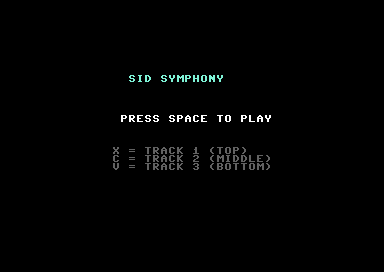
Game States
Every game is a state machine. SID Symphony has four states:
STATE_TITLE     = 0
STATE_PLAYING   = 1
STATE_GAMEOVER  = 2
STATE_VICTORY   = 3

game_state:     !byte STATE_TITLE
The game starts at the title screen. Press SPACE to play. Win or lose, press SPACE to return to the title. Simple, but it’s a complete loop.
The Main Loop as Dispatcher
Instead of one big main loop, we dispatch to different update routines based on state:
main_loop:
            jsr wait_frame

            lda game_state
            cmp #STATE_TITLE
            bne ml_not_title
            jsr update_title
            jmp main_loop
ml_not_title:
            cmp #STATE_PLAYING
            bne ml_not_playing
            jsr update_game
            jmp main_loop
ml_not_playing:
            cmp #STATE_GAMEOVER
            bne ml_not_gameover
            jsr update_endscreen
            jmp main_loop
ml_not_gameover:
            jsr update_endscreen
            jmp main_loop
Each state has its own update routine. The dispatcher just routes to the right one.
The Title Screen
Simple text, no animation:
draw_title_screen:
            ; Clear screen...

            ; Draw "SID SYMPHONY"
            ldx #$00
dts_title:
            lda title_text,x
            beq dts_title_done
            sta SCREEN + (5 * 40) + 12,x
            lda #COL_CYAN
            sta COLOUR + (5 * 40) + 12,x
            inx
            bne dts_title
dts_title_done:

            ; Draw "Press SPACE to play"
            ; Draw control instructions...
            rts
The title state just waits for SPACE:
update_title:
            jsr check_space_key
            beq ut_done
            ; Space pressed - start game
            jsr reset_game
            lda #STATE_PLAYING
            sta game_state
ut_done:
            rts
Checking the Space Key
SPACE is on row 7, column 4 of the keyboard matrix:
check_space_key:
            lda #%01111111              ; Row 7
            sta CIA1_PRA
            lda CIA1_PRB
            and #%00010000              ; Column 4 (SPACE)
            bne csk_not
            lda #$01
            rts
csk_not:
            lda #$00
            rts
We already know how to read the keyboard matrix from Unit 6. This is just another key.
State Transitions
Title → Playing: When SPACE is pressed, call reset_game and change state.
Playing → Game Over: When the crowd meter hits zero in update_crowd_miss:
update_crowd_miss:
            ; ... subtract from crowd ...
            sta crowd_meter
            bne ucm_done
            ; Game over!
            lda #STATE_GAMEOVER
            sta game_state
            jsr draw_gameover_screen
ucm_done:
            rts
Playing → Victory: When the song ends and no notes remain:
check_notes_remaining:
            ldx #$00
cnr_loop:
            lda note_x,x
            cmp #NOTE_INACTIVE
            bne cnr_found
            inx
            cpx #MAX_NOTES
            bne cnr_loop
            ; No notes left - victory!
            lda #STATE_VICTORY
            sta game_state
            jsr draw_victory_screen
cnr_found:
            rts
Game Over/Victory → Title: Both end screens wait for SPACE, then return to title.
Reset Game
When starting a new game, everything must reset:
reset_game:
            ; Clear all notes
            ldx #MAX_NOTES - 1
rg_notes:
            lda #NOTE_INACTIVE
            sta note_x,x
            lda #$00
            sta note_track,x
            dex
            bpl rg_notes

            ; Reset song pointer
            lda #<song_data
            sta song_ptr
            lda #>song_data
            sta song_ptr + 1

            ; Read first delta
            ldy #$00
            lda (song_ptr),y
            sta next_note_timer

            lda #$01
            sta song_playing

            ; Reset score, crowd, key states, flash timers...
            ; ... lots of zeroing ...

            ; Draw game screen
            jsr draw_game_screen
            jsr update_display
            jsr draw_crowd

            rts
This is why we kept variables organised. Resetting means setting them all back to their starting values.
End Screens
Game over and victory are similar — show a message, display the final score, wait for SPACE:
draw_gameover_screen:
            ; Clear middle area of screen
            ; Draw "GAME OVER" in red
            ; Draw final score
            ; Draw "Press SPACE to retry"
            rts

draw_victory_screen:
            ; Clear middle area of screen
            ; Draw "SONG COMPLETE!" in green
            ; Draw final score
            ; Draw "Press SPACE to play again"
            rts
The difference is the message and colour. Victory is green, game over is red.
Displaying Final Score
Both end screens show your score and best streak:
draw_final_score:
            ; "Score: NNNNNN"
            jsr convert_score
            ; Draw score digits...

            ; "Best: NN"
            ; Convert best_streak to digits...
            ; Draw streak digits...
            rts
We already have convert_score from Unit 4. We just call it and draw the digits in a different location.
The Complete Game Loop
- Title → Shows instructions, waits for SPACE
- Playing → The game you’ve been building for 7 units
- Game Over → Crowd emptied, show score, wait for SPACE
- Victory → Song completed, show score, wait for SPACE
- Back to Title
That’s a game. Not a demo. Not a prototype. A complete game with a beginning, middle, and end.
What You’ve Built
Run it. See the title screen. Press SPACE. Play the song. Win or lose, you’ll see your score. Press SPACE to try again.
You now have:
- State machine architecture — Clean separation of game phases
- Title screen — First impression, instructions
- End screens — Victory and defeat, final score
- Full game loop — Play again without restarting
- A complete game — Something you can show people
What You’ve Learnt
- State machines — The pattern that organises all games
- Dispatcher loops — Routing to different code based on state
- Screen management — Drawing different screens for different states
- Game reset — Returning all variables to starting values
- Polish — The details that make a demo into a game
The Core Game is Complete
Eight units. From an empty screen to a complete rhythm game.
You’ve learnt:
- Screen layout and character graphics
- Animation and movement
- Keyboard input from the CIA
- SID chip fundamentals
- Hit detection and scoring
- Data-driven design
- State machines
Units 9-16 are bonus content — enhancements that make the game better but aren’t required to have a complete, playable game.
You built a game. On a Commodore 64. In assembly. That’s worth celebrating.