Game 1 Unit 7 of 64 1 hr learning time
Enemies Appear
Add enemy sprites to the arena.
11% of Neon Nexus
What You’re Building
Enemies in the arena. Four hostile sprites waiting for you.
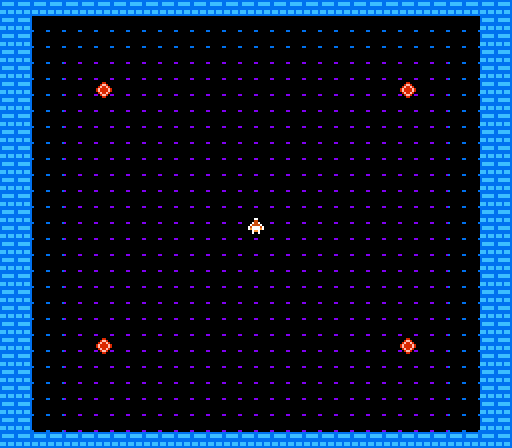
The arena now feels dangerous.
Enemy Data
Enemies need positions. We store them in zero page for fast access:
NUM_ENEMIES = 4

.segment "ZEROPAGE"
enemy_x:     .res NUM_ENEMIES
enemy_y:     .res NUM_ENEMIES
Four bytes for X positions, four for Y. Simple arrays.
Initialising Enemies
Place enemies at the four corners of the play area:
init_enemies:
    ; Enemy 0: Top-left
    lda #48
    sta enemy_x+0
    lda #48
    sta enemy_y+0

    ; Enemy 1: Top-right
    lda #200
    sta enemy_x+1
    lda #48
    sta enemy_y+1

    ; Continue for enemies 2 and 3...
    rts
Multiple Sprites in OAM
The player uses OAM slots 0-3. Enemies use slots 4-19 (4 enemies × 4 bytes each):
update_enemy_sprites:
    ldx #0              ; Enemy index
    ldy #4              ; OAM offset (after player)

@loop:
    ; Y position
    lda enemy_y, x
    sta oam_buffer, y
    iny

    ; Tile index
    lda #SPRITE_ENEMY
    sta oam_buffer, y
    iny

    ; Attributes: palette 1
    lda #%00000001
    sta oam_buffer, y
    iny

    ; X position
    lda enemy_x, x
    sta oam_buffer, y
    iny

    inx
    cpx #NUM_ENEMIES
    bne @loop
    rts
Sprite Palettes
Enemies use a different palette from the player:
; Sprite palettes
.byte BG_COLOUR, $30, $27, $17  ; Palette 0: Player (white/orange)
.byte BG_COLOUR, $16, $26, $36  ; Palette 1: Enemy (red)
The attribute byte’s low 2 bits select the sprite palette.
The Enemy Tile
A hostile diamond shape:
; Tile 8: Enemy sprite
.byte %00011000
.byte %00111100
.byte %01111110
.byte %11111111
.byte %11111111
.byte %01111110
.byte %00111100
.byte %00011000
The Code
; =============================================================================
; NEON NEXUS - Unit 7: Enemies Appear
; =============================================================================
; Add enemy sprites to the arena.
; =============================================================================

; -----------------------------------------------------------------------------
; NES Hardware Addresses
; -----------------------------------------------------------------------------
PPUCTRL   = $2000
PPUMASK   = $2001
PPUSTATUS = $2002
OAMADDR   = $2003
PPUSCROLL = $2005
PPUADDR   = $2006
PPUDATA   = $2007
OAMDMA    = $4014

JOYPAD1   = $4016
JOYPAD2   = $4017

; Controller buttons
BTN_A      = %10000000
BTN_B      = %01000000
BTN_SELECT = %00100000
BTN_START  = %00010000
BTN_UP     = %00001000
BTN_DOWN   = %00000100
BTN_LEFT   = %00000010
BTN_RIGHT  = %00000001

; -----------------------------------------------------------------------------
; Game Constants
; -----------------------------------------------------------------------------
PLAYER_START_X = 124
PLAYER_START_Y = 116
PLAYER_SPEED   = 2

NUM_ENEMIES    = 4

; Tile indices (background)
TILE_EMPTY     = 0
TILE_BORDER    = 1
TILE_FLOOR     = 2
TILE_CORNER_TL = 3
TILE_CORNER_TR = 4
TILE_CORNER_BL = 5
TILE_CORNER_BR = 6

; Sprite tiles
SPRITE_PLAYER  = 7
SPRITE_ENEMY   = 8

; Arena boundaries
ARENA_LEFT   = 16
ARENA_RIGHT  = 232
ARENA_TOP    = 16
ARENA_BOTTOM = 208

BG_COLOUR = $0F

; -----------------------------------------------------------------------------
; Memory Layout
; -----------------------------------------------------------------------------
.segment "ZEROPAGE"
player_x:    .res 1
player_y:    .res 1
buttons:     .res 1
temp:        .res 1
row_counter: .res 1

; Enemy positions (4 enemies)
enemy_x:     .res NUM_ENEMIES
enemy_y:     .res NUM_ENEMIES

.segment "OAM"
oam_buffer:  .res 256

.segment "BSS"

; -----------------------------------------------------------------------------
; iNES Header
; -----------------------------------------------------------------------------
.segment "HEADER"
    .byte "NES", $1A
    .byte 2
    .byte 1
    .byte $01
    .byte $00
    .byte 0,0,0,0,0,0,0,0

; -----------------------------------------------------------------------------
; Code
; -----------------------------------------------------------------------------
.segment "CODE"

reset:
    sei
    cld
    ldx #$40
    stx $4017
    ldx #$FF
    txs
    inx
    stx PPUCTRL
    stx PPUMASK
    stx $4010

@vblank1:
    bit PPUSTATUS
    bpl @vblank1

    lda #0
@clear_ram:
    sta $0000, x
    sta $0100, x
    sta $0200, x
    sta $0300, x
    sta $0400, x
    sta $0500, x
    sta $0600, x
    sta $0700, x
    inx
    bne @clear_ram

@vblank2:
    bit PPUSTATUS
    bpl @vblank2

    jsr load_palette
    jsr draw_arena
    jsr set_attributes
    jsr init_enemies

    ; Set up player
    lda #PLAYER_START_X
    sta player_x
    lda #PLAYER_START_Y
    sta player_y

    ; Initialise player sprite (OAM slot 0)
    lda player_y
    sta oam_buffer+0
    lda #SPRITE_PLAYER
    sta oam_buffer+1
    lda #0              ; Attributes: palette 0, no flip
    sta oam_buffer+2
    lda player_x
    sta oam_buffer+3

    ; Set up enemy sprites in OAM
    jsr update_enemy_sprites

    ; Hide remaining sprites (after player + 4 enemies = 5 sprites used)
    lda #$FF
    ldx #20             ; Start after 5 sprites (5*4=20)
@hide_sprites:
    sta oam_buffer, x
    inx
    bne @hide_sprites

    lda #0
    sta PPUSCROLL
    sta PPUSCROLL

    lda #%10000000
    sta PPUCTRL
    lda #%00011110
    sta PPUMASK

main_loop:
    jsr read_controller
    jsr move_player
    jmp main_loop

; -----------------------------------------------------------------------------
; Initialise Enemies - Place 4 enemies at corners of play area
; -----------------------------------------------------------------------------
init_enemies:
    ; Enemy 0: Top-left area
    lda #48
    sta enemy_x+0
    lda #48
    sta enemy_y+0

    ; Enemy 1: Top-right area
    lda #200
    sta enemy_x+1
    lda #48
    sta enemy_y+1

    ; Enemy 2: Bottom-left area
    lda #48
    sta enemy_x+2
    lda #176
    sta enemy_y+2

    ; Enemy 3: Bottom-right area
    lda #200
    sta enemy_x+3
    lda #176
    sta enemy_y+3

    rts

; -----------------------------------------------------------------------------
; Update Enemy Sprites in OAM
; -----------------------------------------------------------------------------
update_enemy_sprites:
    ldx #0              ; Enemy index
    ldy #4              ; OAM offset (after player sprite)

@loop:
    ; Y position
    lda enemy_y, x
    sta oam_buffer, y
    iny

    ; Tile
    lda #SPRITE_ENEMY
    sta oam_buffer, y
    iny

    ; Attributes: palette 1 (different colour from player)
    lda #%00000001
    sta oam_buffer, y
    iny

    ; X position
    lda enemy_x, x
    sta oam_buffer, y
    iny

    inx
    cpx #NUM_ENEMIES
    bne @loop

    rts

; -----------------------------------------------------------------------------
; Load Palette
; -----------------------------------------------------------------------------
load_palette:
    bit PPUSTATUS
    lda #$3F
    sta PPUADDR
    lda #$00
    sta PPUADDR

    ldx #0
@loop:
    lda palette_data, x
    sta PPUDATA
    inx
    cpx #32
    bne @loop
    rts

; -----------------------------------------------------------------------------
; Draw Arena
; -----------------------------------------------------------------------------
draw_arena:
    bit PPUSTATUS
    lda #$20
    sta PPUADDR
    lda #$00
    sta PPUADDR

    lda #0
    sta row_counter

@draw_row:
    lda row_counter

    cmp #0
    beq @top_row
    cmp #1
    beq @top_row

    cmp #28
    beq @bottom_row
    cmp #29
    beq @bottom_row

    jmp @middle_row

@top_row:
    lda row_counter
    cmp #0
    bne @top_row_inner

    lda #TILE_CORNER_TL
    sta PPUDATA
    lda #TILE_BORDER
    ldx #30
@top_fill:
    sta PPUDATA
    dex
    bne @top_fill
    lda #TILE_CORNER_TR
    sta PPUDATA
    jmp @next_row

@top_row_inner:
    lda #TILE_BORDER
    ldx #32
@top_inner_fill:
    sta PPUDATA
    dex
    bne @top_inner_fill
    jmp @next_row

@bottom_row:
    lda row_counter
    cmp #29
    bne @bottom_row_inner

    lda #TILE_CORNER_BL
    sta PPUDATA
    lda #TILE_BORDER
    ldx #30
@bottom_fill:
    sta PPUDATA
    dex
    bne @bottom_fill
    lda #TILE_CORNER_BR
    sta PPUDATA
    jmp @next_row

@bottom_row_inner:
    lda #TILE_BORDER
    ldx #32
@bottom_inner_fill:
    sta PPUDATA
    dex
    bne @bottom_inner_fill
    jmp @next_row

@middle_row:
    lda #TILE_BORDER
    sta PPUDATA
    sta PPUDATA

    lda #TILE_FLOOR
    ldx #28
@floor_fill:
    sta PPUDATA
    dex
    bne @floor_fill

    lda #TILE_BORDER
    sta PPUDATA
    sta PPUDATA

@next_row:
    inc row_counter
    lda row_counter
    cmp #30
    beq @done_drawing
    jmp @draw_row

@done_drawing:
    rts

; -----------------------------------------------------------------------------
; Set Attribute Table
; -----------------------------------------------------------------------------
set_attributes:
    bit PPUSTATUS
    lda #$23
    sta PPUADDR
    lda #$C0
    sta PPUADDR

    ldx #8
    lda #$00
@attr_top:
    sta PPUDATA
    dex
    bne @attr_top

    ldx #6
@attr_floor_rows:
    lda #$00
    sta PPUDATA
    lda #%01010101
    sta PPUDATA
    sta PPUDATA
    sta PPUDATA
    sta PPUDATA
    sta PPUDATA
    sta PPUDATA
    lda #$00
    sta PPUDATA
    dex
    bne @attr_floor_rows

    ldx #8
    lda #$00
@attr_bottom:
    sta PPUDATA
    dex
    bne @attr_bottom

    rts

; -----------------------------------------------------------------------------
; Read Controller
; -----------------------------------------------------------------------------
read_controller:
    lda #1
    sta JOYPAD1
    lda #0
    sta JOYPAD1

    ldx #8
@read_loop:
    lda JOYPAD1
    lsr a
    rol buttons
    dex
    bne @read_loop
    rts

; -----------------------------------------------------------------------------
; Move Player
; -----------------------------------------------------------------------------
move_player:
    lda buttons
    and #BTN_UP
    beq @check_down
    lda player_y
    sec
    sbc #PLAYER_SPEED
    cmp #ARENA_TOP
    bcc @check_down
    sta player_y

@check_down:
    lda buttons
    and #BTN_DOWN
    beq @check_left
    lda player_y
    clc
    adc #PLAYER_SPEED
    cmp #ARENA_BOTTOM
    bcs @check_left
    sta player_y

@check_left:
    lda buttons
    and #BTN_LEFT
    beq @check_right
    lda player_x
    sec
    sbc #PLAYER_SPEED
    cmp #ARENA_LEFT
    bcc @check_right
    sta player_x

@check_right:
    lda buttons
    and #BTN_RIGHT
    beq @done
    lda player_x
    clc
    adc #PLAYER_SPEED
    cmp #ARENA_RIGHT
    bcs @done
    sta player_x

@done:
    rts

; === NMI ===
nmi:
    pha
    txa
    pha
    tya
    pha

    lda #0
    sta OAMADDR
    lda #>oam_buffer
    sta OAMDMA

    ; Update player sprite position
    lda player_y
    sta oam_buffer+0
    lda player_x
    sta oam_buffer+3

    lda #0
    sta PPUSCROLL
    sta PPUSCROLL

    pla
    tay
    pla
    tax
    pla
    rti

irq:
    rti

; -----------------------------------------------------------------------------
; Data
; -----------------------------------------------------------------------------
palette_data:
    ; Background palettes
    .byte BG_COLOUR, $11, $21, $31  ; Palette 0: Blue
    .byte BG_COLOUR, $13, $23, $33  ; Palette 1: Purple
    .byte BG_COLOUR, $19, $29, $39  ; Palette 2: Green
    .byte BG_COLOUR, $16, $26, $36  ; Palette 3: Red
    ; Sprite palettes
    .byte BG_COLOUR, $30, $27, $17  ; Palette 0: Player (white/orange)
    .byte BG_COLOUR, $16, $26, $36  ; Palette 1: Enemy (red)
    .byte BG_COLOUR, $30, $27, $17
    .byte BG_COLOUR, $30, $27, $17

; -----------------------------------------------------------------------------
; Vectors
; -----------------------------------------------------------------------------
.segment "VECTORS"
    .word nmi
    .word reset
    .word irq

; -----------------------------------------------------------------------------
; CHR-ROM
; -----------------------------------------------------------------------------
.segment "CHARS"

; Tile 0: Empty
.byte $00,$00,$00,$00,$00,$00,$00,$00
.byte $00,$00,$00,$00,$00,$00,$00,$00

; Tile 1: Border (brick pattern)
.byte %11111111
.byte %10000001
.byte %10000001
.byte %11111111
.byte %11111111
.byte %00010001
.byte %00010001
.byte %11111111
.byte %00000000
.byte %01111110
.byte %01111110
.byte %00000000
.byte %00000000
.byte %11101110
.byte %11101110
.byte %00000000

; Tile 2: Floor (subtle grid)
.byte %00000000
.byte %00000000
.byte %00000000
.byte %00000000
.byte %00000000
.byte %00000000
.byte %00000000
.byte %10000001
.byte %00000000
.byte %00000000
.byte %00000000
.byte %00000000
.byte %00000000
.byte %00000000
.byte %00000000
.byte %00000000

; Tile 3: Corner TL
.byte %11111111
.byte %11000000
.byte %10100000
.byte %10010000
.byte %10001000
.byte %10000100
.byte %10000010
.byte %10000001
.byte %00000000
.byte %00111111
.byte %01011111
.byte %01101111
.byte %01110111
.byte %01111011
.byte %01111101
.byte %01111110

; Tile 4: Corner TR
.byte %11111111
.byte %00000011
.byte %00000101
.byte %00001001
.byte %00010001
.byte %00100001
.byte %01000001
.byte %10000001
.byte %00000000
.byte %11111100
.byte %11111010
.byte %11110110
.byte %11101110
.byte %11011110
.byte %10111110
.byte %01111110

; Tile 5: Corner BL
.byte %10000001
.byte %10000010
.byte %10000100
.byte %10001000
.byte %10010000
.byte %10100000
.byte %11000000
.byte %11111111
.byte %01111110
.byte %01111101
.byte %01111011
.byte %01110111
.byte %01101111
.byte %01011111
.byte %00111111
.byte %00000000

; Tile 6: Corner BR
.byte %10000001
.byte %01000001
.byte %00100001
.byte %00010001
.byte %00001001
.byte %00000101
.byte %00000011
.byte %11111111
.byte %01111110
.byte %10111110
.byte %11011110
.byte %11101110
.byte %11110110
.byte %11111010
.byte %11111100
.byte %00000000

; Tile 7: Player sprite
.byte %00011000
.byte %00011000
.byte %00111100
.byte %01111110
.byte %11111111
.byte %10111101
.byte %00100100
.byte %00100100
.byte %00000000
.byte %00011000
.byte %00011000
.byte %00111100
.byte %01000010
.byte %01000010
.byte %00011000
.byte %00000000

; Tile 8: Enemy sprite (hostile diamond shape)
.byte %00011000
.byte %00111100
.byte %01111110
.byte %11111111
.byte %11111111
.byte %01111110
.byte %00111100
.byte %00011000
.byte %00000000
.byte %00011000
.byte %00100100
.byte %01000010
.byte %01000010
.byte %00100100
.byte %00011000
.byte %00000000

; Fill rest of CHR-ROM
.res 8192 - 144, $00
Build It
ca65 nexus.asm -o nexus.o
ld65 -C nes.cfg nexus.o -o nexus.nes
Four enemies now occupy the arena. They don’t move yet - that’s next.
Next
Static enemies aren’t threatening. Unit 8 makes them patrol.
What Changed
Unit 6 → Unit 7
+115-39
| 1 | 1 | ; ============================================================================= | |
| 2 | - | ; NEON NEXUS - Unit 6: Colour and Attributes | |
| 2 | + | ; NEON NEXUS - Unit 7: Enemies Appear | |
| 3 | 3 | ; ============================================================================= | |
| 4 | - | ; Use the attribute table to add colour regions to the arena. | |
| 4 | + | ; Add enemy sprites to the arena. | |
| 5 | 5 | ; ============================================================================= | |
| 6 | 6 | | |
| 7 | 7 | ; ----------------------------------------------------------------------------- | |
| ... | |||
| 35 | 35 | PLAYER_START_X = 124 | |
| 36 | 36 | PLAYER_START_Y = 116 | |
| 37 | 37 | PLAYER_SPEED = 2 | |
| 38 | + | | |
| 39 | + | NUM_ENEMIES = 4 | |
| 38 | 40 | | |
| 39 | 41 | ; Tile indices (background) | |
| 40 | 42 | TILE_EMPTY = 0 | |
| ... | |||
| 47 | 49 | | |
| 48 | 50 | ; Sprite tiles | |
| 49 | 51 | SPRITE_PLAYER = 7 | |
| 52 | + | SPRITE_ENEMY = 8 | |
| 50 | 53 | | |
| 51 | 54 | ; Arena boundaries | |
| 52 | 55 | ARENA_LEFT = 16 | |
| ... | |||
| 65 | 68 | buttons: .res 1 | |
| 66 | 69 | temp: .res 1 | |
| 67 | 70 | row_counter: .res 1 | |
| 71 | + | | |
| 72 | + | ; Enemy positions (4 enemies) | |
| 73 | + | enemy_x: .res NUM_ENEMIES | |
| 74 | + | enemy_y: .res NUM_ENEMIES | |
| 68 | 75 | | |
| 69 | 76 | .segment "OAM" | |
| 70 | 77 | oam_buffer: .res 256 | |
| ... | |||
| 123 | 130 | jsr load_palette | |
| 124 | 131 | jsr draw_arena | |
| 125 | 132 | jsr set_attributes | |
| 133 | + | jsr init_enemies | |
| 126 | 134 | | |
| 127 | 135 | ; Set up player | |
| 128 | 136 | lda #PLAYER_START_X | |
| ... | |||
| 130 | 138 | lda #PLAYER_START_Y | |
| 131 | 139 | sta player_y | |
| 132 | 140 | | |
| 133 | - | ; Initialise player sprite | |
| 141 | + | ; Initialise player sprite (OAM slot 0) | |
| 134 | 142 | lda player_y | |
| 135 | 143 | sta oam_buffer+0 | |
| 136 | 144 | lda #SPRITE_PLAYER | |
| 137 | 145 | sta oam_buffer+1 | |
| 138 | - | lda #0 | |
| 146 | + | lda #0 ; Attributes: palette 0, no flip | |
| 139 | 147 | sta oam_buffer+2 | |
| 140 | 148 | lda player_x | |
| 141 | 149 | sta oam_buffer+3 | |
| 142 | 150 | | |
| 143 | - | ; Hide other sprites | |
| 151 | + | ; Set up enemy sprites in OAM | |
| 152 | + | jsr update_enemy_sprites | |
| 153 | + | | |
| 154 | + | ; Hide remaining sprites (after player + 4 enemies = 5 sprites used) | |
| 144 | 155 | lda #$FF | |
| 145 | - | ldx #4 | |
| 156 | + | ldx #20 ; Start after 5 sprites (5*4=20) | |
| 146 | 157 | @hide_sprites: | |
| 147 | 158 | sta oam_buffer, x | |
| 148 | 159 | inx | |
| ... | |||
| 152 | 163 | sta PPUSCROLL | |
| 153 | 164 | sta PPUSCROLL | |
| 154 | 165 | | |
| 155 | - | ; Enable rendering | |
| 156 | 166 | lda #%10000000 | |
| 157 | 167 | sta PPUCTRL | |
| 158 | 168 | lda #%00011110 | |
| ... | |||
| 164 | 174 | jmp main_loop | |
| 165 | 175 | | |
| 166 | 176 | ; ----------------------------------------------------------------------------- | |
| 167 | - | ; Load Palette - Four distinct background palettes | |
| 177 | + | ; Initialise Enemies - Place 4 enemies at corners of play area | |
| 178 | + | ; ----------------------------------------------------------------------------- | |
| 179 | + | init_enemies: | |
| 180 | + | ; Enemy 0: Top-left area | |
| 181 | + | lda #48 | |
| 182 | + | sta enemy_x+0 | |
| 183 | + | lda #48 | |
| 184 | + | sta enemy_y+0 | |
| 185 | + | | |
| 186 | + | ; Enemy 1: Top-right area | |
| 187 | + | lda #200 | |
| 188 | + | sta enemy_x+1 | |
| 189 | + | lda #48 | |
| 190 | + | sta enemy_y+1 | |
| 191 | + | | |
| 192 | + | ; Enemy 2: Bottom-left area | |
| 193 | + | lda #48 | |
| 194 | + | sta enemy_x+2 | |
| 195 | + | lda #176 | |
| 196 | + | sta enemy_y+2 | |
| 197 | + | | |
| 198 | + | ; Enemy 3: Bottom-right area | |
| 199 | + | lda #200 | |
| 200 | + | sta enemy_x+3 | |
| 201 | + | lda #176 | |
| 202 | + | sta enemy_y+3 | |
| 203 | + | | |
| 204 | + | rts | |
| 205 | + | | |
| 206 | + | ; ----------------------------------------------------------------------------- | |
| 207 | + | ; Update Enemy Sprites in OAM | |
| 208 | + | ; ----------------------------------------------------------------------------- | |
| 209 | + | update_enemy_sprites: | |
| 210 | + | ldx #0 ; Enemy index | |
| 211 | + | ldy #4 ; OAM offset (after player sprite) | |
| 212 | + | | |
| 213 | + | @loop: | |
| 214 | + | ; Y position | |
| 215 | + | lda enemy_y, x | |
| 216 | + | sta oam_buffer, y | |
| 217 | + | iny | |
| 218 | + | | |
| 219 | + | ; Tile | |
| 220 | + | lda #SPRITE_ENEMY | |
| 221 | + | sta oam_buffer, y | |
| 222 | + | iny | |
| 223 | + | | |
| 224 | + | ; Attributes: palette 1 (different colour from player) | |
| 225 | + | lda #%00000001 | |
| 226 | + | sta oam_buffer, y | |
| 227 | + | iny | |
| 228 | + | | |
| 229 | + | ; X position | |
| 230 | + | lda enemy_x, x | |
| 231 | + | sta oam_buffer, y | |
| 232 | + | iny | |
| 233 | + | | |
| 234 | + | inx | |
| 235 | + | cpx #NUM_ENEMIES | |
| 236 | + | bne @loop | |
| 237 | + | | |
| 238 | + | rts | |
| 239 | + | | |
| 240 | + | ; ----------------------------------------------------------------------------- | |
| 241 | + | ; Load Palette | |
| 168 | 242 | ; ----------------------------------------------------------------------------- | |
| 169 | 243 | load_palette: | |
| 170 | 244 | bit PPUSTATUS | |
| ... | |||
| 183 | 257 | rts | |
| 184 | 258 | | |
| 185 | 259 | ; ----------------------------------------------------------------------------- | |
| 186 | - | ; Draw Arena (same as Unit 5) | |
| 260 | + | ; Draw Arena | |
| 187 | 261 | ; ----------------------------------------------------------------------------- | |
| 188 | 262 | draw_arena: | |
| 189 | 263 | bit PPUSTATUS | |
| ... | |||
| 289 | 363 | rts | |
| 290 | 364 | | |
| 291 | 365 | ; ----------------------------------------------------------------------------- | |
| 292 | - | ; Set Attribute Table - Different palettes for different regions | |
| 366 | + | ; Set Attribute Table | |
| 293 | 367 | ; ----------------------------------------------------------------------------- | |
| 294 | 368 | set_attributes: | |
| 295 | 369 | bit PPUSTATUS | |
| ... | |||
| 297 | 371 | sta PPUADDR | |
| 298 | 372 | lda #$C0 | |
| 299 | 373 | sta PPUADDR | |
| 300 | - | | |
| 301 | - | ; Attribute table: 8 bytes per row, 8 rows = 64 bytes | |
| 302 | - | ; Each byte controls 4 16x16 pixel areas (32x32 total) | |
| 303 | - | ; Bits: 76=BR, 54=BL, 32=TR, 10=TL | |
| 304 | 374 | | |
| 305 | - | ; Row 0-1: All border (palette 0) | |
| 306 | 375 | ldx #8 | |
| 307 | - | lda #$00 ; All palette 0 | |
| 376 | + | lda #$00 | |
| 308 | 377 | @attr_top: | |
| 309 | 378 | sta PPUDATA | |
| 310 | 379 | dex | |
| 311 | 380 | bne @attr_top | |
| 312 | 381 | | |
| 313 | - | ; Rows 2-5: Border edges (palette 0), floor varies | |
| 314 | - | ; Create a gradient effect: palette 1 in centre | |
| 315 | - | ldx #6 ; 6 rows of attributes for floor area | |
| 382 | + | ldx #6 | |
| 316 | 383 | @attr_floor_rows: | |
| 317 | - | ; Byte 0: Left edge - palette 0 | |
| 318 | 384 | lda #$00 | |
| 319 | 385 | sta PPUDATA | |
| 320 | - | | |
| 321 | - | ; Bytes 1-6: Floor area with palette 1 | |
| 322 | - | lda #%01010101 ; All palette 1 | |
| 386 | + | lda #%01010101 | |
| 323 | 387 | sta PPUDATA | |
| 324 | 388 | sta PPUDATA | |
| 325 | 389 | sta PPUDATA | |
| 326 | 390 | sta PPUDATA | |
| 327 | 391 | sta PPUDATA | |
| 328 | 392 | sta PPUDATA | |
| 329 | - | | |
| 330 | - | ; Byte 7: Right edge - palette 0 | |
| 331 | 393 | lda #$00 | |
| 332 | 394 | sta PPUDATA | |
| 333 | - | | |
| 334 | 395 | dex | |
| 335 | 396 | bne @attr_floor_rows | |
| 336 | 397 | | |
| 337 | - | ; Row 7: Bottom border (palette 0) | |
| 338 | 398 | ldx #8 | |
| 339 | 399 | lda #$00 | |
| 340 | 400 | @attr_bottom: | |
| ... | |||
| 425 | 485 | lda #>oam_buffer | |
| 426 | 486 | sta OAMDMA | |
| 427 | 487 | | |
| 488 | + | ; Update player sprite position | |
| 428 | 489 | lda player_y | |
| 429 | 490 | sta oam_buffer+0 | |
| 430 | 491 | lda player_x | |
| ... | |||
| 448 | 509 | ; Data | |
| 449 | 510 | ; ----------------------------------------------------------------------------- | |
| 450 | 511 | palette_data: | |
| 451 | - | ; Background palette 0: Blue border | |
| 452 | - | .byte BG_COLOUR, $11, $21, $31 ; Black, dark blue, light blue, cyan | |
| 453 | - | ; Background palette 1: Purple floor | |
| 454 | - | .byte BG_COLOUR, $13, $23, $33 ; Black, dark purple, purple, light purple | |
| 455 | - | ; Background palette 2: Green (unused for now) | |
| 456 | - | .byte BG_COLOUR, $19, $29, $39 ; Black, dark green, green, light green | |
| 457 | - | ; Background palette 3: Red (unused for now) | |
| 458 | - | .byte BG_COLOUR, $16, $26, $36 ; Black, dark red, red, light red | |
| 512 | + | ; Background palettes | |
| 513 | + | .byte BG_COLOUR, $11, $21, $31 ; Palette 0: Blue | |
| 514 | + | .byte BG_COLOUR, $13, $23, $33 ; Palette 1: Purple | |
| 515 | + | .byte BG_COLOUR, $19, $29, $39 ; Palette 2: Green | |
| 516 | + | .byte BG_COLOUR, $16, $26, $36 ; Palette 3: Red | |
| 459 | 517 | ; Sprite palettes | |
| 460 | - | .byte BG_COLOUR, $30, $27, $17 ; White, orange, brown | |
| 461 | - | .byte BG_COLOUR, $30, $27, $17 | |
| 518 | + | .byte BG_COLOUR, $30, $27, $17 ; Palette 0: Player (white/orange) | |
| 519 | + | .byte BG_COLOUR, $16, $26, $36 ; Palette 1: Enemy (red) | |
| 462 | 520 | .byte BG_COLOUR, $30, $27, $17 | |
| 463 | 521 | .byte BG_COLOUR, $30, $27, $17 | |
| 464 | 522 | | |
| ... | |||
| 471 | 529 | .word irq | |
| 472 | 530 | | |
| 473 | 531 | ; ----------------------------------------------------------------------------- | |
| 474 | - | ; CHR-ROM - Same tiles as Unit 5 | |
| 532 | + | ; CHR-ROM | |
| 475 | 533 | ; ----------------------------------------------------------------------------- | |
| 476 | 534 | .segment "CHARS" | |
| 477 | 535 | | |
| ... | |||
| 597 | 655 | .byte %00100100 | |
| 598 | 656 | .byte %00100100 | |
| 599 | 657 | .byte %00000000 | |
| 658 | + | .byte %00011000 | |
| 659 | + | .byte %00011000 | |
| 660 | + | .byte %00111100 | |
| 661 | + | .byte %01000010 | |
| 662 | + | .byte %01000010 | |
| 600 | 663 | .byte %00011000 | |
| 664 | + | .byte %00000000 | |
| 665 | + | | |
| 666 | + | ; Tile 8: Enemy sprite (hostile diamond shape) | |
| 601 | 667 | .byte %00011000 | |
| 668 | + | .byte %00111100 | |
| 669 | + | .byte %01111110 | |
| 670 | + | .byte %11111111 | |
| 671 | + | .byte %11111111 | |
| 672 | + | .byte %01111110 | |
| 602 | 673 | .byte %00111100 | |
| 674 | + | .byte %00011000 | |
| 675 | + | .byte %00000000 | |
| 676 | + | .byte %00011000 | |
| 677 | + | .byte %00100100 | |
| 603 | 678 | .byte %01000010 | |
| 604 | 679 | .byte %01000010 | |
| 680 | + | .byte %00100100 | |
| 605 | 681 | .byte %00011000 | |
| 606 | 682 | .byte %00000000 | |
| 607 | 683 | | |
| 608 | 684 | ; Fill rest of CHR-ROM | |
| 609 | - | .res 8192 - 128, $00 | |
| 685 | + | .res 8192 - 144, $00 | |
| 610 | 686 | |