Hello Spectrum
Your first ZX Spectrum program. See the game board. Move the cursor. Attributes are your canvas.
The game board is waiting. Eight rows, eight columns, sixty-four cells to claim.
This unit gives you a working ZX Spectrum program immediately. You’ll run it, see the board, move the cursor with the keyboard, and make your first changes to the code. Experience first, explanation after.
Run It
Download the code and assemble it:
pasmonext --tapbas inkwar.asm inkwar.tapLoad the TAP file in Fuse (or your preferred emulator). You’ll see this:
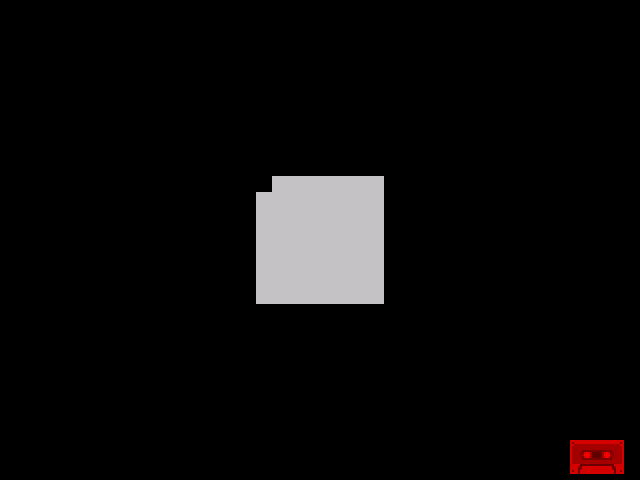
A black screen with a white 8×8 grid in the centre. The top-left cell flashes - that’s your cursor.
Press Q to move up. Press A to move down. Press O to move left. Press P to move right.
The cursor moves around the board. You’re controlling a ZX Spectrum program.
The Complete Code
Here’s everything that makes this work:
; ============================================================================
; INK WAR - Unit 1: Hello Spectrum
; ============================================================================
; A territory control game for the ZX Spectrum
; This scaffold provides: board display, cursor, keyboard movement
;
; Controls: Q=Up, A=Down, O=Left, P=Right
; ============================================================================

            org     32768

; ----------------------------------------------------------------------------
; Constants
; ----------------------------------------------------------------------------

ATTR_BASE   equ     $5800           ; Start of attribute memory
BOARD_ROW   equ     8               ; Board starts at row 8
BOARD_COL   equ     12              ; Board starts at column 12
BOARD_SIZE  equ     8               ; 8x8 playing field

; Attribute colours (FBPPPIII format)
BORDER_ATTR equ     %00000000       ; Black on black (border)
EMPTY_ATTR  equ     %00111000       ; White paper, black ink (empty cell)
CURSOR_ATTR equ     %10111000       ; White paper, black ink + FLASH

; Keyboard ports (active low)
KEY_PORT    equ     $fe
ROW_QAOP    equ     $fb             ; Q W E R T row (bits: T R E W Q)
ROW_ASDF    equ     $fd             ; A S D F G row (bits: G F D S A)
ROW_YUIOP   equ     $df             ; Y U I O P row (bits: P O I U Y)

; ----------------------------------------------------------------------------
; Entry Point
; ----------------------------------------------------------------------------

start:
            call    init_screen     ; Clear screen and set border
            call    draw_board      ; Draw the game board
            call    draw_cursor     ; Show cursor at starting position

main_loop:
            halt                    ; Wait for frame (50Hz timing)

            call    read_keyboard   ; Check for input
            call    move_cursor     ; Update cursor if moved

            jp      main_loop       ; Repeat forever

; ----------------------------------------------------------------------------
; Initialise Screen
; ----------------------------------------------------------------------------
; Clears the screen to black and sets border colour

init_screen:
            ; Set border to black
            xor     a               ; A = 0 (black)
            out     (KEY_PORT), a   ; Set border colour

            ; Clear attributes to black
            ld      hl, ATTR_BASE   ; Start of attributes
            ld      de, ATTR_BASE+1
            ld      bc, 767         ; 768 bytes - 1
            ld      (hl), 0         ; Black on black
            ldir                    ; Fill all attributes

            ret

; ----------------------------------------------------------------------------
; Draw Board
; ----------------------------------------------------------------------------
; Draws the 8x8 game board with border

draw_board:
            ; Draw border (10x10 area, black)
            ; Border is already black from init, so we just draw the cells

            ; Draw the 8x8 playing field (white cells)
            ld      b, BOARD_SIZE   ; 8 rows
            ld      c, BOARD_ROW    ; Start at row 8

.row_loop:
            push    bc

            ld      b, BOARD_SIZE   ; 8 columns
            ld      d, BOARD_COL    ; Start at column 12

.col_loop:
            push    bc

            ; Calculate attribute address: ATTR_BASE + row*32 + col
            ld      a, c            ; Row
            ld      l, a
            ld      h, 0
            add     hl, hl          ; *2
            add     hl, hl          ; *4
            add     hl, hl          ; *8
            add     hl, hl          ; *16
            add     hl, hl          ; *32
            ld      a, d            ; Column
            add     a, l
            ld      l, a
            ld      bc, ATTR_BASE
            add     hl, bc          ; HL = attribute address

            ld      (hl), EMPTY_ATTR ; Set to white (empty cell)

            pop     bc
            inc     d               ; Next column
            djnz    .col_loop

            pop     bc
            inc     c               ; Next row
            djnz    .row_loop

            ret

; ----------------------------------------------------------------------------
; Draw Cursor
; ----------------------------------------------------------------------------
; Shows the cursor at current position with FLASH attribute

draw_cursor:
            ; Calculate attribute address for cursor position
            ld      a, (cursor_row)
            add     a, BOARD_ROW    ; Add board offset
            ld      l, a
            ld      h, 0
            add     hl, hl          ; *32
            add     hl, hl
            add     hl, hl
            add     hl, hl
            add     hl, hl
            ld      a, (cursor_col)
            add     a, BOARD_COL    ; Add board offset
            add     a, l
            ld      l, a
            ld      bc, ATTR_BASE
            add     hl, bc

            ld      (hl), CURSOR_ATTR ; Set FLASH attribute

            ret

; ----------------------------------------------------------------------------
; Clear Cursor
; ----------------------------------------------------------------------------
; Removes cursor flash from current position

clear_cursor:
            ; Calculate attribute address for cursor position
            ld      a, (cursor_row)
            add     a, BOARD_ROW
            ld      l, a
            ld      h, 0
            add     hl, hl
            add     hl, hl
            add     hl, hl
            add     hl, hl
            add     hl, hl
            ld      a, (cursor_col)
            add     a, BOARD_COL
            add     a, l
            ld      l, a
            ld      bc, ATTR_BASE
            add     hl, bc

            ld      (hl), EMPTY_ATTR ; Remove FLASH, back to white

            ret

; ----------------------------------------------------------------------------
; Read Keyboard
; ----------------------------------------------------------------------------
; Checks Q/A/O/P keys and sets direction flags

read_keyboard:
            xor     a
            ld      (key_pressed), a ; Clear previous

            ; Check Q (up) - port $FBFE, bit 0
            ld      a, ROW_QAOP
            in      a, (KEY_PORT)
            bit     0, a            ; Q is bit 0
            jr      nz, .not_q
            ld      a, 1            ; Up
            ld      (key_pressed), a
            ret
.not_q:
            ; Check A (down) - port $FDFE, bit 0
            ld      a, ROW_ASDF
            in      a, (KEY_PORT)
            bit     0, a            ; A is bit 0
            jr      nz, .not_a
            ld      a, 2            ; Down
            ld      (key_pressed), a
            ret
.not_a:
            ; Check O (left) - port $DFFE, bit 1
            ld      a, ROW_YUIOP
            in      a, (KEY_PORT)
            bit     1, a            ; O is bit 1
            jr      nz, .not_o
            ld      a, 3            ; Left
            ld      (key_pressed), a
            ret
.not_o:
            ; Check P (right) - port $DFFE, bit 0
            ld      a, ROW_YUIOP
            in      a, (KEY_PORT)
            bit     0, a            ; P is bit 0
            jr      nz, .not_p
            ld      a, 4            ; Right
            ld      (key_pressed), a
.not_p:
            ret

; ----------------------------------------------------------------------------
; Move Cursor
; ----------------------------------------------------------------------------
; Moves cursor based on key_pressed value

move_cursor:
            ld      a, (key_pressed)
            or      a
            ret     z               ; No key pressed

            call    clear_cursor    ; Remove old cursor

            ld      a, (key_pressed)

            cp      1               ; Up?
            jr      nz, .not_up
            ld      a, (cursor_row)
            or      a
            jr      z, .done        ; Already at top
            dec     a
            ld      (cursor_row), a
            jr      .done
.not_up:
            cp      2               ; Down?
            jr      nz, .not_down
            ld      a, (cursor_row)
            cp      BOARD_SIZE-1
            jr      z, .done        ; Already at bottom
            inc     a
            ld      (cursor_row), a
            jr      .done
.not_down:
            cp      3               ; Left?
            jr      nz, .not_left
            ld      a, (cursor_col)
            or      a
            jr      z, .done        ; Already at left
            dec     a
            ld      (cursor_col), a
            jr      .done
.not_left:
            cp      4               ; Right?
            jr      nz, .done
            ld      a, (cursor_col)
            cp      BOARD_SIZE-1
            jr      z, .done        ; Already at right
            inc     a
            ld      (cursor_col), a

.done:
            call    draw_cursor     ; Draw new cursor
            ret

; ----------------------------------------------------------------------------
; Variables
; ----------------------------------------------------------------------------

cursor_row: defb    0               ; Cursor row (0-7)
cursor_col: defb    0               ; Cursor column (0-7)
key_pressed: defb   0               ; Last key: 0=none, 1=up, 2=down, 3=left, 4=right

; ----------------------------------------------------------------------------
; End
; ----------------------------------------------------------------------------

            end     start
That’s about 200 lines. Don’t worry about understanding all of it yet - we’ll explore each piece. For now, let’s look at the structure and make some changes.
The Main Loop
Every game follows the same pattern: set up, then loop forever.
; ----------------------------------------------------------------------------
; Entry Point
; ----------------------------------------------------------------------------

start:
            call    init_screen     ; Clear screen and set border
            call    draw_board      ; Draw the game board
            call    draw_cursor     ; Show cursor at starting position

main_loop:
            halt                    ; Wait for frame (50Hz timing)

            call    read_keyboard   ; Check for input
            call    move_cursor     ; Update cursor if moved

            jp      main_loop       ; Repeat forever
The halt instruction waits for the next frame - the Spectrum draws the screen 50 times per second, and halt synchronises our code to that rhythm. Without it, the cursor would move impossibly fast.
Try This: Change the Border
Find this line near the top of init_screen:
            xor     a               ; A = 0 (black)
            out     (KEY_PORT), a   ; Set border colour
The xor a sets A to 0 (black). Change it to:
            ld      a, 1            ; A = 1 (blue)
            out     (KEY_PORT), a   ; Set border colour
Reassemble and run. The border is now blue.
The Spectrum’s border colour is set by sending a value (0-7) to port $FE. The colours are:
| Value | Colour |
|---|---|
| 0 | Black |
| 1 | Blue |
| 2 | Red |
| 3 | Magenta |
| 4 | Green |
| 5 | Cyan |
| 6 | Yellow |
| 7 | White |
Try different values. See what happens with 2, 4, or 6.
Try This: Change the Board Colour
The board cells are white because of this constant:
EMPTY_ATTR equ %00111000 ; White paper, black ink (empty cell)That binary value %00111000 means:
- Bits 5-3 (PAPER):
111= 7 = white - Bits 2-0 (INK):
000= 0 = black
Change it to cyan paper:
EMPTY_ATTR equ %00101000 ; Cyan paper, black inkThe 101 in bits 5-3 is 5 = cyan. Reassemble and run - the board is now cyan.
Try This: Change the Cursor
The cursor flashes because of the FLASH bit:
CURSOR_ATTR equ %10111000 ; White paper, black ink + FLASHThe 1 at the start (bit 7) enables FLASH. Try changing it to BRIGHT instead:
CURSOR_ATTR equ %01111000 ; White paper, black ink + BRIGHTNow the cursor doesn’t flash - it’s just brighter than the other cells. Which do you prefer?
The Attribute Byte
You’ve been changing attribute values without fully understanding them. Here’s the format:
Bit:  7      6      5  4  3    2  1  0
FLASH BRIGHT PAPER INK- FLASH (bit 7): When set, the cell alternates between normal and inverted colours
- BRIGHT (bit 6): When set, colours are brighter
- PAPER (bits 5-3): Background colour (0-7)
- INK (bits 2-0): Foreground colour (0-7)
So %00111000 means: no flash, no bright, paper=7 (white), ink=0 (black).
And %10111000 means: flash ON, no bright, paper=7, ink=0.
Where Attributes Live
The Spectrum screen has 768 attribute cells arranged in a 32×24 grid. Each cell controls the colours of an 8×8 pixel area.
Attributes start at address $5800 (22528 decimal) and run to $5AFF. To find the attribute for row R, column C:
Address = $5800 + (R × 32) + COur board starts at row 8, column 12, so the top-left board cell is at:
$5800 + (8 × 32) + 12 = $5800 + 256 + 12 = $590CThat’s what the draw_board routine calculates.
The Keyboard
The Spectrum keyboard is arranged in half-rows. Each half-row has its own port address:
| Port | Keys (bit 0 → bit 4) |
|---|---|
| $FEFE | CAPS V C X Z |
| $FDFE | A S D F G |
| $FBFE | Q W E R T |
| $F7FE | 1 2 3 4 5 |
| $EFFE | 0 9 8 7 6 |
| $DFFE | P O I U Y |
| $BFFE | ENTER L K J H |
| $7FFE | SPACE SYM M N B |
To check if Q is pressed, we read port $FBFE and check bit 0. If the bit is 0 (active low), the key is down.
That’s what read_keyboard does for Q, A, O, and P.
What You’ve Learnt
- Running Z80 code - The
org 32768puts code at a safe address;end starttells the assembler where execution begins - The main loop - Setup once, then halt-read-update forever at 50Hz
- Border colour -
out (254), asets the border to colour 0-7 - Attribute memory - $5800-$5AFF, one byte per 8×8 cell
- Attribute format - FBPPPIII: flash, bright, paper colour, ink colour
- Keyboard reading -
in a, (port)reads a half-row; bits are active low
What’s Next
In Unit 2, we’ll add the ability to claim cells. Press Space, and the cell turns your colour. The game begins.