Moving the Frog
Read the joystick. Move the sprite. Interactivity in Unit 2.
What You’re Building
Joystick control. The frog responds to your input.
By the end of this unit:
- Push joystick up — frog moves up
- Push joystick down — frog moves down
- Left and right work too
- Frog stays within screen bounds
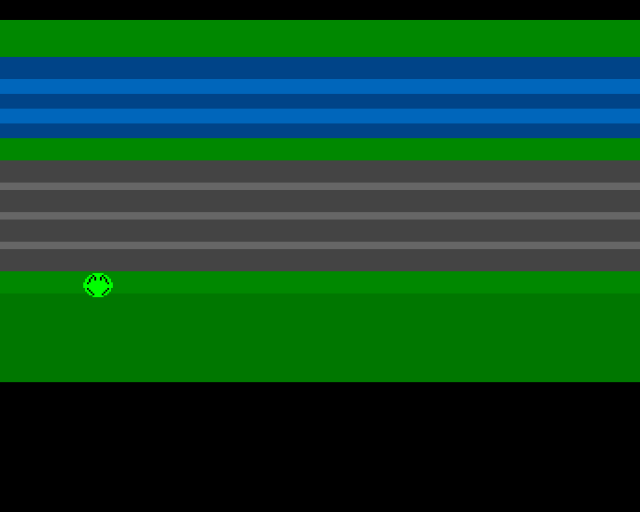
From Static to Interactive
In Unit 1, the frog just sat there. The custom chipset drew it automatically, but it never moved. That’s not a game—that’s a painting.
A game needs input. The player pushes, the game responds. That feedback loop is everything.
The Joystick Hardware
The Amiga reads joystick data through the JOY1DAT register at $DFF00C. This register contains the position of joystick port 2 (the primary game port).
But the data isn’t straightforward. It’s not four bits saying “up, down, left, right”. Instead, it uses a quirky encoding inherited from the Atari design:
JOY1DAT register ($DFF00C):
  Bit 9 = Left XOR'd with vertical
  Bit 8 = Up XOR'd with vertical
  Bit 1 = Right XOR'd with vertical
  Bit 0 = Down XOR'd with vertical
The vertical axis affects the horizontal bits through XOR. To decode it properly, we XOR the register with itself shifted right by one bit:
; Joystick Reading
; Port 2 joystick data is at JOY1DAT ($dff00c)
; Bits use Gray code - XOR adjacent bits to decode direction

read_joystick:
            move.w  JOY1DAT(a5),d0      ; Read raw joystick data
            move.w  d0,d1
            lsr.w   #1,d1               ; Shift for XOR
            eor.w   d1,d0               ; Decode Gray code

            ; After decode:
            ; Bit 0 = Down
            ; Bit 1 = Right
            ; Bit 8 = Up
            ; Bit 9 = Left
            rts

; Example: Check if up is pressed
            btst    #8,d0
            beq.s   .not_up
            ; Up pressed...
.not_up:
After decoding, the bits become meaningful:
- Bit 8 = Up pressed
- Bit 0 = Down pressed
- Bit 9 = Left pressed
- Bit 1 = Right pressed
The Main Loop
Unit 1’s main loop just waited for vertical blank and checked the mouse button. Now it does real work:
mainloop:
            bsr.s   wait_vblank         ; Wait for vertical blank
            bsr.s   read_joystick       ; Read joystick into D0
            bsr.s   move_frog           ; Move frog based on input
            bsr     update_sprite       ; Update sprite control words
            bra.s   mainloop
Every frame:
- Wait for VBlank — synchronises with display refresh (50 times per second on PAL)
- Read joystick — get current direction
- Move frog — update position if direction pressed
- Update sprite — write new position to sprite control words
The hardware does the rest. We just change numbers; the chipset draws.
Moving the Frog
The move_frog routine checks each direction and adjusts the frog’s position:
; Move Frog with Boundaries
; Pixel-based movement with screen boundary checking

move_frog:
            bsr     read_joystick

            ; --- Check UP ---
            btst    #8,d0
            beq.s   .not_up
            move.w  frog_y,d1
            cmp.w   #44,d1              ; Top boundary
            beq.s   .not_up
            subq.w  #2,d1
            move.w  d1,frog_y
.not_up:

            ; --- Check DOWN ---
            btst    #0,d0
            beq.s   .not_down
            move.w  frog_y,d1
            cmp.w   #220,d1             ; Bottom boundary
            beq.s   .not_down
            addq.w  #2,d1
            move.w  d1,frog_y
.not_down:

            ; --- Check LEFT ---
            btst    #9,d0
            beq.s   .not_left
            move.w  frog_x,d1
            cmp.w   #48,d1              ; Left boundary
            beq.s   .not_left
            subq.w  #2,d1
            move.w  d1,frog_x
.not_left:

            ; --- Check RIGHT ---
            btst    #1,d0
            beq.s   .not_right
            move.w  frog_x,d1
            cmp.w   #288,d1             ; Right boundary
            beq.s   .not_right
            addq.w  #2,d1
            move.w  d1,frog_x
.not_right:
            rts
Each direction:
- Test the bit for that direction
- Load current position
- Add or subtract MOVE_SPEED
- Check against boundary
- Store new position (if within bounds)
Boundaries
Without boundaries, the frog would fly off screen and disappear into memory. We define limits:
MIN_X           equ 48          ; Left edge
MAX_X           equ 280         ; Right edge
MIN_Y           equ 44          ; Top of play area
MAX_Y           equ 196         ; Bottom of play area
These keep the frog within the visible playfield. The numbers match where our Copper list draws the game zones.
Updating the Sprite
When frog_x or frog_y changes, we must update the sprite’s control words:
; Update Sprite Control Words
; Pack X/Y coordinates into hardware sprite format

FROG_HEIGHT     equ 16

update_sprite:
            lea     frog_data,a0
            move.w  frog_y,d0           ; Y position
            move.w  frog_x,d1           ; X position

            ; First control word: VSTART<<8 | HSTART>>1
            move.w  d0,d2
            lsl.w   #8,d2               ; VSTART in high byte
            lsr.w   #1,d1               ; HSTART / 2
            or.b    d1,d2               ; Combine
            move.w  d2,(a0)             ; Write to sprite data

            ; Second control word: VSTOP<<8 | control bits
            add.w   #FROG_HEIGHT,d0     ; VSTOP = VSTART + height
            lsl.w   #8,d0               ; VSTOP in high byte
            move.w  d0,2(a0)            ; Write to sprite data
            rts

; Sprite control word format:
; Word 0: [VSTART 7:0] [HSTART 8:1]
; Word 1: [VSTOP 7:0] [V8 H8 ATT SH V0]
The sprite’s first two words control its position:
- Word 1: Vertical start (high byte) and horizontal start divided by 2 (low byte)
- Word 2: Vertical stop (high byte) and control bits (low byte)
We pack these values every frame. The chipset reads them during display and draws the sprite at the new position.
Run It
Build and create the disk:
vasmm68k_mot -Fhunkexe -kick1hunks -o signal signal.asm

xdftool signal.adf create
xdftool signal.adf format "Signal"
xdftool signal.adf makedir s
xdftool signal.adf boot install
echo "signal" > startup-sequence
xdftool signal.adf write startup-sequence s/startup-sequence
rm startup-sequence
xdftool signal.adf write signal
Run in FS-UAE with a joystick (or keyboard arrows mapped to joystick). Push any direction. The frog moves.
Experiment: Change the Feel
Open signal.asm and find the tweakable values:
MOVE_SPEED equ 2 ; Pixels per frameTry these:
MOVE_SPEED equ 1— Slow, precise movementMOVE_SPEED equ 4— Fast, twitchy movementMOVE_SPEED equ 8— Too fast! Hard to control
The boundaries are also tweakable:
- Make
MIN_Ylarger to prevent reaching the home zone - Make
MAX_Ysmaller to shrink the play area
What We Added
Comparing Unit 2 to Unit 1:
| Feature | Unit 1 | Unit 2 |
|---|---|---|
| Joystick reading | No | Yes |
| Sprite movement | No | Yes |
| Boundary checking | No | Yes |
| Variables (frog_x, frog_y) | No | Yes |
| Code size | 326 bytes | 506 bytes |
The extra 180 bytes give us interactivity.
Key Takeaways
- JOY1DAT (
$DFF00C) contains joystick port 2 data - The joystick encoding requires XOR decoding
- Update
frog_x/frog_yvariables, then write to sprite control words - Boundary checking prevents the sprite from leaving the play area
- 50 updates per second (PAL VBlank rate) gives smooth movement
What’s Next
In Unit 3, we’ll step back and understand everything we’ve built. How does the Copper really work? What are those sprite control word bits doing? A theory unit to cement the concepts.
The Code
;──────────────────────────────────────────────────────────────
; SIGNAL - A Frogger-style game for the Commodore Amiga
; Unit 2: Moving the Frog
;
; Push the joystick, the frog moves. Interactivity!
;──────────────────────────────────────────────────────────────

;══════════════════════════════════════════════════════════════
; TWEAKABLE VALUES
;══════════════════════════════════════════════════════════════

FROG_START_X    equ 160         ; Starting horizontal position
FROG_START_Y    equ 180         ; Starting vertical position

MOVE_SPEED      equ 2           ; Pixels per frame (try 1, 2, or 4)

; Boundaries (where the frog can move)
MIN_X           equ 48          ; Left edge
MAX_X           equ 280         ; Right edge
MIN_Y           equ 44          ; Top of play area
MAX_Y           equ 196         ; Bottom of play area

; Sprite dimensions
FROG_HEIGHT     equ 16

; Colours
COLOUR_HOME     equ $0080       ; Home zone: green
COLOUR_WATER    equ $0048       ; Water: dark blue
COLOUR_WAVE     equ $006b       ; Water highlight: lighter blue
COLOUR_MEDIAN   equ $0080       ; Safe median: green
COLOUR_ROAD     equ $0444       ; Road: dark grey
COLOUR_MARKER   equ $0666       ; Road marking: light grey
COLOUR_START    equ $0080       ; Start zone: green
COLOUR_BORDER   equ $0070       ; Border: darker green

; Frog colours
COLOUR_FROG     equ $00f0       ; Frog body: bright green
COLOUR_EYES     equ $0ff0       ; Frog eyes: yellow
COLOUR_OUTLINE  equ $0000       ; Frog outline: black

;══════════════════════════════════════════════════════════════
; HARDWARE REGISTERS
;══════════════════════════════════════════════════════════════

CUSTOM      equ $dff000

; Custom chip register offsets
DMACONR     equ $002
VPOSR       equ $004
JOY1DAT     equ $00c            ; Joystick port 2 data
COP1LC      equ $080
COPJMP1     equ $088
DMACON      equ $096
INTENA      equ $09a
INTREQ      equ $09c
COLOR00     equ $180
SPR0PTH     equ $120
SPR0PTL     equ $122

;══════════════════════════════════════════════════════════════
; CODE SECTION (in chip RAM)
;══════════════════════════════════════════════════════════════
            section code,code_c

start:
            lea     CUSTOM,a5           ; Custom chip base in A5

            ; --- Take over the machine ---
            move.w  #$7fff,INTENA(a5)   ; Disable all interrupts
            move.w  #$7fff,INTREQ(a5)   ; Clear pending interrupts
            move.w  #$7fff,DMACON(a5)   ; Disable all DMA

            ; --- Initialise frog position ---
            move.w  #FROG_START_X,frog_x
            move.w  #FROG_START_Y,frog_y

            ; --- Set sprite pointer in copper list ---
            lea     frog_data,a0
            move.l  a0,d0
            swap    d0
            lea     sprpth_val,a1
            move.w  d0,(a1)
            swap    d0
            lea     sprptl_val,a1
            move.w  d0,(a1)

            ; --- Update sprite position ---
            bsr     update_sprite

            ; --- Install copper list ---
            lea     copperlist,a0
            move.l  a0,COP1LC(a5)
            move.w  d0,COPJMP1(a5)

            ; --- Enable DMA ---
            move.w  #$83a0,DMACON(a5)   ; Master + copper + sprites + bitplanes

;══════════════════════════════════════════════════════════════
; MAIN LOOP
;══════════════════════════════════════════════════════════════

mainloop:
            bsr.s   wait_vblank         ; Wait for vertical blank
            bsr.s   read_joystick       ; Read joystick into D0
            bsr.s   move_frog           ; Move frog based on input
            bsr     update_sprite       ; Update sprite control words

            ; Check left mouse button for exit
            btst    #6,$bfe001
            bne.s   mainloop

            ; Button pressed - exit
            bra.s   mainloop            ; (Actually just loop - reset to exit)

;──────────────────────────────────────────────────────────────
; Wait for vertical blank
;──────────────────────────────────────────────────────────────
wait_vblank:
            move.l  #$1ff00,d1
.wait:
            move.l  VPOSR(a5),d0
            and.l   d1,d0
            bne.s   .wait
            rts

;──────────────────────────────────────────────────────────────
; Read joystick
; Output: D0 = decoded directions
;         Bit 8 = up, Bit 0 = down, Bit 9 = left, Bit 1 = right
;──────────────────────────────────────────────────────────────
read_joystick:
            move.w  JOY1DAT(a5),d0      ; Read joystick data
            move.w  d0,d1
            lsr.w   #1,d1               ; Shift for XOR decode
            eor.w   d1,d0               ; XOR decode for up/down
            rts

;──────────────────────────────────────────────────────────────
; Move frog based on joystick input
; Input: D0 = decoded joystick directions
;──────────────────────────────────────────────────────────────
move_frog:
            ; --- Check Up ---
            btst    #8,d0
            beq.s   .no_up
            move.w  frog_y,d1
            sub.w   #MOVE_SPEED,d1
            cmp.w   #MIN_Y,d1
            blt.s   .no_up
            move.w  d1,frog_y
.no_up:
            ; --- Check Down ---
            btst    #0,d0
            beq.s   .no_down
            move.w  frog_y,d1
            add.w   #MOVE_SPEED,d1
            cmp.w   #MAX_Y,d1
            bgt.s   .no_down
            move.w  d1,frog_y
.no_down:
            ; --- Check Left ---
            btst    #9,d0
            beq.s   .no_left
            move.w  frog_x,d1
            sub.w   #MOVE_SPEED,d1
            cmp.w   #MIN_X,d1
            blt.s   .no_left
            move.w  d1,frog_x
.no_left:
            ; --- Check Right ---
            btst    #1,d0
            beq.s   .no_right
            move.w  frog_x,d1
            add.w   #MOVE_SPEED,d1
            cmp.w   #MAX_X,d1
            bgt.s   .no_right
            move.w  d1,frog_x
.no_right:
            rts

;──────────────────────────────────────────────────────────────
; Update sprite control words from frog_x/frog_y
;──────────────────────────────────────────────────────────────
update_sprite:
            lea     frog_data,a0
            move.w  frog_y,d0           ; D0 = Y position
            move.w  frog_x,d1           ; D1 = X position

            ; --- Control word 1: VSTART<<8 | HSTART>>1 ---
            move.w  d0,d2               ; D2 = VSTART
            lsl.w   #8,d2               ; Shift to high byte
            lsr.w   #1,d1               ; HSTART / 2
            or.b    d1,d2               ; Combine
            move.w  d2,(a0)             ; Write to sprite

            ; --- Control word 2: VSTOP<<8 | control bits ---
            add.w   #FROG_HEIGHT,d0     ; VSTOP = VSTART + height
            lsl.w   #8,d0               ; Shift to high byte
            move.w  d0,2(a0)            ; Write to sprite

            rts

;──────────────────────────────────────────────────────────────
; Variables
;──────────────────────────────────────────────────────────────
frog_x:     dc.w    160
frog_y:     dc.w    180

;══════════════════════════════════════════════════════════════
; COPPER LIST
;══════════════════════════════════════════════════════════════

copperlist:
            dc.w    COLOR00,$0000       ; Black border at top

            ; --- Sprite 0 palette (colours 17-19) ---
            dc.w    $01a2,COLOUR_FROG
            dc.w    $01a4,COLOUR_EYES
            dc.w    $01a6,COLOUR_OUTLINE

            ; --- Sprite 0 pointer ---
            dc.w    SPR0PTH
sprpth_val: dc.w    $0000
            dc.w    SPR0PTL
sprptl_val: dc.w    $0000

            ; === HOME ZONE ===
            dc.w    $2c07,$fffe
            dc.w    COLOR00,COLOUR_HOME

            ; === WATER ZONE (5 lanes) ===
            dc.w    $4007,$fffe
            dc.w    COLOR00,COLOUR_WATER

            dc.w    $4c07,$fffe
            dc.w    COLOR00,COLOUR_WAVE

            dc.w    $5407,$fffe
            dc.w    COLOR00,COLOUR_WATER

            dc.w    $5c07,$fffe
            dc.w    COLOR00,COLOUR_WAVE

            dc.w    $6407,$fffe
            dc.w    COLOR00,COLOUR_WATER

            ; === MEDIAN (safe zone) ===
            dc.w    $6c07,$fffe
            dc.w    COLOR00,COLOUR_MEDIAN

            ; === ROAD ZONE (4 lanes) ===
            dc.w    $7807,$fffe
            dc.w    COLOR00,COLOUR_ROAD

            dc.w    $8407,$fffe
            dc.w    COLOR00,COLOUR_MARKER

            dc.w    $8807,$fffe
            dc.w    COLOR00,COLOUR_ROAD

            dc.w    $9407,$fffe
            dc.w    COLOR00,COLOUR_MARKER

            dc.w    $9807,$fffe
            dc.w    COLOR00,COLOUR_ROAD

            dc.w    $a407,$fffe
            dc.w    COLOR00,COLOUR_MARKER

            dc.w    $a807,$fffe
            dc.w    COLOR00,COLOUR_ROAD

            ; === START ZONE ===
            dc.w    $b407,$fffe
            dc.w    COLOR00,COLOUR_START

            dc.w    $c007,$fffe
            dc.w    COLOR00,COLOUR_BORDER

            ; === BOTTOM ===
            dc.w    $f007,$fffe
            dc.w    COLOR00,$0000

            ; End of copper list
            dc.w    $ffff,$fffe

;──────────────────────────────────────────────────────────────
; SPRITE DATA
;──────────────────────────────────────────────────────────────
            even
frog_data:
            dc.w    $b450,$c400         ; Control words (updated by code)

            ; 16 lines of sprite data (plane0, plane1)
            dc.w    $0000,$0000
            dc.w    $07e0,$0000
            dc.w    $1ff8,$0420
            dc.w    $3ffc,$0a50
            dc.w    $7ffe,$1248
            dc.w    $7ffe,$1008
            dc.w    $ffff,$2004
            dc.w    $ffff,$0000
            dc.w    $ffff,$0000
            dc.w    $7ffe,$2004
            dc.w    $7ffe,$1008
            dc.w    $3ffc,$0810
            dc.w    $1ff8,$0420
            dc.w    $07e0,$0000
            dc.w    $0000,$0000
            dc.w    $0000,$0000

            ; End marker
            dc.w    $0000,$0000
What Changed
| 1 | 1 | ;────────────────────────────────────────────────────────────── | |
| 2 | 2 | ; SIGNAL - A Frogger-style game for the Commodore Amiga | |
| 3 | - | ; Unit 1: Hello Amiga | |
| 3 | + | ; Unit 2: Moving the Frog | |
| 4 | 4 | ; | |
| 5 | - | ; This is your scaffold. Run it, see the frog, change the values. | |
| 5 | + | ; Push the joystick, the frog moves. Interactivity! | |
| 6 | 6 | ;────────────────────────────────────────────────────────────── | |
| 7 | 7 | | |
| 8 | 8 | ;══════════════════════════════════════════════════════════════ | |
| 9 | - | ; TWEAKABLE VALUES - Change these and see what happens! | |
| 9 | + | ; TWEAKABLE VALUES | |
| 10 | 10 | ;══════════════════════════════════════════════════════════════ | |
| 11 | 11 | | |
| 12 | - | FROG_X equ 160 ; Frog horizontal position (try 64-280) | |
| 13 | - | FROG_Y equ 140 ; Frog vertical position (try 44-220) | |
| 12 | + | FROG_START_X equ 160 ; Starting horizontal position | |
| 13 | + | FROG_START_Y equ 180 ; Starting vertical position | |
| 14 | 14 | | |
| 15 | - | ; Colours are $0RGB (0-15 for each component) | |
| 15 | + | MOVE_SPEED equ 2 ; Pixels per frame (try 1, 2, or 4) | |
| 16 | + | | |
| 17 | + | ; Boundaries (where the frog can move) | |
| 18 | + | MIN_X equ 48 ; Left edge | |
| 19 | + | MAX_X equ 280 ; Right edge | |
| 20 | + | MIN_Y equ 44 ; Top of play area | |
| 21 | + | MAX_Y equ 196 ; Bottom of play area | |
| 22 | + | | |
| 23 | + | ; Sprite dimensions | |
| 24 | + | FROG_HEIGHT equ 16 | |
| 25 | + | | |
| 26 | + | ; Colours | |
| 16 | 27 | COLOUR_HOME equ $0080 ; Home zone: green | |
| 17 | 28 | COLOUR_WATER equ $0048 ; Water: dark blue | |
| 18 | 29 | COLOUR_WAVE equ $006b ; Water highlight: lighter blue | |
| ... | |||
| 22 | 33 | COLOUR_START equ $0080 ; Start zone: green | |
| 23 | 34 | COLOUR_BORDER equ $0070 ; Border: darker green | |
| 24 | 35 | | |
| 25 | - | ; Frog colours (sprite palette: colours 17-19) | |
| 26 | - | COLOUR_FROG equ $0f0 ; Frog body: bright green (contrasts with dark green zones) | |
| 27 | - | COLOUR_EYES equ $ff0 ; Frog eyes: yellow | |
| 28 | - | COLOUR_OUTLINE equ $000 ; Frog outline: black | |
| 36 | + | ; Frog colours | |
| 37 | + | COLOUR_FROG equ $00f0 ; Frog body: bright green | |
| 38 | + | COLOUR_EYES equ $0ff0 ; Frog eyes: yellow | |
| 39 | + | COLOUR_OUTLINE equ $0000 ; Frog outline: black | |
| 29 | 40 | | |
| 30 | 41 | ;══════════════════════════════════════════════════════════════ | |
| 31 | 42 | ; HARDWARE REGISTERS | |
| ... | |||
| 35 | 46 | | |
| 36 | 47 | ; Custom chip register offsets | |
| 37 | 48 | DMACONR equ $002 | |
| 49 | + | VPOSR equ $004 | |
| 50 | + | JOY1DAT equ $00c ; Joystick port 2 data | |
| 51 | + | COP1LC equ $080 | |
| 52 | + | COPJMP1 equ $088 | |
| 38 | 53 | DMACON equ $096 | |
| 39 | 54 | INTENA equ $09a | |
| 40 | 55 | INTREQ equ $09c | |
| 41 | - | COP1LC equ $080 | |
| 42 | - | COPJMP1 equ $088 | |
| 43 | - | VPOSR equ $004 | |
| 44 | 56 | COLOR00 equ $180 | |
| 45 | 57 | SPR0PTH equ $120 | |
| 46 | 58 | SPR0PTL equ $122 | |
| 47 | 59 | | |
| 48 | 60 | ;══════════════════════════════════════════════════════════════ | |
| 49 | - | ; CODE SECTION (in chip RAM for sprites/copper to work) | |
| 61 | + | ; CODE SECTION (in chip RAM) | |
| 50 | 62 | ;══════════════════════════════════════════════════════════════ | |
| 51 | 63 | section code,code_c | |
| 52 | 64 | | |
| ... | |||
| 57 | 69 | move.w #$7fff,INTENA(a5) ; Disable all interrupts | |
| 58 | 70 | move.w #$7fff,INTREQ(a5) ; Clear pending interrupts | |
| 59 | 71 | move.w #$7fff,DMACON(a5) ; Disable all DMA | |
| 72 | + | | |
| 73 | + | ; --- Initialise frog position --- | |
| 74 | + | move.w #FROG_START_X,frog_x | |
| 75 | + | move.w #FROG_START_Y,frog_y | |
| 60 | 76 | | |
| 61 | 77 | ; --- Set sprite pointer in copper list --- | |
| 62 | - | lea frog_data,a0 ; A0 = sprite data address | |
| 63 | - | move.l a0,d0 ; D0 = sprite data address | |
| 64 | - | swap d0 ; High word first | |
| 78 | + | lea frog_data,a0 | |
| 79 | + | move.l a0,d0 | |
| 80 | + | swap d0 | |
| 65 | 81 | lea sprpth_val,a1 | |
| 66 | - | move.w d0,(a1) ; Write high word | |
| 67 | - | swap d0 ; Low word | |
| 82 | + | move.w d0,(a1) | |
| 83 | + | swap d0 | |
| 68 | 84 | lea sprptl_val,a1 | |
| 69 | - | move.w d0,(a1) ; Write low word | |
| 85 | + | move.w d0,(a1) | |
| 86 | + | | |
| 87 | + | ; --- Update sprite position --- | |
| 88 | + | bsr update_sprite | |
| 70 | 89 | | |
| 71 | 90 | ; --- Install copper list --- | |
| 72 | 91 | lea copperlist,a0 | |
| 73 | - | move.l a0,COP1LC(a5) ; Point copper at our list | |
| 74 | - | move.w d0,COPJMP1(a5) ; Strobe to start copper | |
| 92 | + | move.l a0,COP1LC(a5) | |
| 93 | + | move.w d0,COPJMP1(a5) | |
| 75 | 94 | | |
| 76 | 95 | ; --- Enable DMA --- | |
| 77 | - | move.w #$83a0,DMACON(a5) ; Master + copper + sprites (+ bitplanes) | |
| 96 | + | move.w #$83a0,DMACON(a5) ; Master + copper + sprites + bitplanes | |
| 78 | 97 | | |
| 79 | - | ; === Main Loop === | |
| 98 | + | ;══════════════════════════════════════════════════════════════ | |
| 99 | + | ; MAIN LOOP | |
| 100 | + | ;══════════════════════════════════════════════════════════════ | |
| 101 | + | | |
| 80 | 102 | mainloop: | |
| 81 | - | ; Wait for vertical blank | |
| 103 | + | bsr.s wait_vblank ; Wait for vertical blank | |
| 104 | + | bsr.s read_joystick ; Read joystick into D0 | |
| 105 | + | bsr.s move_frog ; Move frog based on input | |
| 106 | + | bsr update_sprite ; Update sprite control words | |
| 107 | + | | |
| 108 | + | ; Check left mouse button for exit | |
| 109 | + | btst #6,$bfe001 | |
| 110 | + | bne.s mainloop | |
| 111 | + | | |
| 112 | + | ; Button pressed - exit | |
| 113 | + | bra.s mainloop ; (Actually just loop - reset to exit) | |
| 114 | + | | |
| 115 | + | ;────────────────────────────────────────────────────────────── | |
| 116 | + | ; Wait for vertical blank | |
| 117 | + | ;────────────────────────────────────────────────────────────── | |
| 118 | + | wait_vblank: | |
| 82 | 119 | move.l #$1ff00,d1 | |
| 83 | - | .vbwait: | |
| 120 | + | .wait: | |
| 84 | 121 | move.l VPOSR(a5),d0 | |
| 85 | 122 | and.l d1,d0 | |
| 86 | - | bne.s .vbwait | |
| 123 | + | bne.s .wait | |
| 124 | + | rts | |
| 87 | 125 | | |
| 88 | - | ; Check left mouse button (run until reset) | |
| 89 | - | btst #6,$bfe001 | |
| 90 | - | bne.s mainloop | |
| 126 | + | ;────────────────────────────────────────────────────────────── | |
| 127 | + | ; Read joystick | |
| 128 | + | ; Output: D0 = decoded directions | |
| 129 | + | ; Bit 8 = up, Bit 0 = down, Bit 9 = left, Bit 1 = right | |
| 130 | + | ;────────────────────────────────────────────────────────────── | |
| 131 | + | read_joystick: | |
| 132 | + | move.w JOY1DAT(a5),d0 ; Read joystick data | |
| 133 | + | move.w d0,d1 | |
| 134 | + | lsr.w #1,d1 ; Shift for XOR decode | |
| 135 | + | eor.w d1,d0 ; XOR decode for up/down | |
| 136 | + | rts | |
| 91 | 137 | | |
| 92 | - | ; Button pressed - loop forever (machine takeover, reset to exit) | |
| 93 | - | bra.s mainloop | |
| 138 | + | ;────────────────────────────────────────────────────────────── | |
| 139 | + | ; Move frog based on joystick input | |
| 140 | + | ; Input: D0 = decoded joystick directions | |
| 141 | + | ;────────────────────────────────────────────────────────────── | |
| 142 | + | move_frog: | |
| 143 | + | ; --- Check Up --- | |
| 144 | + | btst #8,d0 | |
| 145 | + | beq.s .no_up | |
| 146 | + | move.w frog_y,d1 | |
| 147 | + | sub.w #MOVE_SPEED,d1 | |
| 148 | + | cmp.w #MIN_Y,d1 | |
| 149 | + | blt.s .no_up | |
| 150 | + | move.w d1,frog_y | |
| 151 | + | .no_up: | |
| 152 | + | ; --- Check Down --- | |
| 153 | + | btst #0,d0 | |
| 154 | + | beq.s .no_down | |
| 155 | + | move.w frog_y,d1 | |
| 156 | + | add.w #MOVE_SPEED,d1 | |
| 157 | + | cmp.w #MAX_Y,d1 | |
| 158 | + | bgt.s .no_down | |
| 159 | + | move.w d1,frog_y | |
| 160 | + | .no_down: | |
| 161 | + | ; --- Check Left --- | |
| 162 | + | btst #9,d0 | |
| 163 | + | beq.s .no_left | |
| 164 | + | move.w frog_x,d1 | |
| 165 | + | sub.w #MOVE_SPEED,d1 | |
| 166 | + | cmp.w #MIN_X,d1 | |
| 167 | + | blt.s .no_left | |
| 168 | + | move.w d1,frog_x | |
| 169 | + | .no_left: | |
| 170 | + | ; --- Check Right --- | |
| 171 | + | btst #1,d0 | |
| 172 | + | beq.s .no_right | |
| 173 | + | move.w frog_x,d1 | |
| 174 | + | add.w #MOVE_SPEED,d1 | |
| 175 | + | cmp.w #MAX_X,d1 | |
| 176 | + | bgt.s .no_right | |
| 177 | + | move.w d1,frog_x | |
| 178 | + | .no_right: | |
| 179 | + | rts | |
| 180 | + | | |
| 181 | + | ;────────────────────────────────────────────────────────────── | |
| 182 | + | ; Update sprite control words from frog_x/frog_y | |
| 183 | + | ;────────────────────────────────────────────────────────────── | |
| 184 | + | update_sprite: | |
| 185 | + | lea frog_data,a0 | |
| 186 | + | move.w frog_y,d0 ; D0 = Y position | |
| 187 | + | move.w frog_x,d1 ; D1 = X position | |
| 188 | + | | |
| 189 | + | ; --- Control word 1: VSTART<<8 | HSTART>>1 --- | |
| 190 | + | move.w d0,d2 ; D2 = VSTART | |
| 191 | + | lsl.w #8,d2 ; Shift to high byte | |
| 192 | + | lsr.w #1,d1 ; HSTART / 2 | |
| 193 | + | or.b d1,d2 ; Combine | |
| 194 | + | move.w d2,(a0) ; Write to sprite | |
| 195 | + | | |
| 196 | + | ; --- Control word 2: VSTOP<<8 | control bits --- | |
| 197 | + | add.w #FROG_HEIGHT,d0 ; VSTOP = VSTART + height | |
| 198 | + | lsl.w #8,d0 ; Shift to high byte | |
| 199 | + | move.w d0,2(a0) ; Write to sprite | |
| 200 | + | | |
| 201 | + | rts | |
| 202 | + | | |
| 203 | + | ;────────────────────────────────────────────────────────────── | |
| 204 | + | ; Variables | |
| 205 | + | ;────────────────────────────────────────────────────────────── | |
| 206 | + | frog_x: dc.w 160 | |
| 207 | + | frog_y: dc.w 180 | |
| 94 | 208 | | |
| 95 | 209 | ;══════════════════════════════════════════════════════════════ | |
| 96 | - | ; CHIP RAM DATA (copper list and sprites - same section as code) | |
| 210 | + | ; COPPER LIST | |
| 97 | 211 | ;══════════════════════════════════════════════════════════════ | |
| 98 | 212 | | |
| 99 | 213 | copperlist: | |
| 100 | 214 | dc.w COLOR00,$0000 ; Black border at top | |
| 101 | 215 | | |
| 102 | 216 | ; --- Sprite 0 palette (colours 17-19) --- | |
| 103 | - | dc.w $01a2,COLOUR_FROG ; Colour 17: body | |
| 104 | - | dc.w $01a4,COLOUR_EYES ; Colour 18: eyes | |
| 105 | - | dc.w $01a6,COLOUR_OUTLINE ; Colour 19: outline | |
| 217 | + | dc.w $01a2,COLOUR_FROG | |
| 218 | + | dc.w $01a4,COLOUR_EYES | |
| 219 | + | dc.w $01a6,COLOUR_OUTLINE | |
| 106 | 220 | | |
| 107 | - | ; --- Sprite 0 pointer (filled by CPU) --- | |
| 108 | - | dc.w SPR0PTH ; SPR0PTH register | |
| 109 | - | sprpth_val: dc.w $0000 ; High word (patched by code) | |
| 110 | - | dc.w SPR0PTL ; SPR0PTL register | |
| 111 | - | sprptl_val: dc.w $0000 ; Low word (patched by code) | |
| 221 | + | ; --- Sprite 0 pointer --- | |
| 222 | + | dc.w SPR0PTH | |
| 223 | + | sprpth_val: dc.w $0000 | |
| 224 | + | dc.w SPR0PTL | |
| 225 | + | sprptl_val: dc.w $0000 | |
| 112 | 226 | | |
| 113 | 227 | ; === HOME ZONE === | |
| 114 | 228 | dc.w $2c07,$fffe | |
| ... | |||
| 116 | 230 | | |
| 117 | 231 | ; === WATER ZONE (5 lanes) === | |
| 118 | 232 | dc.w $4007,$fffe | |
| 119 | - | dc.w COLOR00,COLOUR_WATER ; Lane 1 | |
| 233 | + | dc.w COLOR00,COLOUR_WATER | |
| 120 | 234 | | |
| 121 | 235 | dc.w $4c07,$fffe | |
| 122 | - | dc.w COLOR00,COLOUR_WAVE ; Wave highlight | |
| 236 | + | dc.w COLOR00,COLOUR_WAVE | |
| 123 | 237 | | |
| 124 | 238 | dc.w $5407,$fffe | |
| 125 | - | dc.w COLOR00,COLOUR_WATER ; Lane 2 | |
| 239 | + | dc.w COLOR00,COLOUR_WATER | |
| 126 | 240 | | |
| 127 | 241 | dc.w $5c07,$fffe | |
| 128 | - | dc.w COLOR00,COLOUR_WAVE ; Wave highlight | |
| 242 | + | dc.w COLOR00,COLOUR_WAVE | |
| 129 | 243 | | |
| 130 | 244 | dc.w $6407,$fffe | |
| 131 | - | dc.w COLOR00,COLOUR_WATER ; Lane 3 | |
| 245 | + | dc.w COLOR00,COLOUR_WATER | |
| 132 | 246 | | |
| 133 | 247 | ; === MEDIAN (safe zone) === | |
| 134 | 248 | dc.w $6c07,$fffe | |
| ... | |||
| 136 | 250 | | |
| 137 | 251 | ; === ROAD ZONE (4 lanes) === | |
| 138 | 252 | dc.w $7807,$fffe | |
| 139 | - | dc.w COLOR00,COLOUR_ROAD ; Lane 1 | |
| 253 | + | dc.w COLOR00,COLOUR_ROAD | |
| 140 | 254 | | |
| 141 | 255 | dc.w $8407,$fffe | |
| 142 | - | dc.w COLOR00,COLOUR_MARKER ; Road marking | |
| 256 | + | dc.w COLOR00,COLOUR_MARKER | |
| 143 | 257 | | |
| 144 | 258 | dc.w $8807,$fffe | |
| 145 | - | dc.w COLOR00,COLOUR_ROAD ; Lane 2 | |
| 259 | + | dc.w COLOR00,COLOUR_ROAD | |
| 146 | 260 | | |
| 147 | 261 | dc.w $9407,$fffe | |
| 148 | - | dc.w COLOR00,COLOUR_MARKER ; Road marking | |
| 262 | + | dc.w COLOR00,COLOUR_MARKER | |
| 149 | 263 | | |
| 150 | 264 | dc.w $9807,$fffe | |
| 151 | - | dc.w COLOR00,COLOUR_ROAD ; Lane 3 | |
| 265 | + | dc.w COLOR00,COLOUR_ROAD | |
| 152 | 266 | | |
| 153 | 267 | dc.w $a407,$fffe | |
| 154 | - | dc.w COLOR00,COLOUR_MARKER ; Road marking | |
| 268 | + | dc.w COLOR00,COLOUR_MARKER | |
| 155 | 269 | | |
| 156 | 270 | dc.w $a807,$fffe | |
| 157 | - | dc.w COLOR00,COLOUR_ROAD ; Lane 4 | |
| 271 | + | dc.w COLOR00,COLOUR_ROAD | |
| 158 | 272 | | |
| 159 | 273 | ; === START ZONE === | |
| 160 | 274 | dc.w $b407,$fffe | |
| 161 | 275 | dc.w COLOR00,COLOUR_START | |
| 162 | 276 | | |
| 163 | 277 | dc.w $c007,$fffe | |
| 164 | - | dc.w COLOR00,COLOUR_BORDER ; Bottom border | |
| 278 | + | dc.w COLOR00,COLOUR_BORDER | |
| 165 | 279 | | |
| 166 | 280 | ; === BOTTOM === | |
| 167 | 281 | dc.w $f007,$fffe | |
| 168 | - | dc.w COLOR00,$0000 ; Black | |
| 282 | + | dc.w COLOR00,$0000 | |
| 169 | 283 | | |
| 170 | 284 | ; End of copper list | |
| 171 | 285 | dc.w $ffff,$fffe | |
| ... | |||
| 175 | 289 | ;────────────────────────────────────────────────────────────── | |
| 176 | 290 | even | |
| 177 | 291 | frog_data: | |
| 178 | - | ; Control words: Y=180 ($B4), X=160/2=80 ($50) | |
| 179 | - | dc.w $b450 ; VSTART<<8 | HSTART | |
| 180 | - | dc.w $c400 ; VSTOP<<8 | control bits | |
| 292 | + | dc.w $b450,$c400 ; Control words (updated by code) | |
| 181 | 293 | | |
| 182 | 294 | ; 16 lines of sprite data (plane0, plane1) | |
| 183 | - | ; Colours: 00=transparent, 01=green, 10=yellow, 11=black | |
| 184 | - | dc.w $0000,$0000 ; ................ | |
| 185 | - | dc.w $07e0,$0000 ; .....XXXXXX..... | |
| 186 | - | dc.w $1ff8,$0420 ; ...XXXXXXXXXX... | |
| 187 | - | dc.w $3ffc,$0a50 ; ..XXXXXXXXXXXX.. | |
| 188 | - | dc.w $7ffe,$1248 ; .XXXXXXXXXXXXXX. | |
| 189 | - | dc.w $7ffe,$1008 ; .XXXXXXXXXXXXXX. | |
| 190 | - | dc.w $ffff,$2004 ; XXXXXXXXXXXXXXXX | |
| 191 | - | dc.w $ffff,$0000 ; XXXXXXXXXXXXXXXX | |
| 192 | - | dc.w $ffff,$0000 ; XXXXXXXXXXXXXXXX | |
| 193 | - | dc.w $7ffe,$2004 ; .XXXXXXXXXXXXXX. | |
| 194 | - | dc.w $7ffe,$1008 ; .XXXXXXXXXXXXXX. | |
| 195 | - | dc.w $3ffc,$0810 ; ..XXXXXXXXXXXX.. | |
| 196 | - | dc.w $1ff8,$0420 ; ...XXXXXXXXXX... | |
| 197 | - | dc.w $07e0,$0000 ; .....XXXXXX..... | |
| 198 | - | dc.w $0000,$0000 ; ................ | |
| 199 | - | dc.w $0000,$0000 ; ................ | |
| 295 | + | dc.w $0000,$0000 | |
| 296 | + | dc.w $07e0,$0000 | |
| 297 | + | dc.w $1ff8,$0420 | |
| 298 | + | dc.w $3ffc,$0a50 | |
| 299 | + | dc.w $7ffe,$1248 | |
| 300 | + | dc.w $7ffe,$1008 | |
| 301 | + | dc.w $ffff,$2004 | |
| 302 | + | dc.w $ffff,$0000 | |
| 303 | + | dc.w $ffff,$0000 | |
| 304 | + | dc.w $7ffe,$2004 | |
| 305 | + | dc.w $7ffe,$1008 | |
| 306 | + | dc.w $3ffc,$0810 | |
| 307 | + | dc.w $1ff8,$0420 | |
| 308 | + | dc.w $07e0,$0000 | |
| 309 | + | dc.w $0000,$0000 | |
| 310 | + | dc.w $0000,$0000 | |
| 200 | 311 | | |
| 201 | - | ; End marker (required for hardware) | |
| 312 | + | ; End marker | |
| 202 | 313 | dc.w $0000,$0000 | |
| 203 | 314 | |