The Playfield
Copper zone colours. Green homes. Blue river. Grey roads. The game arena.
What You’re Building
The game arena.
Every Frogger game has the same basic layout: home at the top, water hazards, a safe median, road hazards, and a starting area at the bottom. We’re creating that layout using nothing but the Copper and colour changes.
By the end of this unit:
- 13-row grid layout matching classic Frogger
- Green home zone with docking spots
- Blue water zone (5 lanes)
- Green median (safe resting area)
- Grey road zone (5 lanes)
- Green start zone at bottom
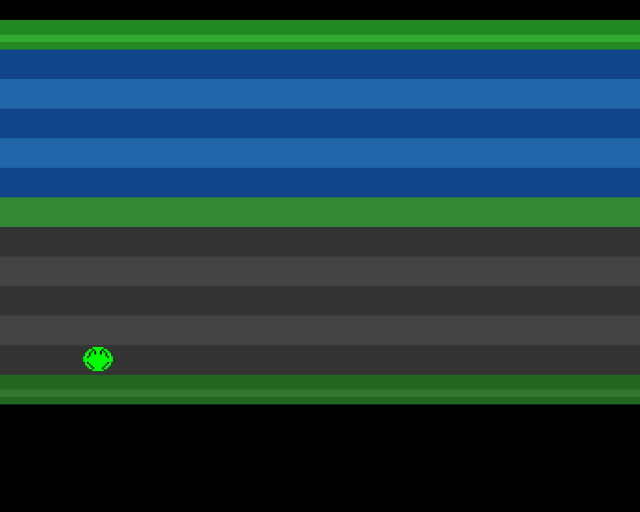
The 13-Row Grid
Classic Frogger uses a 13-row playfield:
| Row | Zone | Purpose |
|---|---|---|
| 1 | Home | 5 docking spots to fill |
| 2-6 | Water | Logs and turtles to ride |
| 7 | Median | Safe resting zone |
| 8-12 | Road | Cars and trucks to dodge |
| 13 | Start | Where the frog begins |
Each row is 16 pixels tall. Our playfield spans from scanline 44 (row 1) to scanline 251 (row 13), giving us 208 pixels of gameplay area.
Copper Timing
The Copper executes instructions in sync with the video beam. When we write:
dc.w    $3c07,$fffe          ; WAIT for line 60, position 7
dc.w    COLOR00,COLOUR_WATER1 ; Set background to blue
The Copper waits until the beam reaches line 60, then changes the background colour. All subsequent pixels on that line (and following lines) are drawn in the new colour until the next WAIT.
Calculating Scanlines
We want row 2 (first water lane) to start at scanline 60. With 16 pixels per row:
Row 1 (Home):   44-59   ($2C-$3B)
Row 2 (Water):  60-75   ($3C-$4B)
Row 3 (Water):  76-91   ($4C-$5B)
...and so on
The hex values are: 44 = $2C, 60 = $3C, 76 = $4C, etc.
Zone Colours
Good colour choice makes the playfield readable at a glance:
; Zone Colour Palette
; Colours are $0RGB format (0-15 per component)

; Home zone - distinct greens show docking spots
COLOUR_HOME     equ $0282       ; Deep green background
COLOUR_HOME_LIT equ $03a3       ; Brighter green highlight

; Water zone - alternating blues suggest movement
COLOUR_WATER1   equ $0148       ; Deep blue
COLOUR_WATER2   equ $026a       ; Medium blue (wave effect)

; Safe median - bright green signals "rest here"
COLOUR_MEDIAN   equ $0383       ; Bright green (stands out!)

; Road zone - alternating greys for lane structure
COLOUR_ROAD1    equ $0333       ; Dark grey
COLOUR_ROAD2    equ $0444       ; Medium grey

; Start zone - grass green with highlight
COLOUR_START    equ $0262       ; Grass green
COLOUR_START_LIT equ $0373      ; Brighter grass
The median is the brightest green—it needs to scream “SAFE ZONE!” to the player. Alternating shades in the water and road zones suggest depth and lane divisions.
Alternating Lane Colours
Each zone alternates between two shades:
; Row 2: Water lane 1
dc.w    $3c07,$fffe
dc.w    COLOR00,COLOUR_WATER1

; Row 3: Water lane 2
dc.w    $4c07,$fffe
dc.w    COLOR00,COLOUR_WATER2

; Row 4: Water lane 3
dc.w    $5c07,$fffe
dc.w    COLOR00,COLOUR_WATER1
This subtle striping helps players judge distances and identify individual lanes—important when dodging traffic or timing log jumps.
Highlight Stripes
The home and start zones have a thin highlight stripe for visual interest:
; Home zone with highlight
dc.w    $2c07,$fffe
dc.w    COLOR00,COLOUR_HOME      ; Main colour
dc.w    $3407,$fffe
dc.w    COLOR00,COLOUR_HOME_LIT  ; Highlight stripe
dc.w    $3807,$fffe
dc.w    COLOR00,COLOUR_HOME      ; Back to main
Small details like this make the playfield feel polished.
The Complete Copper List
Our Copper list now has 40+ instructions—still tiny by Amiga standards, but enough to create a complete game arena:
- Sprite palette setup (colours 17-19)
- Sprite pointer
- Home zone colours (with highlight)
- Water zone (5 lanes, alternating)
- Median
- Road zone (5 lanes, alternating)
- Start zone colours (with highlight)
- Bottom border
All this without a single pixel of bitmap graphics—just colour changes synced to scanlines.
Memory Cost
Traditional bitmap graphics for a 320×208 playfield would require:
- 1 bitplane: 8,320 bytes
- 4 bitplanes (16 colours): 33,280 bytes
Our Copper list: ~200 bytes.
This is why Amiga developers loved the Copper. The memory we save can hold sprite graphics, sound samples, or more game code.
Key Takeaways
- 13-row grid matches classic Frogger layout
- Copper timing lets us change colours at exact scanlines
- Zone colours make the playfield readable at a glance
- Alternating shades help distinguish lanes
- Copper-only graphics use minimal memory
The Code
;══════════════════════════════════════════════════════════════════════════════
; SIGNAL - A Frogger-style game for the Commodore Amiga
; Unit 4: The Playfield
;
; This unit refines our Copper list to create a proper 13-row Frogger grid:
; - Row 1: Home zone (5 docking spots at top)
; - Rows 2-6: Water zone (5 lanes for logs and turtles)
; - Row 7: Median (safe resting zone)
; - Rows 8-12: Road zone (5 lanes for traffic)
; - Row 13: Start zone (where the frog begins)
;══════════════════════════════════════════════════════════════════════════════

;══════════════════════════════════════════════════════════════════════════════
; TWEAKABLE VALUES
;══════════════════════════════════════════════════════════════════════════════

FROG_START_X    equ 160         ; Centre of screen
FROG_START_Y    equ 220         ; Bottom row (start zone)

MOVE_SPEED      equ 2           ; Pixels per frame

; Screen boundaries match our 13-row grid
MIN_X           equ 48          ; Left edge
MAX_X           equ 280         ; Right edge
MIN_Y           equ 44          ; Top of home zone
MAX_Y           equ 220         ; Bottom of start zone

FROG_HEIGHT     equ 16          ; Sprite height

; Grid layout constants
ROW_HEIGHT      equ 16          ; Each row is 16 pixels tall
GRID_TOP        equ 44          ; First row starts at scanline 44
GRID_ROWS       equ 13          ; Total rows in the playfield

; Zone colours - carefully chosen for readability and atmosphere
COLOUR_BLACK    equ $0000       ; Border
COLOUR_HOME     equ $0282       ; Home zone: deep green
COLOUR_HOME_LIT equ $03a3       ; Home zone highlight
COLOUR_WATER1   equ $0148       ; Water: deep blue
COLOUR_WATER2   equ $026a       ; Water: medium blue
COLOUR_MEDIAN   equ $0383       ; Median: bright green (safe!)
COLOUR_ROAD1    equ $0333       ; Road: dark grey
COLOUR_ROAD2    equ $0444       ; Road: medium grey
COLOUR_START    equ $0262       ; Start zone: grass green
COLOUR_START_LIT equ $0373      ; Start zone highlight

; Sprite palette
COLOUR_FROG     equ $00f0       ; Bright green body
COLOUR_EYES     equ $0ff0       ; Yellow eyes
COLOUR_OUTLINE  equ $0000       ; Black outline

;══════════════════════════════════════════════════════════════════════════════
; HARDWARE REGISTERS
;══════════════════════════════════════════════════════════════════════════════

CUSTOM      equ $dff000

DMACONR     equ $002
DMACON      equ $096
INTENA      equ $09a
INTREQ      equ $09c
VPOSR       equ $004
JOY1DAT     equ $00c
COP1LC      equ $080
COPJMP1     equ $088
COLOR00     equ $180
SPR0PTH     equ $120
SPR0PTL     equ $122

;══════════════════════════════════════════════════════════════════════════════
; CODE SECTION
;══════════════════════════════════════════════════════════════════════════════

            section code,code_c

start:
            lea     CUSTOM,a5

            ; --- System takeover ---
            move.w  #$7fff,INTENA(a5)
            move.w  #$7fff,INTREQ(a5)
            move.w  #$7fff,DMACON(a5)

            ; --- Initialise frog position ---
            move.w  #FROG_START_X,frog_x
            move.w  #FROG_START_Y,frog_y

            ; --- Set sprite pointer in copper list ---
            lea     frog_data,a0
            move.l  a0,d0
            swap    d0
            lea     sprpth_val,a1
            move.w  d0,(a1)
            swap    d0
            lea     sprptl_val,a1
            move.w  d0,(a1)

            ; --- Update sprite control words ---
            bsr     update_sprite

            ; --- Install copper list ---
            lea     copperlist,a0
            move.l  a0,COP1LC(a5)
            move.w  d0,COPJMP1(a5)

            ; --- Enable DMA ---
            move.w  #$83a0,DMACON(a5)

;══════════════════════════════════════════════════════════════════════════════
; MAIN LOOP
;══════════════════════════════════════════════════════════════════════════════

mainloop:
            bsr.s   wait_vblank
            bsr.s   read_joystick
            bsr.s   move_frog
            bsr     update_sprite

            btst    #6,$bfe001
            bne.s   mainloop
            bra.s   mainloop

;══════════════════════════════════════════════════════════════════════════════
; SUBROUTINES
;══════════════════════════════════════════════════════════════════════════════

wait_vblank:
            move.l  #$1ff00,d1
.wait:
            move.l  VPOSR(a5),d0
            and.l   d1,d0
            bne.s   .wait
            rts

read_joystick:
            move.w  JOY1DAT(a5),d0
            move.w  d0,d1
            lsr.w   #1,d1
            eor.w   d1,d0
            rts

move_frog:
            btst    #8,d0
            beq.s   .no_up
            move.w  frog_y,d1
            sub.w   #MOVE_SPEED,d1
            cmp.w   #MIN_Y,d1
            blt.s   .no_up
            move.w  d1,frog_y
.no_up:
            btst    #0,d0
            beq.s   .no_down
            move.w  frog_y,d1
            add.w   #MOVE_SPEED,d1
            cmp.w   #MAX_Y,d1
            bgt.s   .no_down
            move.w  d1,frog_y
.no_down:
            btst    #9,d0
            beq.s   .no_left
            move.w  frog_x,d1
            sub.w   #MOVE_SPEED,d1
            cmp.w   #MIN_X,d1
            blt.s   .no_left
            move.w  d1,frog_x
.no_left:
            btst    #1,d0
            beq.s   .no_right
            move.w  frog_x,d1
            add.w   #MOVE_SPEED,d1
            cmp.w   #MAX_X,d1
            bgt.s   .no_right
            move.w  d1,frog_x
.no_right:
            rts

update_sprite:
            lea     frog_data,a0
            move.w  frog_y,d0
            move.w  frog_x,d1

            move.w  d0,d2
            lsl.w   #8,d2
            lsr.w   #1,d1
            or.b    d1,d2
            move.w  d2,(a0)

            add.w   #FROG_HEIGHT,d0
            lsl.w   #8,d0
            move.w  d0,2(a0)

            rts

;══════════════════════════════════════════════════════════════════════════════
; VARIABLES
;══════════════════════════════════════════════════════════════════════════════

frog_x:     dc.w    160
frog_y:     dc.w    220

;══════════════════════════════════════════════════════════════════════════════
; COPPER LIST
;══════════════════════════════════════════════════════════════════════════════
; The playfield is organised as a 13-row grid, each row 16 pixels tall.
; Row numbers (1-13) and scanlines are:
;
;   Row 1  (Home)   : $2C-$3B (44-59)   - 5 docking spots
;   Row 2  (Water)  : $3C-$4B (60-75)   - Log/turtle lane 1
;   Row 3  (Water)  : $4C-$5B (76-91)   - Log/turtle lane 2
;   Row 4  (Water)  : $5C-$6B (92-107)  - Log/turtle lane 3
;   Row 5  (Water)  : $6C-$7B (108-123) - Log/turtle lane 4
;   Row 6  (Water)  : $7C-$8B (124-139) - Log/turtle lane 5
;   Row 7  (Median) : $8C-$9B (140-155) - Safe zone
;   Row 8  (Road)   : $9C-$AB (156-171) - Car lane 1
;   Row 9  (Road)   : $AC-$BB (172-187) - Car lane 2
;   Row 10 (Road)   : $BC-$CB (188-203) - Car lane 3
;   Row 11 (Road)   : $CC-$DB (204-219) - Car lane 4
;   Row 12 (Road)   : $DC-$EB (220-235) - Car lane 5
;   Row 13 (Start)  : $EC-$FB (236-251) - Starting area
;
; The Copper changes COLOR00 at each row boundary to create the zones.

copperlist:
            dc.w    COLOR00,COLOUR_BLACK    ; Black border at top

            ; --- Sprite palette (colours 17-19) ---
            dc.w    $01a2,COLOUR_FROG
            dc.w    $01a4,COLOUR_EYES
            dc.w    $01a6,COLOUR_OUTLINE

            ; --- Sprite 0 pointer ---
            dc.w    SPR0PTH
sprpth_val: dc.w    $0000
            dc.w    SPR0PTL
sprptl_val: dc.w    $0000

            ; ═══════════════════════════════════════════════════════════════
            ; ROW 1: HOME ZONE (scanline $2C = 44)
            ; ═══════════════════════════════════════════════════════════════
            dc.w    $2c07,$fffe
            dc.w    COLOR00,COLOUR_HOME
            dc.w    $3407,$fffe              ; Highlight stripe in home zone
            dc.w    COLOR00,COLOUR_HOME_LIT
            dc.w    $3807,$fffe
            dc.w    COLOR00,COLOUR_HOME

            ; ═══════════════════════════════════════════════════════════════
            ; ROWS 2-6: WATER ZONE (5 lanes)
            ; ═══════════════════════════════════════════════════════════════
            ; Alternating blue shades suggest rippling water

            ; Row 2: Water lane 1 (scanline $3C = 60)
            dc.w    $3c07,$fffe
            dc.w    COLOR00,COLOUR_WATER1

            ; Row 3: Water lane 2 (scanline $4C = 76)
            dc.w    $4c07,$fffe
            dc.w    COLOR00,COLOUR_WATER2

            ; Row 4: Water lane 3 (scanline $5C = 92)
            dc.w    $5c07,$fffe
            dc.w    COLOR00,COLOUR_WATER1

            ; Row 5: Water lane 4 (scanline $6C = 108)
            dc.w    $6c07,$fffe
            dc.w    COLOR00,COLOUR_WATER2

            ; Row 6: Water lane 5 (scanline $7C = 124)
            dc.w    $7c07,$fffe
            dc.w    COLOR00,COLOUR_WATER1

            ; ═══════════════════════════════════════════════════════════════
            ; ROW 7: MEDIAN - SAFE ZONE (scanline $8C = 140)
            ; ═══════════════════════════════════════════════════════════════
            dc.w    $8c07,$fffe
            dc.w    COLOR00,COLOUR_MEDIAN

            ; ═══════════════════════════════════════════════════════════════
            ; ROWS 8-12: ROAD ZONE (5 lanes)
            ; ═══════════════════════════════════════════════════════════════
            ; Alternating grey shades suggest lane markings

            ; Row 8: Road lane 1 (scanline $9C = 156)
            dc.w    $9c07,$fffe
            dc.w    COLOR00,COLOUR_ROAD1

            ; Row 9: Road lane 2 (scanline $AC = 172)
            dc.w    $ac07,$fffe
            dc.w    COLOR00,COLOUR_ROAD2

            ; Row 10: Road lane 3 (scanline $BC = 188)
            dc.w    $bc07,$fffe
            dc.w    COLOR00,COLOUR_ROAD1

            ; Row 11: Road lane 4 (scanline $CC = 204)
            dc.w    $cc07,$fffe
            dc.w    COLOR00,COLOUR_ROAD2

            ; Row 12: Road lane 5 (scanline $DC = 220)
            dc.w    $dc07,$fffe
            dc.w    COLOR00,COLOUR_ROAD1

            ; ═══════════════════════════════════════════════════════════════
            ; ROW 13: START ZONE (scanline $EC = 236)
            ; ═══════════════════════════════════════════════════════════════
            dc.w    $ec07,$fffe
            dc.w    COLOR00,COLOUR_START
            dc.w    $f407,$fffe              ; Highlight stripe in start zone
            dc.w    COLOR00,COLOUR_START_LIT
            dc.w    $f807,$fffe
            dc.w    COLOR00,COLOUR_START

            ; ═══════════════════════════════════════════════════════════════
            ; BOTTOM BORDER
            ; ═══════════════════════════════════════════════════════════════
            dc.w    $fc07,$fffe
            dc.w    COLOR00,COLOUR_BLACK

            ; End of copper list
            dc.w    $ffff,$fffe

;══════════════════════════════════════════════════════════════════════════════
; SPRITE DATA
;══════════════════════════════════════════════════════════════════════════════

            even
frog_data:
            dc.w    $dc50,$ec00             ; Control words (Y=220, X=160)

            ; 16 lines of image data
            dc.w    $0000,$0000             ; ................
            dc.w    $07e0,$0000             ; .....######.....
            dc.w    $1ff8,$0420             ; ...##########...
            dc.w    $3ffc,$0a50             ; ..############..
            dc.w    $7ffe,$1248             ; .##############.
            dc.w    $7ffe,$1008             ; .##############.
            dc.w    $ffff,$2004             ; ################
            dc.w    $ffff,$0000             ; ################
            dc.w    $ffff,$0000             ; ################
            dc.w    $7ffe,$2004             ; .##############.
            dc.w    $7ffe,$1008             ; .##############.
            dc.w    $3ffc,$0810             ; ..############..
            dc.w    $1ff8,$0420             ; ...##########...
            dc.w    $07e0,$0000             ; .....######.....
            dc.w    $0000,$0000             ; ................
            dc.w    $0000,$0000             ; ................

            dc.w    $0000,$0000             ; End marker
Build It
vasmm68k_mot -Fhunkexe -kick1hunks -o signal signal.asmWhat’s Next
The playfield is complete. In Unit 5, we’ll change from smooth movement to grid-based hopping—the frog should jump one row at a time, not glide continuously.
What Changed
| 1 | 1 | ;══════════════════════════════════════════════════════════════════════════════ | |
| 2 | 2 | ; SIGNAL - A Frogger-style game for the Commodore Amiga | |
| 3 | - | ; Unit 3: Understanding What We Built | |
| 3 | + | ; Unit 4: The Playfield | |
| 4 | 4 | ; | |
| 5 | - | ; This is the same code as Unit 2, with extensive comments explaining | |
| 6 | - | ; every aspect of how the Amiga's custom chipset creates our game display. | |
| 5 | + | ; This unit refines our Copper list to create a proper 13-row Frogger grid: | |
| 6 | + | ; - Row 1: Home zone (5 docking spots at top) | |
| 7 | + | ; - Rows 2-6: Water zone (5 lanes for logs and turtles) | |
| 8 | + | ; - Row 7: Median (safe resting zone) | |
| 9 | + | ; - Rows 8-12: Road zone (5 lanes for traffic) | |
| 10 | + | ; - Row 13: Start zone (where the frog begins) | |
| 7 | 11 | ;══════════════════════════════════════════════════════════════════════════════ | |
| 8 | 12 | | |
| 9 | 13 | ;══════════════════════════════════════════════════════════════════════════════ | |
| 10 | 14 | ; TWEAKABLE VALUES | |
| 11 | 15 | ;══════════════════════════════════════════════════════════════════════════════ | |
| 12 | - | ; These constants let you experiment without understanding the code. | |
| 13 | - | ; Change them, rebuild, see results. | |
| 14 | 16 | | |
| 15 | - | FROG_START_X equ 160 ; Horizontal: 0=left edge, 320=right edge | |
| 16 | - | FROG_START_Y equ 180 ; Vertical: 0=top, 256=bottom (PAL) | |
| 17 | + | FROG_START_X equ 160 ; Centre of screen | |
| 18 | + | FROG_START_Y equ 220 ; Bottom row (start zone) | |
| 17 | 19 | | |
| 18 | - | MOVE_SPEED equ 2 ; Pixels moved per frame (at 50fps PAL) | |
| 20 | + | MOVE_SPEED equ 2 ; Pixels per frame | |
| 19 | 21 | | |
| 20 | - | ; Screen boundaries for the frog | |
| 21 | - | MIN_X equ 48 ; Sprites can't go left of ~44 | |
| 22 | - | MAX_X equ 280 ; Or right of ~304 | |
| 23 | - | MIN_Y equ 44 ; Top of playfield (home zone) | |
| 24 | - | MAX_Y equ 196 ; Bottom of playfield (start zone) | |
| 22 | + | ; Screen boundaries match our 13-row grid | |
| 23 | + | MIN_X equ 48 ; Left edge | |
| 24 | + | MAX_X equ 280 ; Right edge | |
| 25 | + | MIN_Y equ 44 ; Top of home zone | |
| 26 | + | MAX_Y equ 220 ; Bottom of start zone | |
| 25 | 27 | | |
| 26 | - | FROG_HEIGHT equ 16 ; Sprite is 16 pixels tall | |
| 28 | + | FROG_HEIGHT equ 16 ; Sprite height | |
| 27 | 29 | | |
| 28 | - | ; Colours in $0RGB format (0-15 for each component) | |
| 29 | - | ; Example: $0F00 = red, $00F0 = green, $000F = blue, $0FFF = white | |
| 30 | - | COLOUR_HOME equ $0080 ; Home zone: dark green | |
| 31 | - | COLOUR_WATER equ $0048 ; Water: dark blue | |
| 32 | - | COLOUR_WAVE equ $006b ; Water highlight: lighter blue | |
| 33 | - | COLOUR_MEDIAN equ $0080 ; Safe median: dark green | |
| 34 | - | COLOUR_ROAD equ $0444 ; Road: dark grey | |
| 35 | - | COLOUR_MARKER equ $0666 ; Lane markings: lighter grey | |
| 36 | - | COLOUR_START equ $0080 ; Start zone: dark green | |
| 37 | - | COLOUR_BORDER equ $0070 ; Border: slightly different green | |
| 30 | + | ; Grid layout constants | |
| 31 | + | ROW_HEIGHT equ 16 ; Each row is 16 pixels tall | |
| 32 | + | GRID_TOP equ 44 ; First row starts at scanline 44 | |
| 33 | + | GRID_ROWS equ 13 ; Total rows in the playfield | |
| 38 | 34 | | |
| 39 | - | ; Sprite palette (colours 17-19 in the Amiga palette) | |
| 40 | - | ; Sprites use a separate palette from the playfield | |
| 35 | + | ; Zone colours - carefully chosen for readability and atmosphere | |
| 36 | + | COLOUR_BLACK equ $0000 ; Border | |
| 37 | + | COLOUR_HOME equ $0282 ; Home zone: deep green | |
| 38 | + | COLOUR_HOME_LIT equ $03a3 ; Home zone highlight | |
| 39 | + | COLOUR_WATER1 equ $0148 ; Water: deep blue | |
| 40 | + | COLOUR_WATER2 equ $026a ; Water: medium blue | |
| 41 | + | COLOUR_MEDIAN equ $0383 ; Median: bright green (safe!) | |
| 42 | + | COLOUR_ROAD1 equ $0333 ; Road: dark grey | |
| 43 | + | COLOUR_ROAD2 equ $0444 ; Road: medium grey | |
| 44 | + | COLOUR_START equ $0262 ; Start zone: grass green | |
| 45 | + | COLOUR_START_LIT equ $0373 ; Start zone highlight | |
| 46 | + | | |
| 47 | + | ; Sprite palette | |
| 41 | 48 | COLOUR_FROG equ $00f0 ; Bright green body | |
| 42 | 49 | COLOUR_EYES equ $0ff0 ; Yellow eyes | |
| 43 | 50 | COLOUR_OUTLINE equ $0000 ; Black outline | |
| 44 | 51 | | |
| 45 | 52 | ;══════════════════════════════════════════════════════════════════════════════ | |
| 46 | - | ; HARDWARE REGISTER DEFINITIONS | |
| 53 | + | ; HARDWARE REGISTERS | |
| 47 | 54 | ;══════════════════════════════════════════════════════════════════════════════ | |
| 48 | - | ; The Amiga's custom chipset is memory-mapped starting at $DFF000. | |
| 49 | - | ; Each register is accessed as an offset from this base address. | |
| 50 | - | | |
| 51 | - | CUSTOM equ $dff000 ; Custom chip base address | |
| 52 | - | | |
| 53 | - | ; DMA and interrupt control | |
| 54 | - | DMACONR equ $002 ; DMA control read (tells us what's enabled) | |
| 55 | - | DMACON equ $096 ; DMA control write (enables/disables DMA channels) | |
| 56 | - | INTENA equ $09a ; Interrupt enable (which interrupts are active) | |
| 57 | - | INTREQ equ $09c ; Interrupt request (which interrupts are pending) | |
| 58 | - | | |
| 59 | - | ; Timing | |
| 60 | - | VPOSR equ $004 ; Vertical beam position (high bits) | |
| 61 | - | ; Used with VHPOSR ($006) for full position | |
| 62 | - | | |
| 63 | - | ; Input | |
| 64 | - | JOY1DAT equ $00c ; Joystick port 2 data register | |
| 65 | - | | |
| 66 | - | ; Copper (display co-processor) | |
| 67 | - | COP1LC equ $080 ; Copper list 1 location (32-bit address) | |
| 68 | - | COPJMP1 equ $088 ; Copper jump strobe (writing here starts copper) | |
| 69 | 55 | | |
| 70 | - | ; Colours | |
| 71 | - | COLOR00 equ $180 ; Background colour (colour 0) | |
| 72 | - | ; COLOR01-COLOR31 follow at $182, $184, etc. | |
| 56 | + | CUSTOM equ $dff000 | |
| 73 | 57 | | |
| 74 | - | ; Sprite registers | |
| 75 | - | SPR0PTH equ $120 ; Sprite 0 pointer high word | |
| 76 | - | SPR0PTL equ $122 ; Sprite 0 pointer low word | |
| 77 | - | ; SPR1PTH/L at $124/$126, and so on up to SPR7 | |
| 58 | + | DMACONR equ $002 | |
| 59 | + | DMACON equ $096 | |
| 60 | + | INTENA equ $09a | |
| 61 | + | INTREQ equ $09c | |
| 62 | + | VPOSR equ $004 | |
| 63 | + | JOY1DAT equ $00c | |
| 64 | + | COP1LC equ $080 | |
| 65 | + | COPJMP1 equ $088 | |
| 66 | + | COLOR00 equ $180 | |
| 67 | + | SPR0PTH equ $120 | |
| 68 | + | SPR0PTL equ $122 | |
| 78 | 69 | | |
| 79 | 70 | ;══════════════════════════════════════════════════════════════════════════════ | |
| 80 | 71 | ; CODE SECTION | |
| 81 | 72 | ;══════════════════════════════════════════════════════════════════════════════ | |
| 82 | - | ; The section directive tells the assembler how to organise the output. | |
| 83 | - | ; | |
| 84 | - | ; "code_c" means "code in Chip RAM". Chip RAM is the first 512K (or more) | |
| 85 | - | ; that the custom chipset can access. The Copper and sprites MUST be in | |
| 86 | - | ; Chip RAM - they can't see Fast RAM. | |
| 87 | - | ; | |
| 88 | - | ; Without "_c", data would go to Fast RAM, which is faster for the CPU | |
| 89 | - | ; but invisible to the custom chipset. | |
| 90 | 73 | | |
| 91 | 74 | section code,code_c | |
| 92 | 75 | | |
| 93 | 76 | start: | |
| 94 | - | lea CUSTOM,a5 ; A5 = $DFF000 (custom chip base) | |
| 95 | - | ; We keep this in A5 throughout the program | |
| 96 | - | ; for quick access to hardware registers | |
| 97 | - | | |
| 98 | - | ;────────────────────────────────────────────────────────────────────────────── | |
| 99 | - | ; SYSTEM TAKEOVER | |
| 100 | - | ;────────────────────────────────────────────────────────────────────────────── | |
| 101 | - | ; AmigaOS is a preemptive multitasking operating system. It uses interrupts | |
| 102 | - | ; to switch between tasks, and DMA for disk, sound, and graphics. | |
| 103 | - | ; | |
| 104 | - | ; For a game that needs precise timing and full hardware control, we disable | |
| 105 | - | ; all of this. The OS stops running; we own the machine. | |
| 106 | - | ; | |
| 107 | - | ; This is why you need to reset to exit - there's no OS to return to! | |
| 108 | - | | |
| 109 | - | move.w #$7fff,INTENA(a5) ; Disable ALL interrupts | |
| 110 | - | ; $7fff = bits 0-14 set, bit 15 clear | |
| 111 | - | ; Bit 15 is SET/CLR: 0=disable, 1=enable | |
| 112 | - | ; So this disables bits 0-14 | |
| 113 | - | | |
| 114 | - | move.w #$7fff,INTREQ(a5) ; Clear any pending interrupt requests | |
| 115 | - | ; Even disabled interrupts might be waiting | |
| 116 | - | | |
| 117 | - | move.w #$7fff,DMACON(a5) ; Disable ALL DMA channels | |
| 118 | - | ; Same SET/CLR bit 15 logic | |
| 119 | - | ; Stops copper, sprites, bitplanes, audio, disk | |
| 120 | - | | |
| 121 | - | ;────────────────────────────────────────────────────────────────────────────── | |
| 122 | - | ; INITIALISE FROG POSITION | |
| 123 | - | ;────────────────────────────────────────────────────────────────────────────── | |
| 124 | - | | |
| 125 | - | move.w #FROG_START_X,frog_x ; Set initial X position | |
| 126 | - | move.w #FROG_START_Y,frog_y ; Set initial Y position | |
| 127 | - | | |
| 128 | - | ;────────────────────────────────────────────────────────────────────────────── | |
| 129 | - | ; SET UP SPRITE POINTER | |
| 130 | - | ;────────────────────────────────────────────────────────────────────────────── | |
| 131 | - | ; The Copper needs to know where sprite data is in memory. We write the | |
| 132 | - | ; address of our sprite data into the Copper list. | |
| 133 | - | ; | |
| 134 | - | ; Amiga addresses are 32-bit, but each Copper instruction is only 32 bits | |
| 135 | - | ; total (16-bit register + 16-bit value). So we need TWO instructions: | |
| 136 | - | ; one for the high 16 bits, one for the low 16 bits. | |
| 137 | - | | |
| 138 | - | lea frog_data,a0 ; A0 = address of sprite data | |
| 139 | - | move.l a0,d0 ; D0 = same address (32-bit) | |
| 140 | - | swap d0 ; D0 high word now in low word | |
| 141 | - | lea sprpth_val,a1 ; A1 = where to write high word | |
| 142 | - | move.w d0,(a1) ; Write high word to Copper list | |
| 143 | - | swap d0 ; Restore: low word back in low word | |
| 144 | - | lea sprptl_val,a1 ; A1 = where to write low word | |
| 145 | - | move.w d0,(a1) ; Write low word to Copper list | |
| 77 | + | lea CUSTOM,a5 | |
| 146 | 78 | | |
| 147 | - | ;────────────────────────────────────────────────────────────────────────────── | |
| 148 | - | ; UPDATE SPRITE CONTROL WORDS | |
| 149 | - | ;────────────────────────────────────────────────────────────────────────────── | |
| 79 | + | ; --- System takeover --- | |
| 80 | + | move.w #$7fff,INTENA(a5) | |
| 81 | + | move.w #$7fff,INTREQ(a5) | |
| 82 | + | move.w #$7fff,DMACON(a5) | |
| 150 | 83 | | |
| 151 | - | bsr update_sprite ; Set initial sprite position | |
| 84 | + | ; --- Initialise frog position --- | |
| 85 | + | move.w #FROG_START_X,frog_x | |
| 86 | + | move.w #FROG_START_Y,frog_y | |
| 152 | 87 | | |
| 153 | - | ;────────────────────────────────────────────────────────────────────────────── | |
| 154 | - | ; INSTALL COPPER LIST | |
| 155 | - | ;────────────────────────────────────────────────────────────────────────────── | |
| 156 | - | ; The Copper is a simple processor that runs in sync with the video beam. | |
| 157 | - | ; It can WAIT for a specific screen position, or MOVE a value to a register. | |
| 158 | - | ; Our Copper list sets colours at specific scanlines to create the playfield. | |
| 88 | + | ; --- Set sprite pointer in copper list --- | |
| 89 | + | lea frog_data,a0 | |
| 90 | + | move.l a0,d0 | |
| 91 | + | swap d0 | |
| 92 | + | lea sprpth_val,a1 | |
| 93 | + | move.w d0,(a1) | |
| 94 | + | swap d0 | |
| 95 | + | lea sprptl_val,a1 | |
| 96 | + | move.w d0,(a1) | |
| 159 | 97 | | |
| 160 | - | lea copperlist,a0 ; A0 = address of our Copper list | |
| 161 | - | move.l a0,COP1LC(a5) ; Tell hardware where list is | |
| 162 | - | move.w d0,COPJMP1(a5) ; "Strobe" register - writing ANY value | |
| 163 | - | ; here makes the Copper jump to COP1LC | |
| 98 | + | ; --- Update sprite control words --- | |
| 99 | + | bsr update_sprite | |
| 164 | 100 | | |
| 165 | - | ;────────────────────────────────────────────────────────────────────────────── | |
| 166 | - | ; ENABLE DMA | |
| 167 | - | ;────────────────────────────────────────────────────────────────────────────── | |
| 168 | - | ; Now we selectively enable only what we need: | |
| 169 | - | ; | |
| 170 | - | ; $83a0 = %1000 0011 1010 0000 | |
| 171 | - | ; │ │ │ │ │ | |
| 172 | - | ; │ │ │ │ └─ Bit 5: SPREN (sprite DMA enable) | |
| 173 | - | ; │ │ │ └──── Bit 7: COPEN (Copper DMA enable) | |
| 174 | - | ; │ │ └────── Bit 8: BPLEN (bitplane DMA enable) | |
| 175 | - | ; │ └───────── Bit 9: DMAEN (master DMA enable) | |
| 176 | - | ; └────────────── Bit 15: SET (1=enable the bits below) | |
| 177 | - | ; | |
| 178 | - | ; IMPORTANT: We need BPLEN even though we have no bitplanes! | |
| 179 | - | ; Without it, sprites don't render correctly. This is a hardware quirk. | |
| 101 | + | ; --- Install copper list --- | |
| 102 | + | lea copperlist,a0 | |
| 103 | + | move.l a0,COP1LC(a5) | |
| 104 | + | move.w d0,COPJMP1(a5) | |
| 180 | 105 | | |
| 181 | - | move.w #$83a0,DMACON(a5) ; Enable master + copper + sprites + bitplanes | |
| 106 | + | ; --- Enable DMA --- | |
| 107 | + | move.w #$83a0,DMACON(a5) | |
| 182 | 108 | | |
| 183 | 109 | ;══════════════════════════════════════════════════════════════════════════════ | |
| 184 | 110 | ; MAIN LOOP | |
| 185 | 111 | ;══════════════════════════════════════════════════════════════════════════════ | |
| 186 | - | ; This runs 50 times per second (PAL) or 60 times per second (NTSC). | |
| 187 | - | ; Each iteration: | |
| 188 | - | ; 1. Wait for vertical blank (beam at bottom of screen) | |
| 189 | - | ; 2. Read joystick input | |
| 190 | - | ; 3. Update frog position based on input | |
| 191 | - | ; 4. Update sprite control words for new position | |
| 192 | 112 | | |
| 193 | 113 | mainloop: | |
| 194 | - | bsr.s wait_vblank ; Wait for vertical blank | |
| 195 | - | bsr.s read_joystick ; Read joystick -> D0 | |
| 196 | - | bsr.s move_frog ; Move frog based on D0 | |
| 197 | - | bsr update_sprite ; Update sprite position | |
| 198 | - | | |
| 199 | - | ; Check left mouse button (active low at $BFE001 bit 6) | |
| 200 | - | btst #6,$bfe001 ; Test bit 6 of CIA-A PRA | |
| 201 | - | bne.s mainloop ; If not pressed (bit=1), continue | |
| 114 | + | bsr.s wait_vblank | |
| 115 | + | bsr.s read_joystick | |
| 116 | + | bsr.s move_frog | |
| 117 | + | bsr update_sprite | |
| 202 | 118 | | |
| 203 | - | ; Button pressed - but we have nowhere to go! | |
| 204 | - | ; On a real Amiga, you'd restore the system here. | |
| 205 | - | ; For now, just keep looping until reset. | |
| 119 | + | btst #6,$bfe001 | |
| 120 | + | bne.s mainloop | |
| 206 | 121 | bra.s mainloop | |
| 207 | 122 | | |
| 208 | 123 | ;══════════════════════════════════════════════════════════════════════════════ | |
| 209 | 124 | ; SUBROUTINES | |
| 210 | 125 | ;══════════════════════════════════════════════════════════════════════════════ | |
| 211 | - | | |
| 212 | - | ;────────────────────────────────────────────────────────────────────────────── | |
| 213 | - | ; WAIT_VBLANK - Wait for vertical blank | |
| 214 | - | ;────────────────────────────────────────────────────────────────────────────── | |
| 215 | - | ; The video beam scans from top-left to bottom-right, then returns to top. | |
| 216 | - | ; "Vertical blank" is when the beam is returning - no visible output. | |
| 217 | - | ; This is the safe time to update graphics without visible tearing. | |
| 218 | - | ; | |
| 219 | - | ; VPOSR contains the beam position. We wait until it's at line 0. | |
| 220 | 126 | | |
| 221 | 127 | wait_vblank: | |
| 222 | - | move.l #$1ff00,d1 ; Mask: bits 16-8 (vertical position) | |
| 128 | + | move.l #$1ff00,d1 | |
| 223 | 129 | .wait: | |
| 224 | - | move.l VPOSR(a5),d0 ; Read beam position | |
| 225 | - | and.l d1,d0 ; Mask out horizontal position | |
| 226 | - | bne.s .wait ; Loop until vertical = 0 | |
| 130 | + | move.l VPOSR(a5),d0 | |
| 131 | + | and.l d1,d0 | |
| 132 | + | bne.s .wait | |
| 227 | 133 | rts | |
| 228 | - | | |
| 229 | - | ;────────────────────────────────────────────────────────────────────────────── | |
| 230 | - | ; READ_JOYSTICK - Read and decode joystick input | |
| 231 | - | ;────────────────────────────────────────────────────────────────────────────── | |
| 232 | - | ; JOY1DAT contains joystick data, but it's encoded weirdly (inherited from | |
| 233 | - | ; the Atari 400/800). The vertical movement affects the horizontal bits | |
| 234 | - | ; through XOR, so we need to decode it. | |
| 235 | - | ; | |
| 236 | - | ; Raw JOY1DAT: | |
| 237 | - | ; Bit 9: Y1 XOR X1 (left signal) | |
| 238 | - | ; Bit 8: Y1 (up signal before decode) | |
| 239 | - | ; Bit 1: Y0 XOR X0 (right signal) | |
| 240 | - | ; Bit 0: Y0 (down signal before decode) | |
| 241 | - | ; | |
| 242 | - | ; After XOR decoding, bits represent actual directions. | |
| 243 | 134 | | |
| 244 | 135 | read_joystick: | |
| 245 | - | move.w JOY1DAT(a5),d0 ; Read raw joystick data | |
| 246 | - | move.w d0,d1 ; Copy to D1 | |
| 247 | - | lsr.w #1,d1 ; Shift D1 right by 1 | |
| 248 | - | eor.w d1,d0 ; XOR with shifted copy | |
| 249 | - | ; This decodes the quadrature encoding | |
| 136 | + | move.w JOY1DAT(a5),d0 | |
| 137 | + | move.w d0,d1 | |
| 138 | + | lsr.w #1,d1 | |
| 139 | + | eor.w d1,d0 | |
| 250 | 140 | rts | |
| 251 | - | ; Result in D0: | |
| 252 | - | ; Bit 8 = up | |
| 253 | - | ; Bit 0 = down | |
| 254 | - | ; Bit 9 = left | |
| 255 | - | ; Bit 1 = right | |
| 256 | - | | |
| 257 | - | ;────────────────────────────────────────────────────────────────────────────── | |
| 258 | - | ; MOVE_FROG - Update frog position based on joystick | |
| 259 | - | ;────────────────────────────────────────────────────────────────────────────── | |
| 260 | - | ; For each direction: | |
| 261 | - | ; 1. Test if that direction bit is set | |
| 262 | - | ; 2. Calculate new position | |
| 263 | - | ; 3. Check against boundary | |
| 264 | - | ; 4. Store new position if within bounds | |
| 265 | 141 | | |
| 266 | 142 | move_frog: | |
| 267 | - | ; --- Check Up (bit 8) --- | |
| 268 | - | btst #8,d0 ; Test up bit | |
| 269 | - | beq.s .no_up ; Skip if not pressed | |
| 270 | - | move.w frog_y,d1 ; Get current Y | |
| 271 | - | sub.w #MOVE_SPEED,d1 ; Subtract (up = decrease Y) | |
| 272 | - | cmp.w #MIN_Y,d1 ; Compare with top boundary | |
| 273 | - | blt.s .no_up ; Skip if past boundary | |
| 274 | - | move.w d1,frog_y ; Store new Y | |
| 143 | + | btst #8,d0 | |
| 144 | + | beq.s .no_up | |
| 145 | + | move.w frog_y,d1 | |
| 146 | + | sub.w #MOVE_SPEED,d1 | |
| 147 | + | cmp.w #MIN_Y,d1 | |
| 148 | + | blt.s .no_up | |
| 149 | + | move.w d1,frog_y | |
| 275 | 150 | .no_up: | |
| 276 | - | ; --- Check Down (bit 0) --- | |
| 277 | 151 | btst #0,d0 | |
| 278 | 152 | beq.s .no_down | |
| 279 | 153 | move.w frog_y,d1 | |
| 280 | - | add.w #MOVE_SPEED,d1 ; Add (down = increase Y) | |
| 154 | + | add.w #MOVE_SPEED,d1 | |
| 281 | 155 | cmp.w #MAX_Y,d1 | |
| 282 | - | bgt.s .no_down ; Skip if past boundary | |
| 156 | + | bgt.s .no_down | |
| 283 | 157 | move.w d1,frog_y | |
| 284 | 158 | .no_down: | |
| 285 | - | ; --- Check Left (bit 9) --- | |
| 286 | 159 | btst #9,d0 | |
| 287 | 160 | beq.s .no_left | |
| 288 | 161 | move.w frog_x,d1 | |
| 289 | - | sub.w #MOVE_SPEED,d1 ; Subtract (left = decrease X) | |
| 162 | + | sub.w #MOVE_SPEED,d1 | |
| 290 | 163 | cmp.w #MIN_X,d1 | |
| 291 | 164 | blt.s .no_left | |
| 292 | 165 | move.w d1,frog_x | |
| 293 | 166 | .no_left: | |
| 294 | - | ; --- Check Right (bit 1) --- | |
| 295 | 167 | btst #1,d0 | |
| 296 | 168 | beq.s .no_right | |
| 297 | 169 | move.w frog_x,d1 | |
| 298 | - | add.w #MOVE_SPEED,d1 ; Add (right = increase X) | |
| 170 | + | add.w #MOVE_SPEED,d1 | |
| 299 | 171 | cmp.w #MAX_X,d1 | |
| 300 | 172 | bgt.s .no_right | |
| 301 | 173 | move.w d1,frog_x | |
| 302 | 174 | .no_right: | |
| 303 | 175 | rts | |
| 304 | - | | |
| 305 | - | ;────────────────────────────────────────────────────────────────────────────── | |
| 306 | - | ; UPDATE_SPRITE - Write position to sprite control words | |
| 307 | - | ;────────────────────────────────────────────────────────────────────────────── | |
| 308 | - | ; Hardware sprites have control words at the start of their data: | |
| 309 | - | ; | |
| 310 | - | ; Word 0: VSTART[7:0] << 8 | HSTART[8:1] | |
| 311 | - | ; (vertical start position, horizontal start / 2) | |
| 312 | - | ; | |
| 313 | - | ; Word 1: VSTOP[7:0] << 8 | VSTART[8] << 2 | VSTOP[8] << 1 | HSTART[0] | |
| 314 | - | ; (vertical stop position, plus extra bits for large positions) | |
| 315 | - | ; | |
| 316 | - | ; For our 16-pixel tall sprite starting at Y positions < 256, we can | |
| 317 | - | ; simplify: just pack VSTART and HSTART/2 into word 0, VSTOP into word 1. | |
| 318 | 176 | | |
| 319 | 177 | update_sprite: | |
| 320 | - | lea frog_data,a0 ; A0 = sprite data start | |
| 321 | - | move.w frog_y,d0 ; D0 = Y position (VSTART) | |
| 322 | - | move.w frog_x,d1 ; D1 = X position (HSTART) | |
| 178 | + | lea frog_data,a0 | |
| 179 | + | move.w frog_y,d0 | |
| 180 | + | move.w frog_x,d1 | |
| 323 | 181 | | |
| 324 | - | ; Build control word 0: VSTART << 8 | HSTART >> 1 | |
| 325 | - | move.w d0,d2 ; D2 = VSTART | |
| 326 | - | lsl.w #8,d2 ; Shift to high byte | |
| 327 | - | lsr.w #1,d1 ; HSTART / 2 (sprites use half-res X) | |
| 328 | - | or.b d1,d2 ; Combine into low byte | |
| 329 | - | move.w d2,(a0) ; Write to sprite control word 0 | |
| 182 | + | move.w d0,d2 | |
| 183 | + | lsl.w #8,d2 | |
| 184 | + | lsr.w #1,d1 | |
| 185 | + | or.b d1,d2 | |
| 186 | + | move.w d2,(a0) | |
| 330 | 187 | | |
| 331 | - | ; Build control word 1: VSTOP << 8 | |
| 332 | - | add.w #FROG_HEIGHT,d0 ; D0 = VSTOP (VSTART + height) | |
| 333 | - | lsl.w #8,d0 ; Shift to high byte | |
| 334 | - | move.w d0,2(a0) ; Write to sprite control word 1 | |
| 188 | + | add.w #FROG_HEIGHT,d0 | |
| 189 | + | lsl.w #8,d0 | |
| 190 | + | move.w d0,2(a0) | |
| 335 | 191 | | |
| 336 | 192 | rts | |
| 337 | 193 | | |
| 338 | 194 | ;══════════════════════════════════════════════════════════════════════════════ | |
| 339 | 195 | ; VARIABLES | |
| 340 | 196 | ;══════════════════════════════════════════════════════════════════════════════ | |
| 341 | - | ; These are in the code section so they're in Chip RAM with everything else. | |
| 342 | - | ; The 68000 can access them with PC-relative addressing for efficiency. | |
| 343 | 197 | | |
| 344 | - | frog_x: dc.w 160 ; Current horizontal position | |
| 345 | - | frog_y: dc.w 180 ; Current vertical position | |
| 198 | + | frog_x: dc.w 160 | |
| 199 | + | frog_y: dc.w 220 | |
| 346 | 200 | | |
| 347 | 201 | ;══════════════════════════════════════════════════════════════════════════════ | |
| 348 | 202 | ; COPPER LIST | |
| 349 | 203 | ;══════════════════════════════════════════════════════════════════════════════ | |
| 350 | - | ; The Copper executes simple instructions synchronised to the video beam. | |
| 351 | - | ; Each instruction is 32 bits (two 16-bit words). | |
| 352 | - | ; | |
| 353 | - | ; MOVE instruction: $XXYY,$VVVV | |
| 354 | - | ; XX = register offset / 2 (bits 8-1 of register address) | |
| 355 | - | ; YY = 00 (identifies this as a MOVE) | |
| 356 | - | ; VVVV = 16-bit value to write | |
| 204 | + | ; The playfield is organised as a 13-row grid, each row 16 pixels tall. | |
| 205 | + | ; Row numbers (1-13) and scanlines are: | |
| 357 | 206 | ; | |
| 358 | - | ; WAIT instruction: $VVHH,$FFFE | |
| 359 | - | ; VV = vertical position to wait for | |
| 360 | - | ; HH = horizontal position to wait for | |
| 361 | - | ; $FFFE = identifies this as a WAIT (bits 0 and 15 clear) | |
| 207 | + | ; Row 1 (Home) : $2C-$3B (44-59) - 5 docking spots | |
| 208 | + | ; Row 2 (Water) : $3C-$4B (60-75) - Log/turtle lane 1 | |
| 209 | + | ; Row 3 (Water) : $4C-$5B (76-91) - Log/turtle lane 2 | |
| 210 | + | ; Row 4 (Water) : $5C-$6B (92-107) - Log/turtle lane 3 | |
| 211 | + | ; Row 5 (Water) : $6C-$7B (108-123) - Log/turtle lane 4 | |
| 212 | + | ; Row 6 (Water) : $7C-$8B (124-139) - Log/turtle lane 5 | |
| 213 | + | ; Row 7 (Median) : $8C-$9B (140-155) - Safe zone | |
| 214 | + | ; Row 8 (Road) : $9C-$AB (156-171) - Car lane 1 | |
| 215 | + | ; Row 9 (Road) : $AC-$BB (172-187) - Car lane 2 | |
| 216 | + | ; Row 10 (Road) : $BC-$CB (188-203) - Car lane 3 | |
| 217 | + | ; Row 11 (Road) : $CC-$DB (204-219) - Car lane 4 | |
| 218 | + | ; Row 12 (Road) : $DC-$EB (220-235) - Car lane 5 | |
| 219 | + | ; Row 13 (Start) : $EC-$FB (236-251) - Starting area | |
| 362 | 220 | ; | |
| 363 | - | ; The $07 in our WAITs means "wait for horizontal position 7" which is | |
| 364 | - | ; just after the left edge of the visible screen. | |
| 221 | + | ; The Copper changes COLOR00 at each row boundary to create the zones. | |
| 365 | 222 | | |
| 366 | 223 | copperlist: | |
| 367 | - | dc.w COLOR00,$0000 ; MOVE: Set background to black | |
| 224 | + | dc.w COLOR00,COLOUR_BLACK ; Black border at top | |
| 368 | 225 | | |
| 369 | - | ; --- Sprite 0 palette (colours 17-19) --- | |
| 370 | - | ; Sprites 0-1 share colours 16-19 ($1A0-$1A6) | |
| 371 | - | ; Colour 16 ($1A0) is transparent, 17-19 are the sprite colours | |
| 372 | - | dc.w $01a2,COLOUR_FROG ; MOVE: Colour 17 = frog body | |
| 373 | - | dc.w $01a4,COLOUR_EYES ; MOVE: Colour 18 = eyes | |
| 374 | - | dc.w $01a6,COLOUR_OUTLINE ; MOVE: Colour 19 = outline | |
| 226 | + | ; --- Sprite palette (colours 17-19) --- | |
| 227 | + | dc.w $01a2,COLOUR_FROG | |
| 228 | + | dc.w $01a4,COLOUR_EYES | |
| 229 | + | dc.w $01a6,COLOUR_OUTLINE | |
| 375 | 230 | | |
| 376 | 231 | ; --- Sprite 0 pointer --- | |
| 377 | - | ; These values are filled in by the CPU at startup | |
| 378 | - | dc.w SPR0PTH ; MOVE: SPR0PTH register ($120) | |
| 379 | - | sprpth_val: dc.w $0000 ; Value: high word of sprite address | |
| 380 | - | dc.w SPR0PTL ; MOVE: SPR0PTL register ($122) | |
| 381 | - | sprptl_val: dc.w $0000 ; Value: low word of sprite address | |
| 382 | - | | |
| 383 | - | ; === HOME ZONE (line $2C = 44) === | |
| 384 | - | dc.w $2c07,$fffe ; WAIT for line 44, position 7 | |
| 385 | - | dc.w COLOR00,COLOUR_HOME ; MOVE: Background = green | |
| 232 | + | dc.w SPR0PTH | |
| 233 | + | sprpth_val: dc.w $0000 | |
| 234 | + | dc.w SPR0PTL | |
| 235 | + | sprptl_val: dc.w $0000 | |
| 386 | 236 | | |
| 387 | - | ; === WATER ZONE (5 lanes with wave highlights) === | |
| 388 | - | dc.w $4007,$fffe ; WAIT for line 64 | |
| 389 | - | dc.w COLOR00,COLOUR_WATER ; Dark blue | |
| 237 | + | ; ═══════════════════════════════════════════════════════════════ | |
| 238 | + | ; ROW 1: HOME ZONE (scanline $2C = 44) | |
| 239 | + | ; ═══════════════════════════════════════════════════════════════ | |
| 240 | + | dc.w $2c07,$fffe | |
| 241 | + | dc.w COLOR00,COLOUR_HOME | |
| 242 | + | dc.w $3407,$fffe ; Highlight stripe in home zone | |
| 243 | + | dc.w COLOR00,COLOUR_HOME_LIT | |
| 244 | + | dc.w $3807,$fffe | |
| 245 | + | dc.w COLOR00,COLOUR_HOME | |
| 390 | 246 | | |
| 391 | - | dc.w $4c07,$fffe ; WAIT for line 76 | |
| 392 | - | dc.w COLOR00,COLOUR_WAVE ; Light blue highlight | |
| 247 | + | ; ═══════════════════════════════════════════════════════════════ | |
| 248 | + | ; ROWS 2-6: WATER ZONE (5 lanes) | |
| 249 | + | ; ═══════════════════════════════════════════════════════════════ | |
| 250 | + | ; Alternating blue shades suggest rippling water | |
| 393 | 251 | | |
| 394 | - | dc.w $5407,$fffe ; WAIT for line 84 | |
| 395 | - | dc.w COLOR00,COLOUR_WATER ; Dark blue | |
| 252 | + | ; Row 2: Water lane 1 (scanline $3C = 60) | |
| 253 | + | dc.w $3c07,$fffe | |
| 254 | + | dc.w COLOR00,COLOUR_WATER1 | |
| 396 | 255 | | |
| 397 | - | dc.w $5c07,$fffe ; WAIT for line 92 | |
| 398 | - | dc.w COLOR00,COLOUR_WAVE ; Light blue highlight | |
| 256 | + | ; Row 3: Water lane 2 (scanline $4C = 76) | |
| 257 | + | dc.w $4c07,$fffe | |
| 258 | + | dc.w COLOR00,COLOUR_WATER2 | |
| 399 | 259 | | |
| 400 | - | dc.w $6407,$fffe ; WAIT for line 100 | |
| 401 | - | dc.w COLOR00,COLOUR_WATER ; Dark blue | |
| 260 | + | ; Row 4: Water lane 3 (scanline $5C = 92) | |
| 261 | + | dc.w $5c07,$fffe | |
| 262 | + | dc.w COLOR00,COLOUR_WATER1 | |
| 402 | 263 | | |
| 403 | - | ; === MEDIAN (safe zone, line $6C = 108) === | |
| 264 | + | ; Row 5: Water lane 4 (scanline $6C = 108) | |
| 404 | 265 | dc.w $6c07,$fffe | |
| 405 | - | dc.w COLOR00,COLOUR_MEDIAN | |
| 266 | + | dc.w COLOR00,COLOUR_WATER2 | |
| 406 | 267 | | |
| 407 | - | ; === ROAD ZONE (4 lanes with markings) === | |
| 408 | - | dc.w $7807,$fffe ; Line 120 - road | |
| 409 | - | dc.w COLOR00,COLOUR_ROAD | |
| 268 | + | ; Row 6: Water lane 5 (scanline $7C = 124) | |
| 269 | + | dc.w $7c07,$fffe | |
| 270 | + | dc.w COLOR00,COLOUR_WATER1 | |
| 410 | 271 | | |
| 411 | - | dc.w $8407,$fffe ; Line 132 - marking | |
| 412 | - | dc.w COLOR00,COLOUR_MARKER | |
| 272 | + | ; ═══════════════════════════════════════════════════════════════ | |
| 273 | + | ; ROW 7: MEDIAN - SAFE ZONE (scanline $8C = 140) | |
| 274 | + | ; ═══════════════════════════════════════════════════════════════ | |
| 275 | + | dc.w $8c07,$fffe | |
| 276 | + | dc.w COLOR00,COLOUR_MEDIAN | |
| 413 | 277 | | |
| 414 | - | dc.w $8807,$fffe ; Line 136 - road | |
| 415 | - | dc.w COLOR00,COLOUR_ROAD | |
| 278 | + | ; ═══════════════════════════════════════════════════════════════ | |
| 279 | + | ; ROWS 8-12: ROAD ZONE (5 lanes) | |
| 280 | + | ; ═══════════════════════════════════════════════════════════════ | |
| 281 | + | ; Alternating grey shades suggest lane markings | |
| 416 | 282 | | |
| 417 | - | dc.w $9407,$fffe ; Line 148 - marking | |
| 418 | - | dc.w COLOR00,COLOUR_MARKER | |
| 283 | + | ; Row 8: Road lane 1 (scanline $9C = 156) | |
| 284 | + | dc.w $9c07,$fffe | |
| 285 | + | dc.w COLOR00,COLOUR_ROAD1 | |
| 419 | 286 | | |
| 420 | - | dc.w $9807,$fffe ; Line 152 - road | |
| 421 | - | dc.w COLOR00,COLOUR_ROAD | |
| 287 | + | ; Row 9: Road lane 2 (scanline $AC = 172) | |
| 288 | + | dc.w $ac07,$fffe | |
| 289 | + | dc.w COLOR00,COLOUR_ROAD2 | |
| 422 | 290 | | |
| 423 | - | dc.w $a407,$fffe ; Line 164 - marking | |
| 424 | - | dc.w COLOR00,COLOUR_MARKER | |
| 291 | + | ; Row 10: Road lane 3 (scanline $BC = 188) | |
| 292 | + | dc.w $bc07,$fffe | |
| 293 | + | dc.w COLOR00,COLOUR_ROAD1 | |
| 425 | 294 | | |
| 426 | - | dc.w $a807,$fffe ; Line 168 - road | |
| 427 | - | dc.w COLOR00,COLOUR_ROAD | |
| 295 | + | ; Row 11: Road lane 4 (scanline $CC = 204) | |
| 296 | + | dc.w $cc07,$fffe | |
| 297 | + | dc.w COLOR00,COLOUR_ROAD2 | |
| 428 | 298 | | |
| 429 | - | ; === START ZONE (line $B4 = 180) === | |
| 430 | - | dc.w $b407,$fffe | |
| 431 | - | dc.w COLOR00,COLOUR_START | |
| 299 | + | ; Row 12: Road lane 5 (scanline $DC = 220) | |
| 300 | + | dc.w $dc07,$fffe | |
| 301 | + | dc.w COLOR00,COLOUR_ROAD1 | |
| 432 | 302 | | |
| 433 | - | dc.w $c007,$fffe ; Line 192 - border | |
| 434 | - | dc.w COLOR00,COLOUR_BORDER | |
| 303 | + | ; ═══════════════════════════════════════════════════════════════ | |
| 304 | + | ; ROW 13: START ZONE (scanline $EC = 236) | |
| 305 | + | ; ═══════════════════════════════════════════════════════════════ | |
| 306 | + | dc.w $ec07,$fffe | |
| 307 | + | dc.w COLOR00,COLOUR_START | |
| 308 | + | dc.w $f407,$fffe ; Highlight stripe in start zone | |
| 309 | + | dc.w COLOR00,COLOUR_START_LIT | |
| 310 | + | dc.w $f807,$fffe | |
| 311 | + | dc.w COLOR00,COLOUR_START | |
| 435 | 312 | | |
| 436 | - | ; === BOTTOM (line $F0 = 240) === | |
| 437 | - | dc.w $f007,$fffe | |
| 438 | - | dc.w COLOR00,$0000 ; Black | |
| 313 | + | ; ═══════════════════════════════════════════════════════════════ | |
| 314 | + | ; BOTTOM BORDER | |
| 315 | + | ; ═══════════════════════════════════════════════════════════════ | |
| 316 | + | dc.w $fc07,$fffe | |
| 317 | + | dc.w COLOR00,COLOUR_BLACK | |
| 439 | 318 | | |
| 440 | - | ; === END OF COPPER LIST === | |
| 441 | - | dc.w $ffff,$fffe ; WAIT for impossible position | |
| 442 | - | ; This effectively halts the Copper | |
| 443 | - | ; until next frame when it restarts | |
| 319 | + | ; End of copper list | |
| 320 | + | dc.w $ffff,$fffe | |
| 444 | 321 | | |
| 445 | 322 | ;══════════════════════════════════════════════════════════════════════════════ | |
| 446 | 323 | ; SPRITE DATA | |
| 447 | 324 | ;══════════════════════════════════════════════════════════════════════════════ | |
| 448 | - | ; Hardware sprites are 16 pixels wide and up to 256 lines tall. | |
| 449 | - | ; Each line is 4 bytes: two 16-bit words (plane 0 and plane 1). | |
| 450 | - | ; | |
| 451 | - | ; The two planes combine to give 4 colours per pixel: | |
| 452 | - | ; Plane0=0, Plane1=0 -> Transparent | |
| 453 | - | ; Plane0=1, Plane1=0 -> Colour 17 (green body) | |
| 454 | - | ; Plane0=0, Plane1=1 -> Colour 18 (yellow eyes) | |
| 455 | - | ; Plane0=1, Plane1=1 -> Colour 19 (black outline) | |
| 456 | 325 | | |
| 457 | - | even ; Ensure word alignment | |
| 326 | + | even | |
| 458 | 327 | frog_data: | |
| 459 | - | ; Control words (updated by update_sprite) | |
| 460 | - | dc.w $b450,$c400 ; Default: Y=180, X=160 | |
| 328 | + | dc.w $dc50,$ec00 ; Control words (Y=220, X=160) | |
| 461 | 329 | | |
| 462 | - | ; 16 lines of image data (plane0, plane1) | |
| 463 | - | ; Each pair: plane0 bits | plane1 bits | |
| 464 | - | dc.w $0000,$0000 ; ................ | |
| 465 | - | dc.w $07e0,$0000 ; .....######..... | |
| 466 | - | dc.w $1ff8,$0420 ; ...##########... (with eye hints) | |
| 467 | - | dc.w $3ffc,$0a50 ; ..############.. | |
| 468 | - | dc.w $7ffe,$1248 ; .##############. (eyes visible) | |
| 469 | - | dc.w $7ffe,$1008 ; .##############. | |
| 470 | - | dc.w $ffff,$2004 ; ################ | |
| 471 | - | dc.w $ffff,$0000 ; ################ | |
| 472 | - | dc.w $ffff,$0000 ; ################ | |
| 473 | - | dc.w $7ffe,$2004 ; .##############. | |
| 474 | - | dc.w $7ffe,$1008 ; .##############. | |
| 475 | - | dc.w $3ffc,$0810 ; ..############.. | |
| 476 | - | dc.w $1ff8,$0420 ; ...##########... | |
| 477 | - | dc.w $07e0,$0000 ; .....######..... | |
| 478 | - | dc.w $0000,$0000 ; ................ | |
| 479 | - | dc.w $0000,$0000 ; ................ | |
| 330 | + | ; 16 lines of image data | |
| 331 | + | dc.w $0000,$0000 ; ................ | |
| 332 | + | dc.w $07e0,$0000 ; .....######..... | |
| 333 | + | dc.w $1ff8,$0420 ; ...##########... | |
| 334 | + | dc.w $3ffc,$0a50 ; ..############.. | |
| 335 | + | dc.w $7ffe,$1248 ; .##############. | |
| 336 | + | dc.w $7ffe,$1008 ; .##############. | |
| 337 | + | dc.w $ffff,$2004 ; ################ | |
| 338 | + | dc.w $ffff,$0000 ; ################ | |
| 339 | + | dc.w $ffff,$0000 ; ################ | |
| 340 | + | dc.w $7ffe,$2004 ; .##############. | |
| 341 | + | dc.w $7ffe,$1008 ; .##############. | |
| 342 | + | dc.w $3ffc,$0810 ; ..############.. | |
| 343 | + | dc.w $1ff8,$0420 ; ...##########... | |
| 344 | + | dc.w $07e0,$0000 ; .....######..... | |
| 345 | + | dc.w $0000,$0000 ; ................ | |
| 346 | + | dc.w $0000,$0000 ; ................ | |
| 480 | 347 | | |
| 481 | - | ; End marker (required by hardware) | |
| 482 | - | dc.w $0000,$0000 ; Tells chipset "no more sprite data" | |
| 348 | + | dc.w $0000,$0000 ; End marker | |
| 483 | 349 | |