Grid-Based Movement
Hop in discrete steps. Smooth animation. The Frogger feel.
What You’re Building
The Frogger feel.
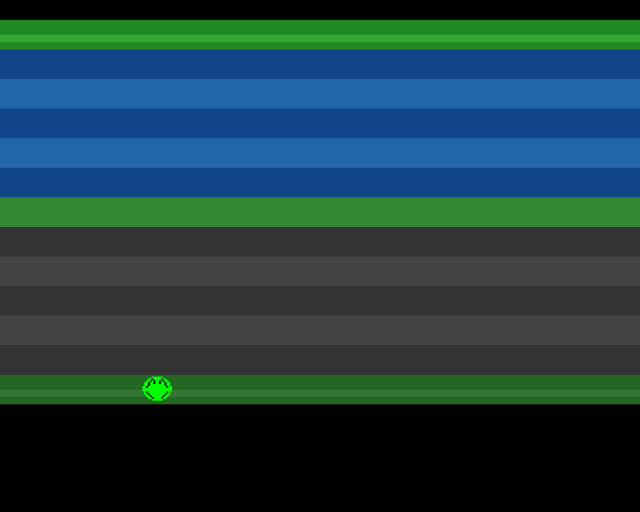
Real Frogger doesn’t glide—it hops. Each joystick press moves the frog exactly one grid cell. The movement is animated over 8 frames, giving that distinctive chunky-but-smooth feel that makes Frogger satisfying to play.
By the end of this unit:
- Frog hops in discrete 16-pixel steps
- Smooth 8-frame animation during each hop
- Grid: 20 columns × 13 rows
- Edge detection prevents holding the joystick
Why Grid Movement?
Frogger isn’t an action game—it’s a puzzle game with timing elements. The grid serves several purposes:
- Predictability: You know exactly where you’ll land
- Collision zones: Each lane is one row; cars and logs occupy grid cells
- Strategic planning: You can count cells to plan safe routes
- Timing windows: Hops take fixed time, creating rhythm
Smooth, analogue movement would make the game feel floaty and imprecise. The grid creates clarity.
The State Machine
Our frog now has two states:
; Frog State Machine
; Two states: waiting for input, or animating a hop

STATE_IDLE      equ 0           ; Waiting for input
STATE_HOPPING   equ 1           ; Currently animating a hop

DIR_UP          equ 0           ; Direction codes
DIR_DOWN        equ 1
DIR_LEFT        equ 2
DIR_RIGHT       equ 3

update_frog:
            tst.w   frog_state
            beq     .idle           ; STATE_IDLE = 0
            bra     .hopping        ; Must be STATE_HOPPING

.idle:
            ; Check for input, validate move, start hop
            bsr     read_joystick_edge
            tst.w   d0
            beq     .done           ; No input
            ; ... check direction bits, validate move ...
            move.w  #STATE_HOPPING,frog_state
            clr.w   frog_anim_frame
            bra     .done

.hopping:
            ; Animate position, check completion
            addq.w  #1,frog_anim_frame
            ; ... move pixel position ...
            cmp.w   #HOP_FRAMES,frog_anim_frame
            blt.s   .done
            ; Hop complete - update grid, return to idle
            move.w  #STATE_IDLE,frog_state

.done:      rts
This prevents the frog from changing direction mid-hop or moving continuously when the joystick is held.
Grid Coordinates
We track position two ways:
; Grid position (which cell)
frog_grid_x:    dc.w    9       ; Column (0-19)
frog_grid_y:    dc.w    12      ; Row (0-12)

; Pixel position (for rendering)
frog_pixel_x:   dc.w    0       ; Screen X
frog_pixel_y:   dc.w    0       ; Screen Y
Grid coordinates are the “true” position—which cell the frog occupies. Pixel coordinates are calculated from grid coordinates for rendering and animation.
Converting Grid to Pixels
; Grid to Pixel Conversion
; Convert cell coordinates to screen position

grid_to_pixels:
            ; pixel_x = grid_x * CELL_SIZE + GRID_ORIGIN_X
            move.w  frog_grid_x,d0
            mulu    #CELL_SIZE,d0
            add.w   #GRID_ORIGIN_X,d0
            move.w  d0,frog_pixel_x

            ; pixel_y = grid_y * CELL_SIZE + GRID_ORIGIN_Y
            move.w  frog_grid_y,d0
            mulu    #CELL_SIZE,d0
            add.w   #GRID_ORIGIN_Y,d0
            move.w  d0,frog_pixel_y

            rts

; Example: grid(9, 12) → pixel(192, 236)
;   192 = 9 * 16 + 48
;   236 = 12 * 16 + 44
The grid origin (48, 44) positions the grid within our playfield.
Edge Detection
Holding the joystick shouldn’t make the frog hop repeatedly. We want one hop per press. This requires edge detection—detecting the transition from “not pressed” to “pressed”.
; Joystick Edge Detection
; Triggers only on new presses, not held directions

read_joystick_edge:
            ; Read and decode joystick
            move.w  JOY1DAT(a5),d0
            move.w  d0,d1
            lsr.w   #1,d1
            eor.w   d1,d0           ; D0 = decoded current state

            ; Edge detection: current AND NOT previous
            ; This gives us bits that just became 1
            move.w  joy_prev,d1
            not.w   d1              ; D1 = NOT previous
            and.w   d0,d1           ; D1 = newly pressed only

            ; Save current for next frame
            move.w  d0,joy_prev

            move.w  d1,d0           ; Return newly pressed
            rts

; Without edge detection: holding UP would cause
; multiple hops. With edge detection: one press = one hop.
The key insight: current AND NOT previous gives us bits that are set now but weren’t set before—exactly the “just pressed” events we want.
Animation Timing
Each hop takes 8 frames at 2 pixels per frame:
HOP_FRAMES      equ 8           ; Animation duration
PIXELS_PER_FRAME equ 2          ; Movement per frame
8 × 2 = 16 pixels = one cell. At 50fps (PAL), each hop takes 8/50 = 0.16 seconds. This feels snappy but visible.
The Hop Animation
.hopping:
    addq.w  #1,frog_anim_frame

    ; Move based on direction
    move.w  frog_dir,d0
    cmp.w   #DIR_UP,d0
    bne.s   .hop_not_up
    sub.w   #PIXELS_PER_FRAME,frog_pixel_y
    bra.s   .check_done
.hop_not_up:
    ; ... check other directions ...

.check_done:
    cmp.w   #HOP_FRAMES,frog_anim_frame
    blt.s   .done

    ; Hop complete: update grid, snap pixels
    ; ... update frog_grid_x/y ...
    bsr     grid_to_pixels
    move.w  #STATE_IDLE,frog_state
We update pixel position each frame for smooth animation, then snap to exact grid position when done. The snap prevents cumulative rounding errors.
Boundary Checking
Before starting a hop, we check if the target cell exists:
btst    #8,d0               ; Up pressed?
beq.s   .not_up
move.w  frog_grid_y,d1
tst.w   d1                  ; Already at row 0?
beq.s   .not_up             ; Can't go higher
move.w  #DIR_UP,frog_dir
bra.s   .start_hop
We check grid coordinates, not pixel coordinates. This is cleaner and prevents the frog from starting a hop it can’t complete.
The Complete Flow
- Frame starts: Wait for VBlank
- Update frog: Run state machine
- Update sprite: Write new position to sprite data
- Loop: Repeat
The frog logic is now significantly more complex than our previous smooth movement, but the result feels much better. The grid creates that classic arcade rhythm.
Key Takeaways
- State machine separates idle and hopping behaviour
- Grid coordinates are the source of truth
- Pixel coordinates are derived for rendering
- Edge detection gives one hop per press
- Snapping to grid prevents drift
- 8-frame animation balances speed and visibility
The Code
;══════════════════════════════════════════════════════════════════════════════
; SIGNAL - A Frogger-style game for the Commodore Amiga
; Unit 5: Grid-Based Movement
;
; Real Frogger doesn't glide—it hops. Each press moves the frog exactly one
; grid cell, with smooth animation over 8 frames. This unit implements that
; distinctive movement feel using a simple state machine.
;══════════════════════════════════════════════════════════════════════════════

;══════════════════════════════════════════════════════════════════════════════
; GRID CONSTANTS
;══════════════════════════════════════════════════════════════════════════════

; Grid dimensions
GRID_COLS       equ 20          ; 20 columns (320 ÷ 16)
GRID_ROWS       equ 13          ; 13 rows (matching our playfield)
CELL_SIZE       equ 16          ; Each cell is 16×16 pixels

; Grid origin (pixel coordinates of top-left cell)
GRID_ORIGIN_X   equ 48          ; Left margin
GRID_ORIGIN_Y   equ 44          ; Top of playfield

; Starting position (grid coordinates)
START_GRID_X    equ 9           ; Middle column (0-19)
START_GRID_Y    equ 12          ; Bottom row (0-12)

; Animation timing
HOP_FRAMES      equ 8           ; Animation lasts 8 frames
PIXELS_PER_FRAME equ 2          ; 2 pixels per frame × 8 frames = 16 pixels

; Movement states
STATE_IDLE      equ 0           ; Waiting for input
STATE_HOPPING   equ 1           ; Currently animating a hop

; Direction codes
DIR_UP          equ 0
DIR_DOWN        equ 1
DIR_LEFT        equ 2
DIR_RIGHT       equ 3

FROG_HEIGHT     equ 16

; Zone colours
COLOUR_BLACK    equ $0000
COLOUR_HOME     equ $0282
COLOUR_HOME_LIT equ $03a3
COLOUR_WATER1   equ $0148
COLOUR_WATER2   equ $026a
COLOUR_MEDIAN   equ $0383
COLOUR_ROAD1    equ $0333
COLOUR_ROAD2    equ $0444
COLOUR_START    equ $0262
COLOUR_START_LIT equ $0373

; Sprite palette
COLOUR_FROG     equ $00f0
COLOUR_EYES     equ $0ff0
COLOUR_OUTLINE  equ $0000

;══════════════════════════════════════════════════════════════════════════════
; HARDWARE REGISTERS
;══════════════════════════════════════════════════════════════════════════════

CUSTOM      equ $dff000

DMACONR     equ $002
DMACON      equ $096
INTENA      equ $09a
INTREQ      equ $09c
VPOSR       equ $004
JOY1DAT     equ $00c
COP1LC      equ $080
COPJMP1     equ $088
COLOR00     equ $180
SPR0PTH     equ $120
SPR0PTL     equ $122

;══════════════════════════════════════════════════════════════════════════════
; CODE SECTION
;══════════════════════════════════════════════════════════════════════════════

            section code,code_c

start:
            lea     CUSTOM,a5

            ; --- System takeover ---
            move.w  #$7fff,INTENA(a5)
            move.w  #$7fff,INTREQ(a5)
            move.w  #$7fff,DMACON(a5)

            ; --- Initialise game state ---
            move.w  #START_GRID_X,frog_grid_x
            move.w  #START_GRID_Y,frog_grid_y
            move.w  #STATE_IDLE,frog_state
            move.w  #0,frog_anim_frame
            clr.w   joy_prev

            ; --- Calculate initial pixel position ---
            bsr     grid_to_pixels

            ; --- Set sprite pointer in copper list ---
            lea     frog_data,a0
            move.l  a0,d0
            swap    d0
            lea     sprpth_val,a1
            move.w  d0,(a1)
            swap    d0
            lea     sprptl_val,a1
            move.w  d0,(a1)

            ; --- Update sprite control words ---
            bsr     update_sprite

            ; --- Install copper list ---
            lea     copperlist,a0
            move.l  a0,COP1LC(a5)
            move.w  d0,COPJMP1(a5)

            ; --- Enable DMA ---
            move.w  #$83a0,DMACON(a5)

;══════════════════════════════════════════════════════════════════════════════
; MAIN LOOP
;══════════════════════════════════════════════════════════════════════════════

mainloop:
            bsr     wait_vblank
            bsr     update_frog
            bsr     update_sprite
            bra.s   mainloop

;══════════════════════════════════════════════════════════════════════════════
; UPDATE_FROG - Main frog logic
;══════════════════════════════════════════════════════════════════════════════
; State machine:
;   IDLE: Check for joystick input, start hop if valid
;   HOPPING: Animate position, return to IDLE when complete

update_frog:
            tst.w   frog_state
            beq     .idle
            bra     .hopping

.idle:
            ; --- Read joystick with edge detection ---
            bsr     read_joystick_edge
            tst.w   d0
            beq     .done                   ; No new input

            ; --- Check each direction ---
            btst    #8,d0                   ; Up?
            beq.s   .not_up
            move.w  frog_grid_y,d1
            tst.w   d1
            beq.s   .not_up                 ; Already at top
            move.w  #DIR_UP,frog_dir
            bra.s   .start_hop
.not_up:
            btst    #0,d0                   ; Down?
            beq.s   .not_down
            move.w  frog_grid_y,d1
            cmp.w   #GRID_ROWS-1,d1
            beq.s   .not_down               ; Already at bottom
            move.w  #DIR_DOWN,frog_dir
            bra.s   .start_hop
.not_down:
            btst    #9,d0                   ; Left?
            beq.s   .not_left
            move.w  frog_grid_x,d1
            tst.w   d1
            beq.s   .not_left               ; Already at left
            move.w  #DIR_LEFT,frog_dir
            bra.s   .start_hop
.not_left:
            btst    #1,d0                   ; Right?
            beq     .done
            move.w  frog_grid_x,d1
            cmp.w   #GRID_COLS-1,d1
            beq     .done                   ; Already at right
            move.w  #DIR_RIGHT,frog_dir
            ; Fall through to start_hop

.start_hop:
            ; --- Begin hopping animation ---
            move.w  #STATE_HOPPING,frog_state
            move.w  #0,frog_anim_frame
            bra.s   .done

.hopping:
            ; --- Advance animation frame ---
            addq.w  #1,frog_anim_frame

            ; --- Move pixel position based on direction ---
            move.w  frog_dir,d0

            cmp.w   #DIR_UP,d0
            bne.s   .hop_not_up
            sub.w   #PIXELS_PER_FRAME,frog_pixel_y
            bra.s   .check_hop_done
.hop_not_up:
            cmp.w   #DIR_DOWN,d0
            bne.s   .hop_not_down
            add.w   #PIXELS_PER_FRAME,frog_pixel_y
            bra.s   .check_hop_done
.hop_not_down:
            cmp.w   #DIR_LEFT,d0
            bne.s   .hop_not_left
            sub.w   #PIXELS_PER_FRAME,frog_pixel_x
            bra.s   .check_hop_done
.hop_not_left:
            ; Must be RIGHT
            add.w   #PIXELS_PER_FRAME,frog_pixel_x

.check_hop_done:
            ; --- Check if animation complete ---
            cmp.w   #HOP_FRAMES,frog_anim_frame
            blt.s   .done

            ; --- Hop complete: update grid position ---
            move.w  frog_dir,d0

            cmp.w   #DIR_UP,d0
            bne.s   .end_not_up
            subq.w  #1,frog_grid_y
            bra.s   .snap_to_grid
.end_not_up:
            cmp.w   #DIR_DOWN,d0
            bne.s   .end_not_down
            addq.w  #1,frog_grid_y
            bra.s   .snap_to_grid
.end_not_down:
            cmp.w   #DIR_LEFT,d0
            bne.s   .end_not_left
            subq.w  #1,frog_grid_x
            bra.s   .snap_to_grid
.end_not_left:
            ; Must be RIGHT
            addq.w  #1,frog_grid_x

.snap_to_grid:
            ; --- Snap pixel position to grid (prevents drift) ---
            bsr     grid_to_pixels

            ; --- Return to idle state ---
            move.w  #STATE_IDLE,frog_state

.done:
            rts

;══════════════════════════════════════════════════════════════════════════════
; GRID_TO_PIXELS - Convert grid coordinates to pixel coordinates
;══════════════════════════════════════════════════════════════════════════════
; Input: frog_grid_x, frog_grid_y
; Output: frog_pixel_x, frog_pixel_y

grid_to_pixels:
            move.w  frog_grid_x,d0
            mulu    #CELL_SIZE,d0
            add.w   #GRID_ORIGIN_X,d0
            move.w  d0,frog_pixel_x

            move.w  frog_grid_y,d0
            mulu    #CELL_SIZE,d0
            add.w   #GRID_ORIGIN_Y,d0
            move.w  d0,frog_pixel_y

            rts

;══════════════════════════════════════════════════════════════════════════════
; READ_JOYSTICK_EDGE - Read joystick with edge detection
;══════════════════════════════════════════════════════════════════════════════
; Returns only newly-pressed directions (not held directions)
; Output: D0 = direction bits (only set on transition from not-pressed)

read_joystick_edge:
            ; --- Read and decode joystick ---
            move.w  JOY1DAT(a5),d0
            move.w  d0,d1
            lsr.w   #1,d1
            eor.w   d1,d0               ; D0 = decoded current state

            ; --- Edge detection: current AND NOT previous ---
            move.w  joy_prev,d1
            not.w   d1                  ; D1 = NOT previous
            and.w   d0,d1               ; D1 = newly pressed only

            ; --- Save current state for next frame ---
            move.w  d0,joy_prev

            move.w  d1,d0               ; Return newly pressed in D0
            rts

;══════════════════════════════════════════════════════════════════════════════
; SUBROUTINES
;══════════════════════════════════════════════════════════════════════════════

wait_vblank:
            move.l  #$1ff00,d1
.wait:
            move.l  VPOSR(a5),d0
            and.l   d1,d0
            bne.s   .wait
            rts

update_sprite:
            lea     frog_data,a0
            move.w  frog_pixel_y,d0
            move.w  frog_pixel_x,d1

            move.w  d0,d2
            lsl.w   #8,d2
            lsr.w   #1,d1
            or.b    d1,d2
            move.w  d2,(a0)

            add.w   #FROG_HEIGHT,d0
            lsl.w   #8,d0
            move.w  d0,2(a0)

            rts

;══════════════════════════════════════════════════════════════════════════════
; VARIABLES
;══════════════════════════════════════════════════════════════════════════════

; Grid position (which cell the frog occupies)
frog_grid_x:    dc.w    9           ; Column (0-19)
frog_grid_y:    dc.w    12          ; Row (0-12)

; Pixel position (for rendering and animation)
frog_pixel_x:   dc.w    0           ; Screen X
frog_pixel_y:   dc.w    0           ; Screen Y

; Movement state machine
frog_state:     dc.w    0           ; 0=idle, 1=hopping
frog_dir:       dc.w    0           ; Direction of current hop
frog_anim_frame: dc.w   0           ; Current frame of hop animation (0-7)

; Input state
joy_prev:       dc.w    0           ; Previous joystick state (for edge detection)

;══════════════════════════════════════════════════════════════════════════════
; COPPER LIST
;══════════════════════════════════════════════════════════════════════════════

copperlist:
            dc.w    COLOR00,COLOUR_BLACK

            ; --- Sprite palette ---
            dc.w    $01a2,COLOUR_FROG
            dc.w    $01a4,COLOUR_EYES
            dc.w    $01a6,COLOUR_OUTLINE

            ; --- Sprite 0 pointer ---
            dc.w    SPR0PTH
sprpth_val: dc.w    $0000
            dc.w    SPR0PTL
sprptl_val: dc.w    $0000

            ; ROW 1: HOME ZONE
            dc.w    $2c07,$fffe
            dc.w    COLOR00,COLOUR_HOME
            dc.w    $3407,$fffe
            dc.w    COLOR00,COLOUR_HOME_LIT
            dc.w    $3807,$fffe
            dc.w    COLOR00,COLOUR_HOME

            ; ROWS 2-6: WATER ZONE
            dc.w    $3c07,$fffe
            dc.w    COLOR00,COLOUR_WATER1
            dc.w    $4c07,$fffe
            dc.w    COLOR00,COLOUR_WATER2
            dc.w    $5c07,$fffe
            dc.w    COLOR00,COLOUR_WATER1
            dc.w    $6c07,$fffe
            dc.w    COLOR00,COLOUR_WATER2
            dc.w    $7c07,$fffe
            dc.w    COLOR00,COLOUR_WATER1

            ; ROW 7: MEDIAN
            dc.w    $8c07,$fffe
            dc.w    COLOR00,COLOUR_MEDIAN

            ; ROWS 8-12: ROAD ZONE
            dc.w    $9c07,$fffe
            dc.w    COLOR00,COLOUR_ROAD1
            dc.w    $ac07,$fffe
            dc.w    COLOR00,COLOUR_ROAD2
            dc.w    $bc07,$fffe
            dc.w    COLOR00,COLOUR_ROAD1
            dc.w    $cc07,$fffe
            dc.w    COLOR00,COLOUR_ROAD2
            dc.w    $dc07,$fffe
            dc.w    COLOR00,COLOUR_ROAD1

            ; ROW 13: START ZONE
            dc.w    $ec07,$fffe
            dc.w    COLOR00,COLOUR_START
            dc.w    $f407,$fffe
            dc.w    COLOR00,COLOUR_START_LIT
            dc.w    $f807,$fffe
            dc.w    COLOR00,COLOUR_START

            ; BOTTOM BORDER
            dc.w    $fc07,$fffe
            dc.w    COLOR00,COLOUR_BLACK

            dc.w    $ffff,$fffe

;══════════════════════════════════════════════════════════════════════════════
; SPRITE DATA
;══════════════════════════════════════════════════════════════════════════════

            even
frog_data:
            dc.w    $ec50,$fc00             ; Control words

            dc.w    $0000,$0000
            dc.w    $07e0,$0000
            dc.w    $1ff8,$0420
            dc.w    $3ffc,$0a50
            dc.w    $7ffe,$1248
            dc.w    $7ffe,$1008
            dc.w    $ffff,$2004
            dc.w    $ffff,$0000
            dc.w    $ffff,$0000
            dc.w    $7ffe,$2004
            dc.w    $7ffe,$1008
            dc.w    $3ffc,$0810
            dc.w    $1ff8,$0420
            dc.w    $07e0,$0000
            dc.w    $0000,$0000
            dc.w    $0000,$0000

            dc.w    $0000,$0000
Build It
vasmm68k_mot -Fhunkexe -kick1hunks -o signal signal.asmWhat’s Next
The frog hops correctly, but there’s nothing to dodge. In Unit 6, we’ll introduce the Blitter—the Amiga’s block image transfer coprocessor—to draw cars on the road.
What Changed
| 1 | 1 | ;══════════════════════════════════════════════════════════════════════════════ | |
| 2 | 2 | ; SIGNAL - A Frogger-style game for the Commodore Amiga | |
| 3 | - | ; Unit 4: The Playfield | |
| 3 | + | ; Unit 5: Grid-Based Movement | |
| 4 | 4 | ; | |
| 5 | - | ; This unit refines our Copper list to create a proper 13-row Frogger grid: | |
| 6 | - | ; - Row 1: Home zone (5 docking spots at top) | |
| 7 | - | ; - Rows 2-6: Water zone (5 lanes for logs and turtles) | |
| 8 | - | ; - Row 7: Median (safe resting zone) | |
| 9 | - | ; - Rows 8-12: Road zone (5 lanes for traffic) | |
| 10 | - | ; - Row 13: Start zone (where the frog begins) | |
| 5 | + | ; Real Frogger doesn't glide—it hops. Each press moves the frog exactly one | |
| 6 | + | ; grid cell, with smooth animation over 8 frames. This unit implements that | |
| 7 | + | ; distinctive movement feel using a simple state machine. | |
| 11 | 8 | ;══════════════════════════════════════════════════════════════════════════════ | |
| 12 | 9 | | |
| 13 | 10 | ;══════════════════════════════════════════════════════════════════════════════ | |
| 14 | - | ; TWEAKABLE VALUES | |
| 11 | + | ; GRID CONSTANTS | |
| 15 | 12 | ;══════════════════════════════════════════════════════════════════════════════ | |
| 16 | 13 | | |
| 17 | - | FROG_START_X equ 160 ; Centre of screen | |
| 18 | - | FROG_START_Y equ 220 ; Bottom row (start zone) | |
| 14 | + | ; Grid dimensions | |
| 15 | + | GRID_COLS equ 20 ; 20 columns (320 ÷ 16) | |
| 16 | + | GRID_ROWS equ 13 ; 13 rows (matching our playfield) | |
| 17 | + | CELL_SIZE equ 16 ; Each cell is 16×16 pixels | |
| 19 | 18 | | |
| 20 | - | MOVE_SPEED equ 2 ; Pixels per frame | |
| 19 | + | ; Grid origin (pixel coordinates of top-left cell) | |
| 20 | + | GRID_ORIGIN_X equ 48 ; Left margin | |
| 21 | + | GRID_ORIGIN_Y equ 44 ; Top of playfield | |
| 21 | 22 | | |
| 22 | - | ; Screen boundaries match our 13-row grid | |
| 23 | - | MIN_X equ 48 ; Left edge | |
| 24 | - | MAX_X equ 280 ; Right edge | |
| 25 | - | MIN_Y equ 44 ; Top of home zone | |
| 26 | - | MAX_Y equ 220 ; Bottom of start zone | |
| 23 | + | ; Starting position (grid coordinates) | |
| 24 | + | START_GRID_X equ 9 ; Middle column (0-19) | |
| 25 | + | START_GRID_Y equ 12 ; Bottom row (0-12) | |
| 27 | 26 | | |
| 28 | - | FROG_HEIGHT equ 16 ; Sprite height | |
| 27 | + | ; Animation timing | |
| 28 | + | HOP_FRAMES equ 8 ; Animation lasts 8 frames | |
| 29 | + | PIXELS_PER_FRAME equ 2 ; 2 pixels per frame × 8 frames = 16 pixels | |
| 29 | 30 | | |
| 30 | - | ; Grid layout constants | |
| 31 | - | ROW_HEIGHT equ 16 ; Each row is 16 pixels tall | |
| 32 | - | GRID_TOP equ 44 ; First row starts at scanline 44 | |
| 33 | - | GRID_ROWS equ 13 ; Total rows in the playfield | |
| 31 | + | ; Movement states | |
| 32 | + | STATE_IDLE equ 0 ; Waiting for input | |
| 33 | + | STATE_HOPPING equ 1 ; Currently animating a hop | |
| 34 | 34 | | |
| 35 | - | ; Zone colours - carefully chosen for readability and atmosphere | |
| 36 | - | COLOUR_BLACK equ $0000 ; Border | |
| 37 | - | COLOUR_HOME equ $0282 ; Home zone: deep green | |
| 38 | - | COLOUR_HOME_LIT equ $03a3 ; Home zone highlight | |
| 39 | - | COLOUR_WATER1 equ $0148 ; Water: deep blue | |
| 40 | - | COLOUR_WATER2 equ $026a ; Water: medium blue | |
| 41 | - | COLOUR_MEDIAN equ $0383 ; Median: bright green (safe!) | |
| 42 | - | COLOUR_ROAD1 equ $0333 ; Road: dark grey | |
| 43 | - | COLOUR_ROAD2 equ $0444 ; Road: medium grey | |
| 44 | - | COLOUR_START equ $0262 ; Start zone: grass green | |
| 45 | - | COLOUR_START_LIT equ $0373 ; Start zone highlight | |
| 35 | + | ; Direction codes | |
| 36 | + | DIR_UP equ 0 | |
| 37 | + | DIR_DOWN equ 1 | |
| 38 | + | DIR_LEFT equ 2 | |
| 39 | + | DIR_RIGHT equ 3 | |
| 40 | + | | |
| 41 | + | FROG_HEIGHT equ 16 | |
| 42 | + | | |
| 43 | + | ; Zone colours | |
| 44 | + | COLOUR_BLACK equ $0000 | |
| 45 | + | COLOUR_HOME equ $0282 | |
| 46 | + | COLOUR_HOME_LIT equ $03a3 | |
| 47 | + | COLOUR_WATER1 equ $0148 | |
| 48 | + | COLOUR_WATER2 equ $026a | |
| 49 | + | COLOUR_MEDIAN equ $0383 | |
| 50 | + | COLOUR_ROAD1 equ $0333 | |
| 51 | + | COLOUR_ROAD2 equ $0444 | |
| 52 | + | COLOUR_START equ $0262 | |
| 53 | + | COLOUR_START_LIT equ $0373 | |
| 46 | 54 | | |
| 47 | 55 | ; Sprite palette | |
| 48 | - | COLOUR_FROG equ $00f0 ; Bright green body | |
| 49 | - | COLOUR_EYES equ $0ff0 ; Yellow eyes | |
| 50 | - | COLOUR_OUTLINE equ $0000 ; Black outline | |
| 56 | + | COLOUR_FROG equ $00f0 | |
| 57 | + | COLOUR_EYES equ $0ff0 | |
| 58 | + | COLOUR_OUTLINE equ $0000 | |
| 51 | 59 | | |
| 52 | 60 | ;══════════════════════════════════════════════════════════════════════════════ | |
| 53 | 61 | ; HARDWARE REGISTERS | |
| ... | |||
| 81 | 89 | move.w #$7fff,INTREQ(a5) | |
| 82 | 90 | move.w #$7fff,DMACON(a5) | |
| 83 | 91 | | |
| 84 | - | ; --- Initialise frog position --- | |
| 85 | - | move.w #FROG_START_X,frog_x | |
| 86 | - | move.w #FROG_START_Y,frog_y | |
| 92 | + | ; --- Initialise game state --- | |
| 93 | + | move.w #START_GRID_X,frog_grid_x | |
| 94 | + | move.w #START_GRID_Y,frog_grid_y | |
| 95 | + | move.w #STATE_IDLE,frog_state | |
| 96 | + | move.w #0,frog_anim_frame | |
| 97 | + | clr.w joy_prev | |
| 98 | + | | |
| 99 | + | ; --- Calculate initial pixel position --- | |
| 100 | + | bsr grid_to_pixels | |
| 87 | 101 | | |
| 88 | 102 | ; --- Set sprite pointer in copper list --- | |
| 89 | 103 | lea frog_data,a0 | |
| ... | |||
| 111 | 125 | ;══════════════════════════════════════════════════════════════════════════════ | |
| 112 | 126 | | |
| 113 | 127 | mainloop: | |
| 114 | - | bsr.s wait_vblank | |
| 115 | - | bsr.s read_joystick | |
| 116 | - | bsr.s move_frog | |
| 128 | + | bsr wait_vblank | |
| 129 | + | bsr update_frog | |
| 117 | 130 | bsr update_sprite | |
| 118 | - | | |
| 119 | - | btst #6,$bfe001 | |
| 120 | - | bne.s mainloop | |
| 121 | 131 | bra.s mainloop | |
| 122 | 132 | | |
| 123 | 133 | ;══════════════════════════════════════════════════════════════════════════════ | |
| 124 | - | ; SUBROUTINES | |
| 134 | + | ; UPDATE_FROG - Main frog logic | |
| 125 | 135 | ;══════════════════════════════════════════════════════════════════════════════ | |
| 136 | + | ; State machine: | |
| 137 | + | ; IDLE: Check for joystick input, start hop if valid | |
| 138 | + | ; HOPPING: Animate position, return to IDLE when complete | |
| 126 | 139 | | |
| 127 | - | wait_vblank: | |
| 128 | - | move.l #$1ff00,d1 | |
| 129 | - | .wait: | |
| 130 | - | move.l VPOSR(a5),d0 | |
| 131 | - | and.l d1,d0 | |
| 132 | - | bne.s .wait | |
| 140 | + | update_frog: | |
| 141 | + | tst.w frog_state | |
| 142 | + | beq .idle | |
| 143 | + | bra .hopping | |
| 144 | + | | |
| 145 | + | .idle: | |
| 146 | + | ; --- Read joystick with edge detection --- | |
| 147 | + | bsr read_joystick_edge | |
| 148 | + | tst.w d0 | |
| 149 | + | beq .done ; No new input | |
| 150 | + | | |
| 151 | + | ; --- Check each direction --- | |
| 152 | + | btst #8,d0 ; Up? | |
| 153 | + | beq.s .not_up | |
| 154 | + | move.w frog_grid_y,d1 | |
| 155 | + | tst.w d1 | |
| 156 | + | beq.s .not_up ; Already at top | |
| 157 | + | move.w #DIR_UP,frog_dir | |
| 158 | + | bra.s .start_hop | |
| 159 | + | .not_up: | |
| 160 | + | btst #0,d0 ; Down? | |
| 161 | + | beq.s .not_down | |
| 162 | + | move.w frog_grid_y,d1 | |
| 163 | + | cmp.w #GRID_ROWS-1,d1 | |
| 164 | + | beq.s .not_down ; Already at bottom | |
| 165 | + | move.w #DIR_DOWN,frog_dir | |
| 166 | + | bra.s .start_hop | |
| 167 | + | .not_down: | |
| 168 | + | btst #9,d0 ; Left? | |
| 169 | + | beq.s .not_left | |
| 170 | + | move.w frog_grid_x,d1 | |
| 171 | + | tst.w d1 | |
| 172 | + | beq.s .not_left ; Already at left | |
| 173 | + | move.w #DIR_LEFT,frog_dir | |
| 174 | + | bra.s .start_hop | |
| 175 | + | .not_left: | |
| 176 | + | btst #1,d0 ; Right? | |
| 177 | + | beq .done | |
| 178 | + | move.w frog_grid_x,d1 | |
| 179 | + | cmp.w #GRID_COLS-1,d1 | |
| 180 | + | beq .done ; Already at right | |
| 181 | + | move.w #DIR_RIGHT,frog_dir | |
| 182 | + | ; Fall through to start_hop | |
| 183 | + | | |
| 184 | + | .start_hop: | |
| 185 | + | ; --- Begin hopping animation --- | |
| 186 | + | move.w #STATE_HOPPING,frog_state | |
| 187 | + | move.w #0,frog_anim_frame | |
| 188 | + | bra.s .done | |
| 189 | + | | |
| 190 | + | .hopping: | |
| 191 | + | ; --- Advance animation frame --- | |
| 192 | + | addq.w #1,frog_anim_frame | |
| 193 | + | | |
| 194 | + | ; --- Move pixel position based on direction --- | |
| 195 | + | move.w frog_dir,d0 | |
| 196 | + | | |
| 197 | + | cmp.w #DIR_UP,d0 | |
| 198 | + | bne.s .hop_not_up | |
| 199 | + | sub.w #PIXELS_PER_FRAME,frog_pixel_y | |
| 200 | + | bra.s .check_hop_done | |
| 201 | + | .hop_not_up: | |
| 202 | + | cmp.w #DIR_DOWN,d0 | |
| 203 | + | bne.s .hop_not_down | |
| 204 | + | add.w #PIXELS_PER_FRAME,frog_pixel_y | |
| 205 | + | bra.s .check_hop_done | |
| 206 | + | .hop_not_down: | |
| 207 | + | cmp.w #DIR_LEFT,d0 | |
| 208 | + | bne.s .hop_not_left | |
| 209 | + | sub.w #PIXELS_PER_FRAME,frog_pixel_x | |
| 210 | + | bra.s .check_hop_done | |
| 211 | + | .hop_not_left: | |
| 212 | + | ; Must be RIGHT | |
| 213 | + | add.w #PIXELS_PER_FRAME,frog_pixel_x | |
| 214 | + | | |
| 215 | + | .check_hop_done: | |
| 216 | + | ; --- Check if animation complete --- | |
| 217 | + | cmp.w #HOP_FRAMES,frog_anim_frame | |
| 218 | + | blt.s .done | |
| 219 | + | | |
| 220 | + | ; --- Hop complete: update grid position --- | |
| 221 | + | move.w frog_dir,d0 | |
| 222 | + | | |
| 223 | + | cmp.w #DIR_UP,d0 | |
| 224 | + | bne.s .end_not_up | |
| 225 | + | subq.w #1,frog_grid_y | |
| 226 | + | bra.s .snap_to_grid | |
| 227 | + | .end_not_up: | |
| 228 | + | cmp.w #DIR_DOWN,d0 | |
| 229 | + | bne.s .end_not_down | |
| 230 | + | addq.w #1,frog_grid_y | |
| 231 | + | bra.s .snap_to_grid | |
| 232 | + | .end_not_down: | |
| 233 | + | cmp.w #DIR_LEFT,d0 | |
| 234 | + | bne.s .end_not_left | |
| 235 | + | subq.w #1,frog_grid_x | |
| 236 | + | bra.s .snap_to_grid | |
| 237 | + | .end_not_left: | |
| 238 | + | ; Must be RIGHT | |
| 239 | + | addq.w #1,frog_grid_x | |
| 240 | + | | |
| 241 | + | .snap_to_grid: | |
| 242 | + | ; --- Snap pixel position to grid (prevents drift) --- | |
| 243 | + | bsr grid_to_pixels | |
| 244 | + | | |
| 245 | + | ; --- Return to idle state --- | |
| 246 | + | move.w #STATE_IDLE,frog_state | |
| 247 | + | | |
| 248 | + | .done: | |
| 133 | 249 | rts | |
| 134 | 250 | | |
| 135 | - | read_joystick: | |
| 251 | + | ;══════════════════════════════════════════════════════════════════════════════ | |
| 252 | + | ; GRID_TO_PIXELS - Convert grid coordinates to pixel coordinates | |
| 253 | + | ;══════════════════════════════════════════════════════════════════════════════ | |
| 254 | + | ; Input: frog_grid_x, frog_grid_y | |
| 255 | + | ; Output: frog_pixel_x, frog_pixel_y | |
| 256 | + | | |
| 257 | + | grid_to_pixels: | |
| 258 | + | move.w frog_grid_x,d0 | |
| 259 | + | mulu #CELL_SIZE,d0 | |
| 260 | + | add.w #GRID_ORIGIN_X,d0 | |
| 261 | + | move.w d0,frog_pixel_x | |
| 262 | + | | |
| 263 | + | move.w frog_grid_y,d0 | |
| 264 | + | mulu #CELL_SIZE,d0 | |
| 265 | + | add.w #GRID_ORIGIN_Y,d0 | |
| 266 | + | move.w d0,frog_pixel_y | |
| 267 | + | | |
| 268 | + | rts | |
| 269 | + | | |
| 270 | + | ;══════════════════════════════════════════════════════════════════════════════ | |
| 271 | + | ; READ_JOYSTICK_EDGE - Read joystick with edge detection | |
| 272 | + | ;══════════════════════════════════════════════════════════════════════════════ | |
| 273 | + | ; Returns only newly-pressed directions (not held directions) | |
| 274 | + | ; Output: D0 = direction bits (only set on transition from not-pressed) | |
| 275 | + | | |
| 276 | + | read_joystick_edge: | |
| 277 | + | ; --- Read and decode joystick --- | |
| 136 | 278 | move.w JOY1DAT(a5),d0 | |
| 137 | 279 | move.w d0,d1 | |
| 138 | 280 | lsr.w #1,d1 | |
| 139 | - | eor.w d1,d0 | |
| 281 | + | eor.w d1,d0 ; D0 = decoded current state | |
| 282 | + | | |
| 283 | + | ; --- Edge detection: current AND NOT previous --- | |
| 284 | + | move.w joy_prev,d1 | |
| 285 | + | not.w d1 ; D1 = NOT previous | |
| 286 | + | and.w d0,d1 ; D1 = newly pressed only | |
| 287 | + | | |
| 288 | + | ; --- Save current state for next frame --- | |
| 289 | + | move.w d0,joy_prev | |
| 290 | + | | |
| 291 | + | move.w d1,d0 ; Return newly pressed in D0 | |
| 140 | 292 | rts | |
| 141 | 293 | | |
| 142 | - | move_frog: | |
| 143 | - | btst #8,d0 | |
| 144 | - | beq.s .no_up | |
| 145 | - | move.w frog_y,d1 | |
| 146 | - | sub.w #MOVE_SPEED,d1 | |
| 147 | - | cmp.w #MIN_Y,d1 | |
| 148 | - | blt.s .no_up | |
| 149 | - | move.w d1,frog_y | |
| 150 | - | .no_up: | |
| 151 | - | btst #0,d0 | |
| 152 | - | beq.s .no_down | |
| 153 | - | move.w frog_y,d1 | |
| 154 | - | add.w #MOVE_SPEED,d1 | |
| 155 | - | cmp.w #MAX_Y,d1 | |
| 156 | - | bgt.s .no_down | |
| 157 | - | move.w d1,frog_y | |
| 158 | - | .no_down: | |
| 159 | - | btst #9,d0 | |
| 160 | - | beq.s .no_left | |
| 161 | - | move.w frog_x,d1 | |
| 162 | - | sub.w #MOVE_SPEED,d1 | |
| 163 | - | cmp.w #MIN_X,d1 | |
| 164 | - | blt.s .no_left | |
| 165 | - | move.w d1,frog_x | |
| 166 | - | .no_left: | |
| 167 | - | btst #1,d0 | |
| 168 | - | beq.s .no_right | |
| 169 | - | move.w frog_x,d1 | |
| 170 | - | add.w #MOVE_SPEED,d1 | |
| 171 | - | cmp.w #MAX_X,d1 | |
| 172 | - | bgt.s .no_right | |
| 173 | - | move.w d1,frog_x | |
| 174 | - | .no_right: | |
| 294 | + | ;══════════════════════════════════════════════════════════════════════════════ | |
| 295 | + | ; SUBROUTINES | |
| 296 | + | ;══════════════════════════════════════════════════════════════════════════════ | |
| 297 | + | | |
| 298 | + | wait_vblank: | |
| 299 | + | move.l #$1ff00,d1 | |
| 300 | + | .wait: | |
| 301 | + | move.l VPOSR(a5),d0 | |
| 302 | + | and.l d1,d0 | |
| 303 | + | bne.s .wait | |
| 175 | 304 | rts | |
| 176 | 305 | | |
| 177 | 306 | update_sprite: | |
| 178 | 307 | lea frog_data,a0 | |
| 179 | - | move.w frog_y,d0 | |
| 180 | - | move.w frog_x,d1 | |
| 308 | + | move.w frog_pixel_y,d0 | |
| 309 | + | move.w frog_pixel_x,d1 | |
| 181 | 310 | | |
| 182 | 311 | move.w d0,d2 | |
| 183 | 312 | lsl.w #8,d2 | |
| ... | |||
| 195 | 324 | ; VARIABLES | |
| 196 | 325 | ;══════════════════════════════════════════════════════════════════════════════ | |
| 197 | 326 | | |
| 198 | - | frog_x: dc.w 160 | |
| 199 | - | frog_y: dc.w 220 | |
| 327 | + | ; Grid position (which cell the frog occupies) | |
| 328 | + | frog_grid_x: dc.w 9 ; Column (0-19) | |
| 329 | + | frog_grid_y: dc.w 12 ; Row (0-12) | |
| 330 | + | | |
| 331 | + | ; Pixel position (for rendering and animation) | |
| 332 | + | frog_pixel_x: dc.w 0 ; Screen X | |
| 333 | + | frog_pixel_y: dc.w 0 ; Screen Y | |
| 334 | + | | |
| 335 | + | ; Movement state machine | |
| 336 | + | frog_state: dc.w 0 ; 0=idle, 1=hopping | |
| 337 | + | frog_dir: dc.w 0 ; Direction of current hop | |
| 338 | + | frog_anim_frame: dc.w 0 ; Current frame of hop animation (0-7) | |
| 339 | + | | |
| 340 | + | ; Input state | |
| 341 | + | joy_prev: dc.w 0 ; Previous joystick state (for edge detection) | |
| 200 | 342 | | |
| 201 | 343 | ;══════════════════════════════════════════════════════════════════════════════ | |
| 202 | 344 | ; COPPER LIST | |
| 203 | 345 | ;══════════════════════════════════════════════════════════════════════════════ | |
| 204 | - | ; The playfield is organised as a 13-row grid, each row 16 pixels tall. | |
| 205 | - | ; Row numbers (1-13) and scanlines are: | |
| 206 | - | ; | |
| 207 | - | ; Row 1 (Home) : $2C-$3B (44-59) - 5 docking spots | |
| 208 | - | ; Row 2 (Water) : $3C-$4B (60-75) - Log/turtle lane 1 | |
| 209 | - | ; Row 3 (Water) : $4C-$5B (76-91) - Log/turtle lane 2 | |
| 210 | - | ; Row 4 (Water) : $5C-$6B (92-107) - Log/turtle lane 3 | |
| 211 | - | ; Row 5 (Water) : $6C-$7B (108-123) - Log/turtle lane 4 | |
| 212 | - | ; Row 6 (Water) : $7C-$8B (124-139) - Log/turtle lane 5 | |
| 213 | - | ; Row 7 (Median) : $8C-$9B (140-155) - Safe zone | |
| 214 | - | ; Row 8 (Road) : $9C-$AB (156-171) - Car lane 1 | |
| 215 | - | ; Row 9 (Road) : $AC-$BB (172-187) - Car lane 2 | |
| 216 | - | ; Row 10 (Road) : $BC-$CB (188-203) - Car lane 3 | |
| 217 | - | ; Row 11 (Road) : $CC-$DB (204-219) - Car lane 4 | |
| 218 | - | ; Row 12 (Road) : $DC-$EB (220-235) - Car lane 5 | |
| 219 | - | ; Row 13 (Start) : $EC-$FB (236-251) - Starting area | |
| 220 | - | ; | |
| 221 | - | ; The Copper changes COLOR00 at each row boundary to create the zones. | |
| 222 | 346 | | |
| 223 | 347 | copperlist: | |
| 224 | - | dc.w COLOR00,COLOUR_BLACK ; Black border at top | |
| 348 | + | dc.w COLOR00,COLOUR_BLACK | |
| 225 | 349 | | |
| 226 | - | ; --- Sprite palette (colours 17-19) --- | |
| 350 | + | ; --- Sprite palette --- | |
| 227 | 351 | dc.w $01a2,COLOUR_FROG | |
| 228 | 352 | dc.w $01a4,COLOUR_EYES | |
| 229 | 353 | dc.w $01a6,COLOUR_OUTLINE | |
| ... | |||
| 234 | 358 | dc.w SPR0PTL | |
| 235 | 359 | sprptl_val: dc.w $0000 | |
| 236 | 360 | | |
| 237 | - | ; ═══════════════════════════════════════════════════════════════ | |
| 238 | - | ; ROW 1: HOME ZONE (scanline $2C = 44) | |
| 239 | - | ; ═══════════════════════════════════════════════════════════════ | |
| 361 | + | ; ROW 1: HOME ZONE | |
| 240 | 362 | dc.w $2c07,$fffe | |
| 241 | 363 | dc.w COLOR00,COLOUR_HOME | |
| 242 | - | dc.w $3407,$fffe ; Highlight stripe in home zone | |
| 364 | + | dc.w $3407,$fffe | |
| 243 | 365 | dc.w COLOR00,COLOUR_HOME_LIT | |
| 244 | 366 | dc.w $3807,$fffe | |
| 245 | 367 | dc.w COLOR00,COLOUR_HOME | |
| 246 | - | | |
| 247 | - | ; ═══════════════════════════════════════════════════════════════ | |
| 248 | - | ; ROWS 2-6: WATER ZONE (5 lanes) | |
| 249 | - | ; ═══════════════════════════════════════════════════════════════ | |
| 250 | - | ; Alternating blue shades suggest rippling water | |
| 251 | 368 | | |
| 252 | - | ; Row 2: Water lane 1 (scanline $3C = 60) | |
| 369 | + | ; ROWS 2-6: WATER ZONE | |
| 253 | 370 | dc.w $3c07,$fffe | |
| 254 | 371 | dc.w COLOR00,COLOUR_WATER1 | |
| 255 | - | | |
| 256 | - | ; Row 3: Water lane 2 (scanline $4C = 76) | |
| 257 | 372 | dc.w $4c07,$fffe | |
| 258 | 373 | dc.w COLOR00,COLOUR_WATER2 | |
| 259 | - | | |
| 260 | - | ; Row 4: Water lane 3 (scanline $5C = 92) | |
| 261 | 374 | dc.w $5c07,$fffe | |
| 262 | 375 | dc.w COLOR00,COLOUR_WATER1 | |
| 263 | - | | |
| 264 | - | ; Row 5: Water lane 4 (scanline $6C = 108) | |
| 265 | 376 | dc.w $6c07,$fffe | |
| 266 | 377 | dc.w COLOR00,COLOUR_WATER2 | |
| 267 | - | | |
| 268 | - | ; Row 6: Water lane 5 (scanline $7C = 124) | |
| 269 | 378 | dc.w $7c07,$fffe | |
| 270 | 379 | dc.w COLOR00,COLOUR_WATER1 | |
| 271 | 380 | | |
| 272 | - | ; ═══════════════════════════════════════════════════════════════ | |
| 273 | - | ; ROW 7: MEDIAN - SAFE ZONE (scanline $8C = 140) | |
| 274 | - | ; ═══════════════════════════════════════════════════════════════ | |
| 381 | + | ; ROW 7: MEDIAN | |
| 275 | 382 | dc.w $8c07,$fffe | |
| 276 | 383 | dc.w COLOR00,COLOUR_MEDIAN | |
| 277 | - | | |
| 278 | - | ; ═══════════════════════════════════════════════════════════════ | |
| 279 | - | ; ROWS 8-12: ROAD ZONE (5 lanes) | |
| 280 | - | ; ═══════════════════════════════════════════════════════════════ | |
| 281 | - | ; Alternating grey shades suggest lane markings | |
| 282 | 384 | | |
| 283 | - | ; Row 8: Road lane 1 (scanline $9C = 156) | |
| 385 | + | ; ROWS 8-12: ROAD ZONE | |
| 284 | 386 | dc.w $9c07,$fffe | |
| 285 | 387 | dc.w COLOR00,COLOUR_ROAD1 | |
| 286 | - | | |
| 287 | - | ; Row 9: Road lane 2 (scanline $AC = 172) | |
| 288 | 388 | dc.w $ac07,$fffe | |
| 289 | 389 | dc.w COLOR00,COLOUR_ROAD2 | |
| 290 | - | | |
| 291 | - | ; Row 10: Road lane 3 (scanline $BC = 188) | |
| 292 | 390 | dc.w $bc07,$fffe | |
| 293 | 391 | dc.w COLOR00,COLOUR_ROAD1 | |
| 294 | - | | |
| 295 | - | ; Row 11: Road lane 4 (scanline $CC = 204) | |
| 296 | 392 | dc.w $cc07,$fffe | |
| 297 | 393 | dc.w COLOR00,COLOUR_ROAD2 | |
| 298 | - | | |
| 299 | - | ; Row 12: Road lane 5 (scanline $DC = 220) | |
| 300 | 394 | dc.w $dc07,$fffe | |
| 301 | 395 | dc.w COLOR00,COLOUR_ROAD1 | |
| 302 | 396 | | |
| 303 | - | ; ═══════════════════════════════════════════════════════════════ | |
| 304 | - | ; ROW 13: START ZONE (scanline $EC = 236) | |
| 305 | - | ; ═══════════════════════════════════════════════════════════════ | |
| 397 | + | ; ROW 13: START ZONE | |
| 306 | 398 | dc.w $ec07,$fffe | |
| 307 | 399 | dc.w COLOR00,COLOUR_START | |
| 308 | - | dc.w $f407,$fffe ; Highlight stripe in start zone | |
| 400 | + | dc.w $f407,$fffe | |
| 309 | 401 | dc.w COLOR00,COLOUR_START_LIT | |
| 310 | 402 | dc.w $f807,$fffe | |
| 311 | 403 | dc.w COLOR00,COLOUR_START | |
| 312 | 404 | | |
| 313 | - | ; ═══════════════════════════════════════════════════════════════ | |
| 314 | 405 | ; BOTTOM BORDER | |
| 315 | - | ; ═══════════════════════════════════════════════════════════════ | |
| 316 | 406 | dc.w $fc07,$fffe | |
| 317 | 407 | dc.w COLOR00,COLOUR_BLACK | |
| 318 | 408 | | |
| 319 | - | ; End of copper list | |
| 320 | 409 | dc.w $ffff,$fffe | |
| 321 | 410 | | |
| 322 | 411 | ;══════════════════════════════════════════════════════════════════════════════ | |
| ... | |||
| 325 | 414 | | |
| 326 | 415 | even | |
| 327 | 416 | frog_data: | |
| 328 | - | dc.w $dc50,$ec00 ; Control words (Y=220, X=160) | |
| 417 | + | dc.w $ec50,$fc00 ; Control words | |
| 329 | 418 | | |
| 330 | - | ; 16 lines of image data | |
| 331 | - | dc.w $0000,$0000 ; ................ | |
| 332 | - | dc.w $07e0,$0000 ; .....######..... | |
| 333 | - | dc.w $1ff8,$0420 ; ...##########... | |
| 334 | - | dc.w $3ffc,$0a50 ; ..############.. | |
| 335 | - | dc.w $7ffe,$1248 ; .##############. | |
| 336 | - | dc.w $7ffe,$1008 ; .##############. | |
| 337 | - | dc.w $ffff,$2004 ; ################ | |
| 338 | - | dc.w $ffff,$0000 ; ################ | |
| 339 | - | dc.w $ffff,$0000 ; ################ | |
| 340 | - | dc.w $7ffe,$2004 ; .##############. | |
| 341 | - | dc.w $7ffe,$1008 ; .##############. | |
| 342 | - | dc.w $3ffc,$0810 ; ..############.. | |
| 343 | - | dc.w $1ff8,$0420 ; ...##########... | |
| 344 | - | dc.w $07e0,$0000 ; .....######..... | |
| 345 | - | dc.w $0000,$0000 ; ................ | |
| 346 | - | dc.w $0000,$0000 ; ................ | |
| 419 | + | dc.w $0000,$0000 | |
| 420 | + | dc.w $07e0,$0000 | |
| 421 | + | dc.w $1ff8,$0420 | |
| 422 | + | dc.w $3ffc,$0a50 | |
| 423 | + | dc.w $7ffe,$1248 | |
| 424 | + | dc.w $7ffe,$1008 | |
| 425 | + | dc.w $ffff,$2004 | |
| 426 | + | dc.w $ffff,$0000 | |
| 427 | + | dc.w $ffff,$0000 | |
| 428 | + | dc.w $7ffe,$2004 | |
| 429 | + | dc.w $7ffe,$1008 | |
| 430 | + | dc.w $3ffc,$0810 | |
| 431 | + | dc.w $1ff8,$0420 | |
| 432 | + | dc.w $07e0,$0000 | |
| 433 | + | dc.w $0000,$0000 | |
| 434 | + | dc.w $0000,$0000 | |
| 347 | 435 | | |
| 348 | - | dc.w $0000,$0000 ; End marker | |
| 436 | + | dc.w $0000,$0000 | |
| 349 | 437 | |