Cars on the Road
Blitter-drawn cars. Multiple lanes. Different speeds. Traffic.
What You’re Building
Traffic.
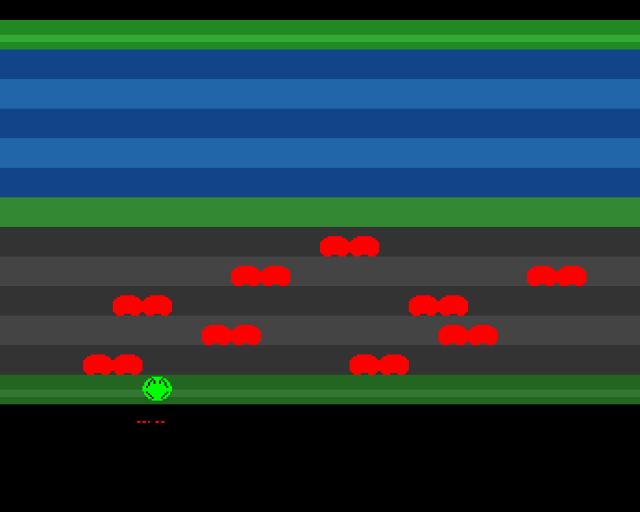
One car doesn’t make a game. This unit adds ten cars across all five road lanes, each moving at different speeds. Some go left, some go right. The result: a busy road that’s challenging to cross.
By the end of this unit:
- 10 cars across 5 road lanes
- 2 cars per lane, staggered positions
- Different speeds per lane
- Bidirectional traffic
- Screen wrapping at edges
Object Data Structures
Each car needs several properties. We store them in a simple array:
; Car Data Structure
; 8 bytes per car: X position, row, speed, padding

; Constants
NUM_CARS        equ 10          ; Total cars
CAR_STRUCT_SIZE equ 8           ; Bytes per car

; Structure layout:
;   Offset 0: X position (word) - pixel position 0-319
;   Offset 2: Row (word) - grid row 7-11 (road lanes)
;   Offset 4: Speed (word) - signed: positive=right, negative=left
;   Offset 6: Reserved (word) - padding for alignment

car_data:
            ; Lane 1 (row 7) - moving right, speed 1
            dc.w    0,7,1,0
            dc.w    160,7,1,0

            ; Lane 2 (row 8) - moving left, speed -2
            dc.w    100,8,-2,0
            dc.w    250,8,-2,0

            ; Lane 3 (row 9) - moving right, speed 2
            dc.w    50,9,2,0
            dc.w    200,9,2,0

            ; Lane 4 (row 10) - moving left, speed -1
            dc.w    80,10,-1,0
            dc.w    220,10,-1,0

            ; Lane 5 (row 11) - moving right, speed 3
            dc.w    30,11,3,0
            dc.w    180,11,3,0
Speed is signed: positive values move right, negative values move left.
The Car Loop
Each frame, we process all cars in three passes:
mainloop:
    bsr     wait_vblank
    bsr     update_frog
    bsr     update_sprite

    bsr     erase_all_cars      ; Pass 1: Clear old positions
    bsr     move_all_cars       ; Pass 2: Update positions
    bsr     draw_all_cars       ; Pass 3: Draw new positions

    bra     mainloop
Why three passes? Erasing all cars first prevents visual glitches where a fast car might be drawn before a slow car in the same area is erased.
Processing All Cars
We use a register as a pointer to walk through the car array. The movement routine also handles screen wrapping:
; Move All Cars with Screen Wrapping
; Update each car's X position, wrap at screen edges

move_all_cars:
            lea     car_data,a2
            moveq   #NUM_CARS-1,d7

.loop:
            move.w  (a2),d0             ; X position
            move.w  4(a2),d1            ; Speed (signed)
            add.w   d1,d0               ; Move

            ; --- Wrap at screen edges ---
            tst.w   d1                  ; Check direction
            bmi.s   .check_left

            ; Moving right: wrap when past right edge
            cmp.w   #320,d0
            blt.s   .store
            sub.w   #320+32,d0          ; Wrap from right to left
            bra.s   .store

.check_left:
            ; Moving left: wrap when past left edge
            cmp.w   #-32,d0
            bgt.s   .store
            add.w   #320+32,d0          ; Wrap from left to right

.store:
            move.w  d0,(a2)             ; Store new X

            lea     CAR_STRUCT_SIZE(a2),a2
            dbf     d7,.loop
            rts
The dbf instruction (Decrement and Branch if False) is the 68000’s loop primitive. It decrements the counter and branches if the result isn’t -1.
We wrap at -32 and 320 to account for the car’s 32-pixel width. This ensures cars fully exit before reappearing.
Lane Configuration
Each lane has its own character:
| Lane | Row | Speed | Direction | Feel |
|---|---|---|---|---|
| 1 | 7 | 1 | Right | Slow and steady |
| 2 | 8 | 2 | Left | Quick, watch out |
| 3 | 9 | 2 | Right | Quick matching |
| 4 | 10 | 1 | Left | Slow return |
| 5 | 11 | 3 | Right | Fast and dangerous |
The mix of speeds and directions creates interesting patterns for the player to navigate.
Skipping Offscreen Cars
When drawing, we skip cars that are completely offscreen:
; Draw All Cars with Blitter
; Loop through car data, skip offscreen, draw visible cars

draw_all_cars:
            lea     car_data,a2
            moveq   #NUM_CARS-1,d7

.loop:
            move.w  (a2),d0             ; X position
            move.w  2(a2),d1            ; Row

            ; Skip if offscreen
            cmp.w   #-32,d0
            blt.s   .next
            cmp.w   #320,d0
            bge.s   .next

            ; Calculate screen address and draw
            bsr     calc_screen_addr
            bsr     wait_blit

            ; Set up Blitter for A→D copy
            move.l  #car_gfx,BLTAPTH(a5)
            move.l  a0,BLTDPTH(a5)
            move.w  #$ffff,BLTAFWM(a5)
            move.w  #$ffff,BLTALWM(a5)
            move.w  #0,BLTAMOD(a5)
            move.w  #SCREEN_W-CAR_WIDTH*2,BLTDMOD(a5)
            move.w  #$09f0,BLTCON0(a5)  ; A→D copy
            move.w  #0,BLTCON1(a5)
            move.w  #(CAR_HEIGHT<<6)|CAR_WIDTH,BLTSIZE(a5)

.next:
            lea     CAR_STRUCT_SIZE(a2),a2
            dbf     d7,.loop
            rts
This is a small optimisation, but more importantly it prevents drawing into invalid screen memory.
The Blitter Cost
Ten cars means ten blitter operations per frame for erasing, plus ten for drawing—twenty total. Each blit of a 32×12 car takes approximately:
Words per blit: 2 × 12 = 24 words
Cycles per word: ~4 DMA cycles
Total: ~96 DMA cycles per blit
20 blits: ~1920 DMA cycles
The Amiga has plenty of DMA bandwidth for this. We could easily have 50+ cars before running into trouble.
Why Not Use Sprites?
We’re using the frog as a sprite (which makes collision detection easier later). For cars, the Blitter approach works well because:
- All cars look the same: We reuse one graphic
- Cars move horizontally: Easy screen address calculation
- Many cars needed: More than 8 sprites would require multiplexing
- No transparency needed: Cars don’t overlap each other (much)
Key Takeaways
- Object arrays store multiple similar entities
- Three-pass update (erase, move, draw) prevents visual glitches
- Signed speed enables bidirectional movement
- Screen wrapping creates continuous traffic flow
- Offscreen culling prevents invalid memory access
- Blitter loops handle many objects efficiently
The Code
;══════════════════════════════════════════════════════════════════════════════
; SIGNAL - A Frogger-style game for the Commodore Amiga
; Unit 7: Cars on the Road
;
; One car isn't traffic. This unit adds multiple cars across all five road
; lanes, each moving at different speeds. Some go left, some go right.
; The Blitter draws them all efficiently using a loop.
;══════════════════════════════════════════════════════════════════════════════
;══════════════════════════════════════════════════════════════════════════════
; CONSTANTS
;══════════════════════════════════════════════════════════════════════════════
; Screen setup
SCREEN_W equ 40
SCREEN_H equ 256
PLANE_SIZE equ SCREEN_W*SCREEN_H
; Grid constants
GRID_COLS equ 20
GRID_ROWS equ 13
CELL_SIZE equ 16
GRID_ORIGIN_X equ 48
GRID_ORIGIN_Y equ 44
START_GRID_X equ 9
START_GRID_Y equ 12
; Frog animation
HOP_FRAMES equ 8
PIXELS_PER_FRAME equ 2
STATE_IDLE equ 0
STATE_HOPPING equ 1
DIR_UP equ 0
DIR_DOWN equ 1
DIR_LEFT equ 2
DIR_RIGHT equ 3
FROG_HEIGHT equ 16
; Car constants
NUM_CARS equ 10 ; Total cars
CAR_WIDTH equ 2 ; 32 pixels = 2 words
CAR_HEIGHT equ 12
CAR_STRUCT_SIZE equ 8 ; Bytes per car: x(2), row(2), speed(2), pad(2)
; Zone colours
COLOUR_BLACK equ $0000
COLOUR_HOME equ $0282
COLOUR_HOME_LIT equ $03a3
COLOUR_WATER1 equ $0148
COLOUR_WATER2 equ $026a
COLOUR_MEDIAN equ $0383
COLOUR_ROAD1 equ $0333
COLOUR_ROAD2 equ $0444
COLOUR_START equ $0262
COLOUR_START_LIT equ $0373
; Sprite and car colours
COLOUR_FROG equ $00f0
COLOUR_EYES equ $0ff0
COLOUR_OUTLINE equ $0000
COLOUR_CAR equ $0f00
;══════════════════════════════════════════════════════════════════════════════
; HARDWARE REGISTERS
;══════════════════════════════════════════════════════════════════════════════
CUSTOM equ $dff000
DMACONR equ $002
VPOSR equ $004
JOY1DAT equ $00c
BLTCON0 equ $040
BLTCON1 equ $042
BLTAFWM equ $044
BLTALWM equ $046
BLTCPTH equ $048
BLTBPTH equ $04c
BLTAPTH equ $050
BLTDPTH equ $054
BLTSIZE equ $058
BLTCMOD equ $060
BLTBMOD equ $062
BLTAMOD equ $064
BLTDMOD equ $066
COP1LC equ $080
COPJMP1 equ $088
DMACON equ $096
INTENA equ $09a
INTREQ equ $09c
COLOR00 equ $180
SPR0PTH equ $120
SPR0PTL equ $122
;══════════════════════════════════════════════════════════════════════════════
; CODE SECTION
;══════════════════════════════════════════════════════════════════════════════
section code,code_c
start:
lea CUSTOM,a5
; --- System takeover ---
move.w #$7fff,INTENA(a5)
move.w #$7fff,INTREQ(a5)
move.w #$7fff,DMACON(a5)
; --- Clear screen ---
bsr clear_screen
; --- Set up bitplane pointer ---
lea screen_plane,a0
move.l a0,d0
swap d0
lea bplpth_val,a1
move.w d0,(a1)
swap d0
lea bplptl_val,a1
move.w d0,(a1)
; --- Initialise frog ---
move.w #START_GRID_X,frog_grid_x
move.w #START_GRID_Y,frog_grid_y
move.w #STATE_IDLE,frog_state
clr.w joy_prev
bsr grid_to_pixels
; --- Set sprite pointer ---
lea frog_data,a0
move.l a0,d0
swap d0
lea sprpth_val,a1
move.w d0,(a1)
swap d0
lea sprptl_val,a1
move.w d0,(a1)
bsr update_sprite
; --- Install copper list ---
lea copperlist,a0
move.l a0,COP1LC(a5)
move.w d0,COPJMP1(a5)
; --- Enable DMA ---
move.w #$87e0,DMACON(a5)
;══════════════════════════════════════════════════════════════════════════════
; MAIN LOOP
;══════════════════════════════════════════════════════════════════════════════
mainloop:
bsr wait_vblank
; --- Update frog ---
bsr update_frog
bsr update_sprite
; --- Update cars ---
bsr erase_all_cars
bsr move_all_cars
bsr draw_all_cars
bra mainloop
;══════════════════════════════════════════════════════════════════════════════
; CAR MANAGEMENT
;══════════════════════════════════════════════════════════════════════════════
;------------------------------------------------------------------------------
; ERASE_ALL_CARS - Clear all cars from screen
;------------------------------------------------------------------------------
erase_all_cars:
lea car_data,a2
moveq #NUM_CARS-1,d7
.loop:
move.w (a2),d0 ; X position
move.w 2(a2),d1 ; Row
bsr calc_screen_addr
bsr wait_blit
move.l a0,BLTDPTH(a5)
move.w #SCREEN_W-CAR_WIDTH*2,BLTDMOD(a5)
move.w #$0100,BLTCON0(a5)
move.w #0,BLTCON1(a5)
move.w #(CAR_HEIGHT<<6)|CAR_WIDTH,BLTSIZE(a5)
lea CAR_STRUCT_SIZE(a2),a2
dbf d7,.loop
rts
;------------------------------------------------------------------------------
; MOVE_ALL_CARS - Update all car positions
;------------------------------------------------------------------------------
move_all_cars:
lea car_data,a2
moveq #NUM_CARS-1,d7
.loop:
move.w (a2),d0 ; X position
move.w 4(a2),d1 ; Speed (signed)
add.w d1,d0 ; Move
; --- Wrap at screen edges ---
tst.w d1 ; Check direction
bmi.s .check_left
; Moving right
cmp.w #320,d0
blt.s .store
sub.w #320+32,d0 ; Wrap from right to left
bra.s .store
.check_left:
; Moving left
cmp.w #-32,d0
bgt.s .store
add.w #320+32,d0 ; Wrap from left to right
.store:
move.w d0,(a2) ; Store new X
lea CAR_STRUCT_SIZE(a2),a2
dbf d7,.loop
rts
;------------------------------------------------------------------------------
; DRAW_ALL_CARS - Draw all cars to screen
;------------------------------------------------------------------------------
draw_all_cars:
lea car_data,a2
moveq #NUM_CARS-1,d7
.loop:
move.w (a2),d0 ; X position
move.w 2(a2),d1 ; Row
; Skip if offscreen
cmp.w #-32,d0
blt.s .next
cmp.w #320,d0
bge.s .next
bsr calc_screen_addr
bsr wait_blit
move.l #car_gfx,BLTAPTH(a5)
move.l a0,BLTDPTH(a5)
move.w #$ffff,BLTAFWM(a5)
move.w #$ffff,BLTALWM(a5)
move.w #0,BLTAMOD(a5)
move.w #SCREEN_W-CAR_WIDTH*2,BLTDMOD(a5)
move.w #$09f0,BLTCON0(a5)
move.w #0,BLTCON1(a5)
move.w #(CAR_HEIGHT<<6)|CAR_WIDTH,BLTSIZE(a5)
.next:
lea CAR_STRUCT_SIZE(a2),a2
dbf d7,.loop
rts
;══════════════════════════════════════════════════════════════════════════════
; BLITTER UTILITIES
;══════════════════════════════════════════════════════════════════════════════
wait_blit:
btst #6,DMACONR(a5)
bne.s wait_blit
rts
clear_screen:
bsr.s wait_blit
move.l #screen_plane,BLTDPTH(a5)
move.w #0,BLTDMOD(a5)
move.w #$0100,BLTCON0(a5)
move.w #0,BLTCON1(a5)
move.w #(SCREEN_H<<6)|SCREEN_W/2,BLTSIZE(a5)
rts
calc_screen_addr:
; D0 = pixel X, D1 = row number -> A0 = screen address
lea screen_plane,a0
move.w d1,d2
mulu #CELL_SIZE,d2
add.w #GRID_ORIGIN_Y,d2
mulu #SCREEN_W,d2
add.l d2,a0
move.w d0,d2
lsr.w #3,d2
ext.l d2
add.l d2,a0
rts
;══════════════════════════════════════════════════════════════════════════════
; FROG ROUTINES
;══════════════════════════════════════════════════════════════════════════════
update_frog:
tst.w frog_state
beq .idle
bra .hopping
.idle:
bsr read_joystick_edge
tst.w d0
beq .done
btst #8,d0
beq.s .not_up
move.w frog_grid_y,d1
tst.w d1
beq.s .not_up
move.w #DIR_UP,frog_dir
bra.s .start_hop
.not_up:
btst #0,d0
beq.s .not_down
move.w frog_grid_y,d1
cmp.w #GRID_ROWS-1,d1
beq.s .not_down
move.w #DIR_DOWN,frog_dir
bra.s .start_hop
.not_down:
btst #9,d0
beq.s .not_left
move.w frog_grid_x,d1
tst.w d1
beq.s .not_left
move.w #DIR_LEFT,frog_dir
bra.s .start_hop
.not_left:
btst #1,d0
beq .done
move.w frog_grid_x,d1
cmp.w #GRID_COLS-1,d1
beq .done
move.w #DIR_RIGHT,frog_dir
.start_hop:
move.w #STATE_HOPPING,frog_state
clr.w frog_anim_frame
bra.s .done
.hopping:
addq.w #1,frog_anim_frame
move.w frog_dir,d0
cmp.w #DIR_UP,d0
bne.s .hop_not_up
sub.w #PIXELS_PER_FRAME,frog_pixel_y
bra.s .check_done
.hop_not_up:
cmp.w #DIR_DOWN,d0
bne.s .hop_not_down
add.w #PIXELS_PER_FRAME,frog_pixel_y
bra.s .check_done
.hop_not_down:
cmp.w #DIR_LEFT,d0
bne.s .hop_not_left
sub.w #PIXELS_PER_FRAME,frog_pixel_x
bra.s .check_done
.hop_not_left:
add.w #PIXELS_PER_FRAME,frog_pixel_x
.check_done:
cmp.w #HOP_FRAMES,frog_anim_frame
blt.s .done
move.w frog_dir,d0
cmp.w #DIR_UP,d0
bne.s .end_not_up
subq.w #1,frog_grid_y
bra.s .snap
.end_not_up:
cmp.w #DIR_DOWN,d0
bne.s .end_not_down
addq.w #1,frog_grid_y
bra.s .snap
.end_not_down:
cmp.w #DIR_LEFT,d0
bne.s .end_not_left
subq.w #1,frog_grid_x
bra.s .snap
.end_not_left:
addq.w #1,frog_grid_x
.snap:
bsr grid_to_pixels
move.w #STATE_IDLE,frog_state
.done:
rts
grid_to_pixels:
move.w frog_grid_x,d0
mulu #CELL_SIZE,d0
add.w #GRID_ORIGIN_X,d0
move.w d0,frog_pixel_x
move.w frog_grid_y,d0
mulu #CELL_SIZE,d0
add.w #GRID_ORIGIN_Y,d0
move.w d0,frog_pixel_y
rts
read_joystick_edge:
move.w JOY1DAT(a5),d0
move.w d0,d1
lsr.w #1,d1
eor.w d1,d0
move.w joy_prev,d1
not.w d1
and.w d0,d1
move.w d0,joy_prev
move.w d1,d0
rts
wait_vblank:
move.l #$1ff00,d1
.wait:
move.l VPOSR(a5),d0
and.l d1,d0
bne.s .wait
rts
update_sprite:
lea frog_data,a0
move.w frog_pixel_y,d0
move.w frog_pixel_x,d1
move.w d0,d2
lsl.w #8,d2
lsr.w #1,d1
or.b d1,d2
move.w d2,(a0)
add.w #FROG_HEIGHT,d0
lsl.w #8,d0
move.w d0,2(a0)
rts
;══════════════════════════════════════════════════════════════════════════════
; VARIABLES
;══════════════════════════════════════════════════════════════════════════════
frog_grid_x: dc.w 9
frog_grid_y: dc.w 12
frog_pixel_x: dc.w 0
frog_pixel_y: dc.w 0
frog_state: dc.w 0
frog_dir: dc.w 0
frog_anim_frame: dc.w 0
joy_prev: dc.w 0
; Car data: X position, Row, Speed, (padding)
; Row 7 = road lane 1 (rows 7-11 are road lanes)
car_data:
; Lane 1 (row 7) - moving right, speed 1
dc.w 0,7,1,0
dc.w 160,7,1,0
; Lane 2 (row 8) - moving left, speed -2
dc.w 100,8,-2,0
dc.w 250,8,-2,0
; Lane 3 (row 9) - moving right, speed 2
dc.w 50,9,2,0
dc.w 200,9,2,0
; Lane 4 (row 10) - moving left, speed -1
dc.w 80,10,-1,0
dc.w 220,10,-1,0
; Lane 5 (row 11) - moving right, speed 3
dc.w 30,11,3,0
dc.w 180,11,3,0
;══════════════════════════════════════════════════════════════════════════════
; COPPER LIST
;══════════════════════════════════════════════════════════════════════════════
copperlist:
dc.w COLOR00,COLOUR_BLACK
dc.w $0100,$1200
dc.w $0102,$0000
dc.w $0104,$0000
dc.w $0108,$0000
dc.w $010a,$0000
dc.w $00e0
bplpth_val: dc.w $0000
dc.w $00e2
bplptl_val: dc.w $0000
dc.w $0180,$0000
dc.w $0182,COLOUR_CAR
dc.w $01a2,COLOUR_FROG
dc.w $01a4,COLOUR_EYES
dc.w $01a6,COLOUR_OUTLINE
dc.w SPR0PTH
sprpth_val: dc.w $0000
dc.w SPR0PTL
sprptl_val: dc.w $0000
; ROW 1: HOME ZONE
dc.w $2c07,$fffe
dc.w COLOR00,COLOUR_HOME
dc.w $3407,$fffe
dc.w COLOR00,COLOUR_HOME_LIT
dc.w $3807,$fffe
dc.w COLOR00,COLOUR_HOME
; ROWS 2-6: WATER ZONE
dc.w $3c07,$fffe
dc.w COLOR00,COLOUR_WATER1
dc.w $4c07,$fffe
dc.w COLOR00,COLOUR_WATER2
dc.w $5c07,$fffe
dc.w COLOR00,COLOUR_WATER1
dc.w $6c07,$fffe
dc.w COLOR00,COLOUR_WATER2
dc.w $7c07,$fffe
dc.w COLOR00,COLOUR_WATER1
; ROW 7: MEDIAN
dc.w $8c07,$fffe
dc.w COLOR00,COLOUR_MEDIAN
; ROWS 8-12: ROAD ZONE
dc.w $9c07,$fffe
dc.w COLOR00,COLOUR_ROAD1
dc.w $ac07,$fffe
dc.w COLOR00,COLOUR_ROAD2
dc.w $bc07,$fffe
dc.w COLOR00,COLOUR_ROAD1
dc.w $cc07,$fffe
dc.w COLOR00,COLOUR_ROAD2
dc.w $dc07,$fffe
dc.w COLOR00,COLOUR_ROAD1
; ROW 13: START ZONE
dc.w $ec07,$fffe
dc.w COLOR00,COLOUR_START
dc.w $f407,$fffe
dc.w COLOR00,COLOUR_START_LIT
dc.w $f807,$fffe
dc.w COLOR00,COLOUR_START
dc.w $fc07,$fffe
dc.w COLOR00,COLOUR_BLACK
dc.w $ffff,$fffe
;══════════════════════════════════════════════════════════════════════════════
; GRAPHICS DATA
;══════════════════════════════════════════════════════════════════════════════
even
car_gfx:
dc.w $0ff0,$0ff0
dc.w $3ffc,$3ffc
dc.w $7ffe,$7ffe
dc.w $ffff,$ffff
dc.w $ffff,$ffff
dc.w $ffff,$ffff
dc.w $ffff,$ffff
dc.w $ffff,$ffff
dc.w $ffff,$ffff
dc.w $7ffe,$7ffe
dc.w $3c3c,$3c3c
dc.w $0000,$0000
even
frog_data:
dc.w $ec50,$fc00
dc.w $0000,$0000
dc.w $07e0,$0000
dc.w $1ff8,$0420
dc.w $3ffc,$0a50
dc.w $7ffe,$1248
dc.w $7ffe,$1008
dc.w $ffff,$2004
dc.w $ffff,$0000
dc.w $ffff,$0000
dc.w $7ffe,$2004
dc.w $7ffe,$1008
dc.w $3ffc,$0810
dc.w $1ff8,$0420
dc.w $07e0,$0000
dc.w $0000,$0000
dc.w $0000,$0000
dc.w $0000,$0000
;══════════════════════════════════════════════════════════════════════════════
; SCREEN BUFFER
;══════════════════════════════════════════════════════════════════════════════
section chipbss,bss_c
even
screen_plane:
ds.b PLANE_SIZE
Build It
vasmm68k_mot -Fhunkexe -kick1hunks -o signal signal.asmWhat’s Next
Traffic fills the road, but the frog can walk right through it! In Unit 8, we’ll add collision detection—finally making the game dangerous.
What Changed
| 1 | 1 | ;══════════════════════════════════════════════════════════════════════════════ | |
| 2 | 2 | ; SIGNAL - A Frogger-style game for the Commodore Amiga | |
| 3 | - | ; Unit 6: The Blitter Introduction | |
| 4 | - | ; | |
| 5 | - | ; Hardware sprites are limited to 8. A Frogger game needs dozens of moving | |
| 6 | - | ; objects: cars, trucks, logs, turtles. The solution? The Blitter—a DMA | |
| 7 | - | ; coprocessor that copies rectangular blocks of memory at high speed. | |
| 3 | + | ; Unit 7: Cars on the Road | |
| 8 | 4 | ; | |
| 9 | - | ; This unit introduces the Blitter with a simple demonstration: one car | |
| 10 | - | ; driving across the road, drawn using the Blitter instead of sprites. | |
| 5 | + | ; One car isn't traffic. This unit adds multiple cars across all five road | |
| 6 | + | ; lanes, each moving at different speeds. Some go left, some go right. | |
| 7 | + | ; The Blitter draws them all efficiently using a loop. | |
| 11 | 8 | ;══════════════════════════════════════════════════════════════════════════════ | |
| 12 | 9 | | |
| 13 | 10 | ;══════════════════════════════════════════════════════════════════════════════ | |
| ... | |||
| 15 | 12 | ;══════════════════════════════════════════════════════════════════════════════ | |
| 16 | 13 | | |
| 17 | 14 | ; Screen setup | |
| 18 | - | SCREEN_W equ 40 ; 320 pixels = 40 bytes per line | |
| 19 | - | SCREEN_H equ 256 ; PAL lines | |
| 20 | - | PLANE_SIZE equ SCREEN_W*SCREEN_H ; 10240 bytes per bitplane | |
| 15 | + | SCREEN_W equ 40 | |
| 16 | + | SCREEN_H equ 256 | |
| 17 | + | PLANE_SIZE equ SCREEN_W*SCREEN_H | |
| 21 | 18 | | |
| 22 | - | ; Grid constants (from Unit 5) | |
| 19 | + | ; Grid constants | |
| 23 | 20 | GRID_COLS equ 20 | |
| 24 | 21 | GRID_ROWS equ 13 | |
| 25 | 22 | CELL_SIZE equ 16 | |
| ... | |||
| 28 | 25 | START_GRID_X equ 9 | |
| 29 | 26 | START_GRID_Y equ 12 | |
| 30 | 27 | | |
| 31 | - | ; Animation | |
| 28 | + | ; Frog animation | |
| 32 | 29 | HOP_FRAMES equ 8 | |
| 33 | 30 | PIXELS_PER_FRAME equ 2 | |
| 34 | 31 | STATE_IDLE equ 0 | |
| ... | |||
| 40 | 37 | FROG_HEIGHT equ 16 | |
| 41 | 38 | | |
| 42 | 39 | ; Car constants | |
| 40 | + | NUM_CARS equ 10 ; Total cars | |
| 43 | 41 | CAR_WIDTH equ 2 ; 32 pixels = 2 words | |
| 44 | - | CAR_HEIGHT equ 12 ; 12 lines tall | |
| 45 | - | CAR_SPEED equ 2 ; Pixels per frame | |
| 46 | - | CAR_ROW equ 10 ; Road lane (row 10 = scanline 204) | |
| 42 | + | CAR_HEIGHT equ 12 | |
| 43 | + | CAR_STRUCT_SIZE equ 8 ; Bytes per car: x(2), row(2), speed(2), pad(2) | |
| 47 | 44 | | |
| 48 | 45 | ; Zone colours | |
| 49 | 46 | COLOUR_BLACK equ $0000 | |
| ... | |||
| 57 | 54 | COLOUR_START equ $0262 | |
| 58 | 55 | COLOUR_START_LIT equ $0373 | |
| 59 | 56 | | |
| 60 | - | ; Sprite and playfield colours | |
| 57 | + | ; Sprite and car colours | |
| 61 | 58 | COLOUR_FROG equ $00f0 | |
| 62 | 59 | COLOUR_EYES equ $0ff0 | |
| 63 | 60 | COLOUR_OUTLINE equ $0000 | |
| 64 | - | COLOUR_CAR equ $0f00 ; Red car on bitplane | |
| 61 | + | COLOUR_CAR equ $0f00 | |
| 65 | 62 | | |
| 66 | 63 | ;══════════════════════════════════════════════════════════════════════════════ | |
| 67 | 64 | ; HARDWARE REGISTERS | |
| ... | |||
| 73 | 70 | VPOSR equ $004 | |
| 74 | 71 | JOY1DAT equ $00c | |
| 75 | 72 | | |
| 76 | - | ; Blitter registers | |
| 77 | 73 | BLTCON0 equ $040 | |
| 78 | 74 | BLTCON1 equ $042 | |
| 79 | 75 | BLTAFWM equ $044 | |
| ... | |||
| 114 | 110 | ; --- Clear screen --- | |
| 115 | 111 | bsr clear_screen | |
| 116 | 112 | | |
| 117 | - | ; --- Set up bitplane pointer in copper list --- | |
| 113 | + | ; --- Set up bitplane pointer --- | |
| 118 | 114 | lea screen_plane,a0 | |
| 119 | 115 | move.l a0,d0 | |
| 120 | 116 | swap d0 | |
| ... | |||
| 140 | 136 | swap d0 | |
| 141 | 137 | lea sprptl_val,a1 | |
| 142 | 138 | move.w d0,(a1) | |
| 143 | - | | |
| 144 | 139 | bsr update_sprite | |
| 145 | - | | |
| 146 | - | ; --- Initialise car --- | |
| 147 | - | clr.w car_x | |
| 148 | 140 | | |
| 149 | 141 | ; --- Install copper list --- | |
| 150 | 142 | lea copperlist,a0 | |
| 151 | 143 | move.l a0,COP1LC(a5) | |
| 152 | 144 | move.w d0,COPJMP1(a5) | |
| 153 | 145 | | |
| 154 | - | ; --- Enable DMA (including Blitter) --- | |
| 155 | - | move.w #$87e0,DMACON(a5) ; Master + blit + copper + bitplane + sprite | |
| 146 | + | ; --- Enable DMA --- | |
| 147 | + | move.w #$87e0,DMACON(a5) | |
| 156 | 148 | | |
| 157 | 149 | ;══════════════════════════════════════════════════════════════════════════════ | |
| 158 | 150 | ; MAIN LOOP | |
| ... | |||
| 165 | 157 | bsr update_frog | |
| 166 | 158 | bsr update_sprite | |
| 167 | 159 | | |
| 168 | - | ; --- Update car --- | |
| 169 | - | bsr erase_car ; Erase at old position | |
| 170 | - | bsr move_car ; Update position | |
| 171 | - | bsr draw_car ; Draw at new position | |
| 160 | + | ; --- Update cars --- | |
| 161 | + | bsr erase_all_cars | |
| 162 | + | bsr move_all_cars | |
| 163 | + | bsr draw_all_cars | |
| 172 | 164 | | |
| 173 | 165 | bra mainloop | |
| 174 | 166 | | |
| 175 | 167 | ;══════════════════════════════════════════════════════════════════════════════ | |
| 176 | - | ; BLITTER ROUTINES | |
| 168 | + | ; CAR MANAGEMENT | |
| 177 | 169 | ;══════════════════════════════════════════════════════════════════════════════ | |
| 178 | 170 | | |
| 179 | 171 | ;------------------------------------------------------------------------------ | |
| 180 | - | ; WAIT_BLIT - Wait for Blitter to finish | |
| 172 | + | ; ERASE_ALL_CARS - Clear all cars from screen | |
| 181 | 173 | ;------------------------------------------------------------------------------ | |
| 182 | - | wait_blit: | |
| 183 | - | btst #6,DMACONR(a5) ; Test BBUSY flag | |
| 184 | - | bne.s wait_blit ; Loop while busy | |
| 185 | - | rts | |
| 174 | + | erase_all_cars: | |
| 175 | + | lea car_data,a2 | |
| 176 | + | moveq #NUM_CARS-1,d7 | |
| 186 | 177 | | |
| 187 | - | ;------------------------------------------------------------------------------ | |
| 188 | - | ; CLEAR_SCREEN - Clear the screen buffer using Blitter | |
| 189 | - | ;------------------------------------------------------------------------------ | |
| 190 | - | clear_screen: | |
| 191 | - | bsr.s wait_blit | |
| 178 | + | .loop: | |
| 179 | + | move.w (a2),d0 ; X position | |
| 180 | + | move.w 2(a2),d1 ; Row | |
| 192 | 181 | | |
| 193 | - | ; Clear entire plane: D channel only, minterm = 0 | |
| 194 | - | move.l #screen_plane,BLTDPTH(a5) | |
| 195 | - | move.w #0,BLTDMOD(a5) ; No modulo (continuous) | |
| 196 | - | move.w #$0100,BLTCON0(a5) ; D only, minterm 0 (clear) | |
| 182 | + | bsr calc_screen_addr | |
| 183 | + | bsr wait_blit | |
| 184 | + | | |
| 185 | + | move.l a0,BLTDPTH(a5) | |
| 186 | + | move.w #SCREEN_W-CAR_WIDTH*2,BLTDMOD(a5) | |
| 187 | + | move.w #$0100,BLTCON0(a5) | |
| 197 | 188 | move.w #0,BLTCON1(a5) | |
| 198 | - | move.w #(SCREEN_H<<6)|SCREEN_W/2,BLTSIZE(a5) ; Trigger! | |
| 189 | + | move.w #(CAR_HEIGHT<<6)|CAR_WIDTH,BLTSIZE(a5) | |
| 199 | 190 | | |
| 191 | + | lea CAR_STRUCT_SIZE(a2),a2 | |
| 192 | + | dbf d7,.loop | |
| 200 | 193 | rts | |
| 201 | 194 | | |
| 202 | 195 | ;------------------------------------------------------------------------------ | |
| 203 | - | ; ERASE_CAR - Clear car at current position | |
| 196 | + | ; MOVE_ALL_CARS - Update all car positions | |
| 204 | 197 | ;------------------------------------------------------------------------------ | |
| 205 | - | erase_car: | |
| 206 | - | bsr.s wait_blit | |
| 198 | + | move_all_cars: | |
| 199 | + | lea car_data,a2 | |
| 200 | + | moveq #NUM_CARS-1,d7 | |
| 207 | 201 | | |
| 208 | - | ; Calculate screen address for car position | |
| 209 | - | move.w car_x,d0 | |
| 210 | - | move.w #CAR_ROW,d1 | |
| 211 | - | bsr calc_screen_addr ; A0 = destination | |
| 202 | + | .loop: | |
| 203 | + | move.w (a2),d0 ; X position | |
| 204 | + | move.w 4(a2),d1 ; Speed (signed) | |
| 205 | + | add.w d1,d0 ; Move | |
| 212 | 206 | | |
| 213 | - | ; Erase: D channel only, minterm 0 | |
| 214 | - | move.l a0,BLTDPTH(a5) | |
| 215 | - | move.w #SCREEN_W-CAR_WIDTH*2,BLTDMOD(a5) | |
| 216 | - | move.w #$0100,BLTCON0(a5) | |
| 217 | - | move.w #0,BLTCON1(a5) | |
| 218 | - | move.w #(CAR_HEIGHT<<6)|CAR_WIDTH,BLTSIZE(a5) | |
| 207 | + | ; --- Wrap at screen edges --- | |
| 208 | + | tst.w d1 ; Check direction | |
| 209 | + | bmi.s .check_left | |
| 210 | + | | |
| 211 | + | ; Moving right | |
| 212 | + | cmp.w #320,d0 | |
| 213 | + | blt.s .store | |
| 214 | + | sub.w #320+32,d0 ; Wrap from right to left | |
| 215 | + | bra.s .store | |
| 216 | + | | |
| 217 | + | .check_left: | |
| 218 | + | ; Moving left | |
| 219 | + | cmp.w #-32,d0 | |
| 220 | + | bgt.s .store | |
| 221 | + | add.w #320+32,d0 ; Wrap from left to right | |
| 222 | + | | |
| 223 | + | .store: | |
| 224 | + | move.w d0,(a2) ; Store new X | |
| 219 | 225 | | |
| 226 | + | lea CAR_STRUCT_SIZE(a2),a2 | |
| 227 | + | dbf d7,.loop | |
| 220 | 228 | rts | |
| 221 | 229 | | |
| 222 | 230 | ;------------------------------------------------------------------------------ | |
| 223 | - | ; DRAW_CAR - Draw car at current position using Blitter | |
| 231 | + | ; DRAW_ALL_CARS - Draw all cars to screen | |
| 224 | 232 | ;------------------------------------------------------------------------------ | |
| 225 | - | draw_car: | |
| 226 | - | bsr.s wait_blit | |
| 233 | + | draw_all_cars: | |
| 234 | + | lea car_data,a2 | |
| 235 | + | moveq #NUM_CARS-1,d7 | |
| 227 | 236 | | |
| 228 | - | ; Calculate screen address | |
| 229 | - | move.w car_x,d0 | |
| 230 | - | move.w #CAR_ROW,d1 | |
| 231 | - | bsr calc_screen_addr ; A0 = destination | |
| 237 | + | .loop: | |
| 238 | + | move.w (a2),d0 ; X position | |
| 239 | + | move.w 2(a2),d1 ; Row | |
| 232 | 240 | | |
| 233 | - | ; Copy A→D: source graphics to screen | |
| 241 | + | ; Skip if offscreen | |
| 242 | + | cmp.w #-32,d0 | |
| 243 | + | blt.s .next | |
| 244 | + | cmp.w #320,d0 | |
| 245 | + | bge.s .next | |
| 246 | + | | |
| 247 | + | bsr calc_screen_addr | |
| 248 | + | bsr wait_blit | |
| 249 | + | | |
| 234 | 250 | move.l #car_gfx,BLTAPTH(a5) | |
| 235 | 251 | move.l a0,BLTDPTH(a5) | |
| 236 | - | | |
| 237 | - | move.w #$ffff,BLTAFWM(a5) ; No masking | |
| 252 | + | move.w #$ffff,BLTAFWM(a5) | |
| 238 | 253 | move.w #$ffff,BLTALWM(a5) | |
| 239 | - | move.w #0,BLTAMOD(a5) ; Source: no gaps | |
| 240 | - | move.w #SCREEN_W-CAR_WIDTH*2,BLTDMOD(a5) ; Dest: screen width | |
| 241 | - | move.w #$09f0,BLTCON0(a5) ; A→D, D=A | |
| 254 | + | move.w #0,BLTAMOD(a5) | |
| 255 | + | move.w #SCREEN_W-CAR_WIDTH*2,BLTDMOD(a5) | |
| 256 | + | move.w #$09f0,BLTCON0(a5) | |
| 242 | 257 | move.w #0,BLTCON1(a5) | |
| 243 | - | move.w #(CAR_HEIGHT<<6)|CAR_WIDTH,BLTSIZE(a5) ; Trigger! | |
| 258 | + | move.w #(CAR_HEIGHT<<6)|CAR_WIDTH,BLTSIZE(a5) | |
| 244 | 259 | | |
| 260 | + | .next: | |
| 261 | + | lea CAR_STRUCT_SIZE(a2),a2 | |
| 262 | + | dbf d7,.loop | |
| 245 | 263 | rts | |
| 246 | 264 | | |
| 247 | - | ;------------------------------------------------------------------------------ | |
| 248 | - | ; CALC_SCREEN_ADDR - Calculate screen address from grid position | |
| 249 | - | ;------------------------------------------------------------------------------ | |
| 250 | - | ; Input: D0 = pixel X, D1 = row number | |
| 251 | - | ; Output: A0 = screen address | |
| 265 | + | ;══════════════════════════════════════════════════════════════════════════════ | |
| 266 | + | ; BLITTER UTILITIES | |
| 267 | + | ;══════════════════════════════════════════════════════════════════════════════ | |
| 268 | + | | |
| 269 | + | wait_blit: | |
| 270 | + | btst #6,DMACONR(a5) | |
| 271 | + | bne.s wait_blit | |
| 272 | + | rts | |
| 273 | + | | |
| 274 | + | clear_screen: | |
| 275 | + | bsr.s wait_blit | |
| 276 | + | move.l #screen_plane,BLTDPTH(a5) | |
| 277 | + | move.w #0,BLTDMOD(a5) | |
| 278 | + | move.w #$0100,BLTCON0(a5) | |
| 279 | + | move.w #0,BLTCON1(a5) | |
| 280 | + | move.w #(SCREEN_H<<6)|SCREEN_W/2,BLTSIZE(a5) | |
| 281 | + | rts | |
| 252 | 282 | | |
| 253 | 283 | calc_screen_addr: | |
| 284 | + | ; D0 = pixel X, D1 = row number -> A0 = screen address | |
| 254 | 285 | lea screen_plane,a0 | |
| 255 | 286 | | |
| 256 | - | ; Calculate Y offset: row × CELL_SIZE × SCREEN_W | |
| 257 | 287 | move.w d1,d2 | |
| 258 | - | mulu #CELL_SIZE,d2 ; D2 = row in pixels (from top of grid) | |
| 259 | - | add.w #GRID_ORIGIN_Y,d2 ; Add top margin | |
| 260 | - | mulu #SCREEN_W,d2 ; D2 = byte offset for Y | |
| 288 | + | mulu #CELL_SIZE,d2 | |
| 289 | + | add.w #GRID_ORIGIN_Y,d2 | |
| 290 | + | mulu #SCREEN_W,d2 | |
| 261 | 291 | add.l d2,a0 | |
| 262 | 292 | | |
| 263 | - | ; Calculate X offset: pixel_x / 8 (convert to bytes) | |
| 264 | 293 | move.w d0,d2 | |
| 265 | - | lsr.w #3,d2 ; D2 = X in bytes | |
| 294 | + | lsr.w #3,d2 | |
| 266 | 295 | ext.l d2 | |
| 267 | 296 | add.l d2,a0 | |
| 268 | - | | |
| 269 | - | rts | |
| 270 | - | | |
| 271 | - | ;------------------------------------------------------------------------------ | |
| 272 | - | ; MOVE_CAR - Update car position | |
| 273 | - | ;------------------------------------------------------------------------------ | |
| 274 | - | move_car: | |
| 275 | - | add.w #CAR_SPEED,car_x | |
| 276 | - | cmp.w #320,car_x | |
| 277 | - | blt.s .no_wrap | |
| 278 | - | clr.w car_x | |
| 279 | - | .no_wrap: | |
| 280 | 297 | rts | |
| 281 | 298 | | |
| 282 | 299 | ;══════════════════════════════════════════════════════════════════════════════ | |
| 283 | - | ; FROG ROUTINES (from Unit 5) | |
| 300 | + | ; FROG ROUTINES | |
| 284 | 301 | ;══════════════════════════════════════════════════════════════════════════════ | |
| 285 | 302 | | |
| 286 | 303 | update_frog: | |
| ... | |||
| 404 | 421 | | |
| 405 | 422 | move.w d1,d0 | |
| 406 | 423 | rts | |
| 407 | - | | |
| 408 | - | ;══════════════════════════════════════════════════════════════════════════════ | |
| 409 | - | ; UTILITY ROUTINES | |
| 410 | - | ;══════════════════════════════════════════════════════════════════════════════ | |
| 411 | 424 | | |
| 412 | 425 | wait_vblank: | |
| 413 | 426 | move.l #$1ff00,d1 | |
| ... | |||
| 446 | 459 | frog_anim_frame: dc.w 0 | |
| 447 | 460 | joy_prev: dc.w 0 | |
| 448 | 461 | | |
| 449 | - | car_x: dc.w 0 | |
| 462 | + | ; Car data: X position, Row, Speed, (padding) | |
| 463 | + | ; Row 7 = road lane 1 (rows 7-11 are road lanes) | |
| 464 | + | car_data: | |
| 465 | + | ; Lane 1 (row 7) - moving right, speed 1 | |
| 466 | + | dc.w 0,7,1,0 | |
| 467 | + | dc.w 160,7,1,0 | |
| 468 | + | | |
| 469 | + | ; Lane 2 (row 8) - moving left, speed -2 | |
| 470 | + | dc.w 100,8,-2,0 | |
| 471 | + | dc.w 250,8,-2,0 | |
| 472 | + | | |
| 473 | + | ; Lane 3 (row 9) - moving right, speed 2 | |
| 474 | + | dc.w 50,9,2,0 | |
| 475 | + | dc.w 200,9,2,0 | |
| 476 | + | | |
| 477 | + | ; Lane 4 (row 10) - moving left, speed -1 | |
| 478 | + | dc.w 80,10,-1,0 | |
| 479 | + | dc.w 220,10,-1,0 | |
| 480 | + | | |
| 481 | + | ; Lane 5 (row 11) - moving right, speed 3 | |
| 482 | + | dc.w 30,11,3,0 | |
| 483 | + | dc.w 180,11,3,0 | |
| 450 | 484 | | |
| 451 | 485 | ;══════════════════════════════════════════════════════════════════════════════ | |
| 452 | 486 | ; COPPER LIST | |
| ... | |||
| 455 | 489 | copperlist: | |
| 456 | 490 | dc.w COLOR00,COLOUR_BLACK | |
| 457 | 491 | | |
| 458 | - | ; --- Bitplane control: 1 plane, colour on --- | |
| 459 | - | dc.w $0100,$1200 ; BPLCON0: 1 plane | |
| 460 | - | dc.w $0102,$0000 ; BPLCON1: no scroll | |
| 461 | - | dc.w $0104,$0000 ; BPLCON2: default priority | |
| 462 | - | dc.w $0108,$0000 ; BPL1MOD | |
| 463 | - | dc.w $010a,$0000 ; BPL2MOD | |
| 492 | + | dc.w $0100,$1200 | |
| 493 | + | dc.w $0102,$0000 | |
| 494 | + | dc.w $0104,$0000 | |
| 495 | + | dc.w $0108,$0000 | |
| 496 | + | dc.w $010a,$0000 | |
| 464 | 497 | | |
| 465 | - | ; --- Bitplane pointer --- | |
| 466 | - | dc.w $00e0 ; BPL1PTH | |
| 498 | + | dc.w $00e0 | |
| 467 | 499 | bplpth_val: dc.w $0000 | |
| 468 | - | dc.w $00e2 ; BPL1PTL | |
| 500 | + | dc.w $00e2 | |
| 469 | 501 | bplptl_val: dc.w $0000 | |
| 470 | 502 | | |
| 471 | - | ; --- Playfield colours --- | |
| 472 | - | dc.w $0180,$0000 ; Colour 0: transparent (shows Copper bg) | |
| 473 | - | dc.w $0182,COLOUR_CAR ; Colour 1: red (car from bitplane) | |
| 503 | + | dc.w $0180,$0000 | |
| 504 | + | dc.w $0182,COLOUR_CAR | |
| 474 | 505 | | |
| 475 | - | ; --- Sprite palette --- | |
| 476 | 506 | dc.w $01a2,COLOUR_FROG | |
| 477 | 507 | dc.w $01a4,COLOUR_EYES | |
| 478 | 508 | dc.w $01a6,COLOUR_OUTLINE | |
| 479 | 509 | | |
| 480 | - | ; --- Sprite 0 pointer --- | |
| 481 | 510 | dc.w SPR0PTH | |
| 482 | 511 | sprpth_val: dc.w $0000 | |
| 483 | 512 | dc.w SPR0PTL | |
| ... | |||
| 527 | 556 | dc.w $f807,$fffe | |
| 528 | 557 | dc.w COLOR00,COLOUR_START | |
| 529 | 558 | | |
| 530 | - | ; BOTTOM BORDER | |
| 531 | 559 | dc.w $fc07,$fffe | |
| 532 | 560 | dc.w COLOR00,COLOUR_BLACK | |
| 533 | 561 | | |
| ... | |||
| 539 | 567 | | |
| 540 | 568 | even | |
| 541 | 569 | car_gfx: | |
| 542 | - | ; 32×12 pixel car (2 words wide × 12 lines) | |
| 543 | - | dc.w $0ff0,$0ff0 ; ..####....####.. | |
| 544 | - | dc.w $3ffc,$3ffc ; ##########..#### | |
| 545 | - | dc.w $7ffe,$7ffe ; ##############.. | |
| 546 | - | dc.w $ffff,$ffff ; ################ | |
| 547 | - | dc.w $ffff,$ffff ; ################ | |
| 548 | - | dc.w $ffff,$ffff ; ################ | |
| 549 | - | dc.w $ffff,$ffff ; ################ | |
| 550 | - | dc.w $ffff,$ffff ; ################ | |
| 551 | - | dc.w $ffff,$ffff ; ################ | |
| 552 | - | dc.w $7ffe,$7ffe ; ##############.. | |
| 553 | - | dc.w $3c3c,$3c3c ; Wheels | |
| 570 | + | dc.w $0ff0,$0ff0 | |
| 571 | + | dc.w $3ffc,$3ffc | |
| 572 | + | dc.w $7ffe,$7ffe | |
| 573 | + | dc.w $ffff,$ffff | |
| 574 | + | dc.w $ffff,$ffff | |
| 575 | + | dc.w $ffff,$ffff | |
| 576 | + | dc.w $ffff,$ffff | |
| 577 | + | dc.w $ffff,$ffff | |
| 578 | + | dc.w $ffff,$ffff | |
| 579 | + | dc.w $7ffe,$7ffe | |
| 580 | + | dc.w $3c3c,$3c3c | |
| 554 | 581 | dc.w $0000,$0000 | |
| 555 | - | | |
| 556 | - | ;══════════════════════════════════════════════════════════════════════════════ | |
| 557 | - | ; SPRITE DATA | |
| 558 | - | ;══════════════════════════════════════════════════════════════════════════════ | |
| 559 | 582 | | |
| 560 | 583 | even | |
| 561 | 584 | frog_data: | |
| ... | |||
| 581 | 604 | dc.w $0000,$0000 | |
| 582 | 605 | | |
| 583 | 606 | ;══════════════════════════════════════════════════════════════════════════════ | |
| 584 | - | ; SCREEN BUFFER (Chip RAM) | |
| 607 | + | ; SCREEN BUFFER | |
| 585 | 608 | ;══════════════════════════════════════════════════════════════════════════════ | |
| 586 | 609 | | |
| 587 | 610 | section chipbss,bss_c |